How to Use an Anker PowerCore Power Bank: A Complete Beginner’s Step-by-Step Guide
Learn how to use an Anker PowerCore Power Bank with this complete beginner-friendly step-by-step guide to charge your devices safely, maximize battery life, and get the best performance wherever you go.
By TechScaleMedia Editorial · Updated July 2026 · 11 min read
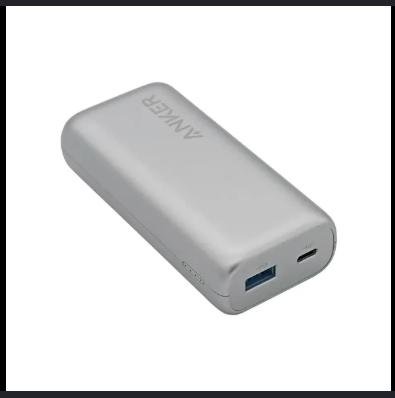
The Anker PowerCore Power Bank Series is one of the most trusted portable charging solutions for people who need reliable power while traveling, commuting, working remotely, or spending time outdoors. Available in various capacities and charging speeds, PowerCore power banks can recharge smartphones, tablets, wireless earbuds, smartwatches, laptops (on compatible models), and other USB-powered devices without requiring access to a wall outlet.
Although using a power bank is simple, many users don’t know the best way to charge the power bank itself, estimate how many device charges remain, choose the correct output port, or maximize battery lifespan. Learning the proper charging sequence and maintenance routine helps ensure your PowerCore is always ready whenever you need backup power.
This guide explains how to use an Anker PowerCore Power Bank, from charging the power bank and powering your devices to troubleshooting common issues and following best practices for long-term battery health.
Need reliable portable power wherever you go? Follow this guide to get the most from your Anker PowerCore Power Bank and keep your devices charged throughout the day.
How do you use an Anker PowerCore Power Bank?
Quick Answer
Using an Anker PowerCore Power Bank is easy:
- Fully charge the power bank before first use.
- Check the remaining battery level.
- Connect your device using a compatible charging cable.
- Press the power button if required.
- Allow your device to charge.
- Disconnect your device when charging is complete.
- Recharge the power bank before storing it.
Prerequisites
Before you begin, make sure you have:
- Anker PowerCore Power Bank
- USB-C or USB-A charging cable
- Compatible smartphone, tablet, laptop, or USB-powered device
- USB wall charger
- User manual (recommended)
Step-by-Step Instructions
Follow these simple step-by-step instructions to safely charge, use, and maintain your Anker PowerCore power bank for reliable power on the go.
Step 1: Fully Charge the Power Bank
Before using it for the first time, connect the PowerCore to a wall charger using the appropriate input port.
Wait until all battery indicator LEDs show a full charge.
Starting with a full battery ensures maximum charging capacity.
Step 2: Check the Battery Level
Press the power button to view the LED battery indicators.
Most Anker PowerCore models use multiple LEDs to display the remaining battery level.
Recharge the power bank if the battery level is low before leaving home.
Step 3: Choose the Correct Output Port
Identify the available charging ports.
Depending on your model, you may have:
- USB-C
- USB-A
- Fast Charging Port
- Power Delivery (PD) Port
Use the port that best matches your device’s charging requirements.
Step 4: Connect Your Device
Plug one end of the charging cable into the power bank and the other into your device.
Some models begin charging automatically, while others require pressing the power button.
Step 5: Monitor the Charging Process
Check your device for:
- Charging notification
- Battery percentage increase
- Fast charging indicator (if supported)
Leave the power bank on a stable surface during charging.
Step 6: Disconnect After Charging
Once your device reaches the desired battery level:
- Unplug the charging cable.
- Turn off the power bank if required.
- Store the cable neatly.
Step 7: Recharge the Power Bank
Recharge the PowerCore after use so it’s ready for your next trip or emergency.
Avoid storing the power bank completely empty for extended periods.
What Tips Help You Get More Battery Life from an Anker PowerCore Power Bank?
Tips
Following these tips will help you maximize charging efficiency and battery longevity.
Recharge Before Every Trip
Always leave home with a fully charged power bank.
Use Fast-Charging Ports When Needed
Connect compatible devices to Power Delivery or Quick Charge ports for faster charging.
Keep Track of Battery Indicators
Check the remaining battery before relying on the power bank for long outings.
Carry Short Charging Cables
Short cables are easier to pack and reduce cable clutter while traveling.
Charge One High-Power Device at a Time
Charging a laptop or tablet individually can deliver the fastest charging speeds.
Protect the Power Bank During Travel
Store it inside a padded electronics pouch to prevent scratches and accidental damage.
Recharge the Power Bank Regularly
Even when not in use, recharge it every few months to maintain battery health.
What Common Mistakes Should You Avoid?
Common Mistakes
Forgetting to Recharge the Power Bank
A depleted power bank won’t be available when you need emergency power.
Using Damaged Charging Cables
Faulty cables can reduce charging performance and damage connectors.
Exposing the Power Bank to Extreme Temperatures
High heat and freezing conditions may shorten battery lifespan.
Ignoring Battery Indicator Lights
Regularly checking the LED indicators helps prevent unexpected power loss.
Carrying the Power Bank Loose in a Bag
Sharp objects may scratch or damage the ports and housing.
Leaving the Power Bank Completely Discharged
Long-term storage with an empty battery can affect battery performance.
Charging Incompatible Devices
Always verify your device supports the selected charging output.
How Can You Troubleshoot Common Anker PowerCore Power Bank Problems?
Troubleshooting
Problem: Power Bank Won’t Charge
Solution
- Check the wall charger.
- Replace the charging cable.
- Inspect the input port for dust or debris.
Problem: Device Isn’t Charging
Solution
- Try another output port.
- Press the power button if required.
- Test another charging cable.
Problem: Charging Is Slower Than Expected
Solution
- Use the Power Delivery or fast-charging port.
- Replace low-quality charging cables.
- Charge one device at a time
Problem: LED Indicators Don’t Turn On
Solution
- Recharge the power bank.
- Hold the power button for several seconds.
- Inspect the charger and cable.
Problem: Power Bank Gets Warm
Solution
- Mild warmth is normal.
- Avoid covering the device.
- Keep it in a well-ventilated area while charging.
Problem: Battery Drains Faster Than Expected
Solution
- Disconnect unused devices.
- Recharge the power bank fully.
- Replace aging charging cables if necessary.
What Are the Best Practices for Long-Term Performance?
Best Practices
Store with Partial Charge
If storing for an extended period, keep the battery around 50–80% charged.
Clean Charging Ports Regularly
Use a soft brush or compressed air to remove dust from the ports.
Use Original or Certified Charging Accessories
High-quality accessories improve charging safety and efficiency.
Avoid Frequent Drops
Protect the power bank from impacts that may damage internal battery cells.
Recharge Every Few Months
Periodic charging helps preserve battery capacity during storage.
Keep Away from Moisture
Store the power bank in a dry environment to protect internal electronics.
Inspect Before Traveling
Check battery level, charging ports, and cables before every trip.
Frequently Asked Questions
How many times can an Anker PowerCore charge my phone?
The number of charges depends on your PowerCore model’s battery capacity and your
smartphone’s battery size.
Can I charge multiple devices at once?
Yes. Many Anker PowerCore models support charging multiple compatible devices
simultaneously.
Is it safe to leave the power bank charging overnight?
Most Anker PowerCore models include built-in safety protections, but disconnecting after a full
charge is recommended
Can I take an Anker PowerCore on an airplane?
Yes. Most models are permitted in carry-on luggage, but always check your airline’s battery
capacity regulations.
Why isn’t fast charging working?
Ensure both your device and charging cable support fast charging and use the correct output port.
Should I fully discharge the power bank before recharging?
No. Lithium-ion batteries perform best with regular charging rather than complete discharge
cycles.
How often should I recharge the power bank if I don’t use it?
Recharge it every 2–3 months to help maintain battery health.
Conclusion
The Anker PowerCore Power Bank Series provides dependable portable power for smartphones, tablets, laptops, and other USB-powered devices, making it an essential companion for travel, work, and emergencies. By charging the power bank regularly, using the correct output ports, and maintaining the battery properly, you can enjoy reliable backup power whenever you need it.
Routine care, proper storage, and following the best practices in this guide will help maximize battery lifespan and ensure your Anker PowerCore continues to deliver consistent charging performance for years to come.
Never Run Out of Power When It Matters Most
Whether you’re traveling, commuting, or preparing for unexpected situations, your Anker PowerCore Power Bank is designed to keep your essential devices running. Keep it fully charged, follow the maintenance tips in this guide, and enjoy the confidence of having dependable portable power wherever life takes you.