How to Clean Gaming Headsets: A Simple Guide
Keep your gaming headset clean and fresh with these simple steps to remove dust, dirt, and everyday buildup safely.
By TechScaleMedia Editorial · Updated July 2026 · 11 min read
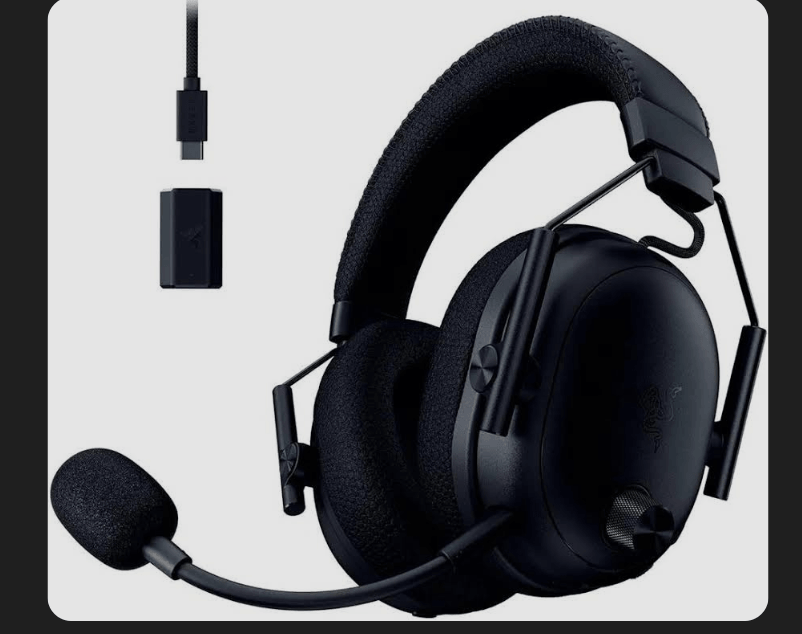
Gaming headsets collect sweat, skin oils, dust, hair, and other debris because they sit against your head and ears for long periods. Over time, this buildup can cause unpleasant odors, make ear cushions uncomfortable, and leave the microphone or speaker mesh dirty.
Regular cleaning helps maintain headset hygiene, comfort, and material condition, but gaming headsets contain sensitive electronics, so they should never be cleaned like ordinary accessories. The safest approach is to use gentle methods suited to each material and follow the manufacturer’s care instructions.
Whether you use a wired or wireless gaming headset, this guide explains what to clean, which materials to use, and what mistakes to avoid.
How Do You Clean a Gaming Headset?
To clean a gaming headset safely, power it off, disconnect it from your device, remove detachable parts if the manufacturer’s instructions allow it, and clean each material appropriately.
For most headsets:
- Use a soft microfiber cloth for the exterior.
- Use a dry, soft brush for microphone mesh and speaker grilles.
- Use mild soap and a small amount of water for compatible fabric or surfaces.
- Wipe leather or faux-leather cushions rather than soaking them.
- Allow removable fabric cushions to dry completely before reinstalling them.
- Keep moisture away from speaker openings, microphone elements, charging ports, and other electronics.
- Avoid harsh solvents, abrasive cleaners, and excessive moisture.
- Always follow your headset manufacturer’s care instructions when they differ from general cleaning advice.
Manufacturers vary in their recommendations, particularly regarding alcohol-based cleaners, so your headset’s specific care guide should take priority.
Why Do Gaming Headsets Get Dirty?
Headsets are exposed to several sources of buildup during normal use, including:
- Sweat and skin oils
- Dust and hair
- Makeup or skincare products
- Dead skin cells
- Food particles
- Moisture around the ear cushions
The ear pads and headband usually collect the most buildup because they remain in direct contact with your skin. Microphone grilles and speaker mesh can also collect dust over time.
What Do You Need to Clean a Gaming Headset?
You generally don’t need specialized equipment. Useful supplies include:
- Microfiber cloth
- Soft-bristled brush
- Cotton swabs
- Mild soap
- Small amount of water
The appropriate cleaning solution depends on your headset’s materials and manufacturer instructions. Cleaning recommendations can differ between brands, particularly regarding alcohol-based products, so don’t assume one cleaner is safe for every headset.
Cleaning Gaming Headset Ear Pads
Ear cushions require the most care because they directly contact your ears.
Leather and faux-leather pads: Wipe gently with a slightly damp microfiber cloth. Avoid soaking the material or using unapproved chemicals.
Fabric and mesh pads: Some removable fabric cushions can be cleaned with mild soap and water, but only when the manufacturer permits it. Allow them to dry completely before reinstalling.
Foam cushions: Use minimal moisture because foam can retain water. Surface cleaning with a soft cloth is generally safer than soaking.
If cushions become cracked, heavily flattened, or permanently damaged, replacement pads may be more practical than continued cleaning.
Cleaning the Microphone and Speaker Mesh
Dust can accumulate around the microphone grille and speaker openings.
Use a dry, soft-bristled brush or cotton swab to remove loose debris. Work gently and avoid pushing dirt farther inside.
Don’t spray cleaning products directly onto these areas. Moisture entering the microphone or speaker can damage internal components.
Cleaning the Headband and Earcups
Use a microfiber cloth to wipe the headband, earcup exterior, buttons, and other hard surfaces.
For fabric or padded areas, use a cleaning method appropriate for the material. Avoid excessive moisture, especially around hinges, controls, charging ports, and other openings.
For wireless models, disconnect the headset from charging before cleaning and keep the charging contacts dry.
How Often Should You Clean a Gaming Headset?
Cleaning frequency depends on how often you use the headset.
For regular gaming, a quick wipe every week or two and a more thorough cleaning every few weeks is a practical routine. If you game for several hours daily or sweat heavily while playing, more frequent cleaning may be appropriate.
Regular light cleaning is preferable to allowing heavy buildup that requires aggressive scrubbing.
Cleaning Products to Avoid
Some household cleaning products can damage headset materials, coatings, or padding.
Avoid using:
- Bleach
- Acetone
- Abrasive cleaners
- Strong solvents
- Excessive water
- Unapproved disinfectants
Be particularly careful with isopropyl alcohol. Some manufacturers permit it on specific surfaces, while others advise against alcohol-based cleaners. Always check the cleaning instructions for your specific headset before using it.
Common Cleaning Mistakes
The biggest mistakes are usually caused by using too much moisture or too much force.
- Don’t submerge the headset.
- Don’t spray liquid directly onto it.
- Don’t use sharp objects to remove debris.
- Don’t aggressively scrub cushions or mesh.
- Don’t use a hair dryer to speed up drying.
- Don’t reinstall washable ear pads while they’re still damp.
Gentle cleaning is safer and usually more effective for gaming peripherals.
Cleaning Different Headset Materials
The material matters more than the brand name when deciding how aggressively to clean.
| Headset Part | Typical Cleaning Approach | Main Concern |
| Leather/Faux Leather | Lightly damp microfiber cloth | Avoid soaking and unsuitable chemicals |
| Fabric/Mesh | Mild soap and water when manufacturer permits | Dry completely |
| Foam | Dry brush + light surface cleaning | Avoid saturation |
| Hard Plastic | Soft microfiber cloth | Keep liquid away from openings |
| Microphone Mesh | Dry soft brush or cotton swab | Don’t push debris inside |
| Metal Components | Soft cloth | Avoid scratching and excess moisture |
| Headband | Material-appropriate cloth cleaning | Avoid soaking padding |
Follow the Manufacturer’s Instructions
Gaming headsets use different combinations of leatherette, fabric, foam, plastic, metal, coatings, and electronic components. Because of these differences, manufacturer-specific care instructions should take priority over generic cleaning advice.
This is especially important when deciding whether to use alcohol, wash removable cushions, or apply a particular cleaning solution.
Frequently Asked Questions
How often should I clean my gaming headset?
For normal use, wiping it every week or two and performing a deeper clean every few weeks is a reasonable starting point. Heavy or daily users may need to clean it more often.
Can I wash gaming headset ear pads?
Some removable fabric or mesh pads can be washed, but not all cushions are designed for it. Check the manufacturer’s instructions before using water or soap.
Can I use alcohol to clean my gaming headset?
It depends on the manufacturer and material. Some headsets allow limited alcohol use on specific surfaces, while others advise against it. Always check the product’s care instructions first.
How do I clean a gaming headset microphone?
Use a dry, soft brush or cotton swab to gently remove dust and debris from the microphone grille. Avoid pushing anything into the microphone opening.
How do I remove sweat smell from headset ear pads?
Clean the cushions according to their material and allow them to dry completely. If the odor remains after cleaning or the material has deteriorated, replacing the ear pads may be the better optio
Conclusion
Keeping a gaming headset clean helps reduce sweat, dust, oils, and debris while maintaining comfort and hygiene. Use gentle, material-appropriate cleaning methods, keep moisture away from electronics, and follow the manufacturer’s care instructions.
Keep Your Headset Fresh
A few minutes of regular maintenance can help your gaming headset stay cleaner, more comfortable, and in better condition for longer.