What Is Headset Latency? A Complete Explainer
Headset latency is the delay between the sound being produced and when you actually hear it through your headphones.
By TechScaleMedia Editorial · Updated July 2026 · 11 min read
Have you ever heard a footstep just a fraction too late, reacted to a gunshot after it happened, or noticed that game audio feels slightly out of sync with what you’re seeing? The problem may not be your reaction time. Headset latency can create a small delay between an event happening in a game and the corresponding sound reaching your ears.
Latency is measured in milliseconds (ms), and the amount of delay can vary significantly depending on how your headset connects to your gaming device. While a few milliseconds may be practically irrelevant for casual gaming, larger delays can become noticeable in competitive shooters, rhythm games, and other timing-sensitive titles.
This guide explains what headset latency means, where the delay comes from, how much latency is noticeable, why wireless connections behave differently, and when low latency actually matters.
Understanding these factors can help you evaluate gaming headsets based on real-world performance rather than marketing claims.
What Is Headset Latency?
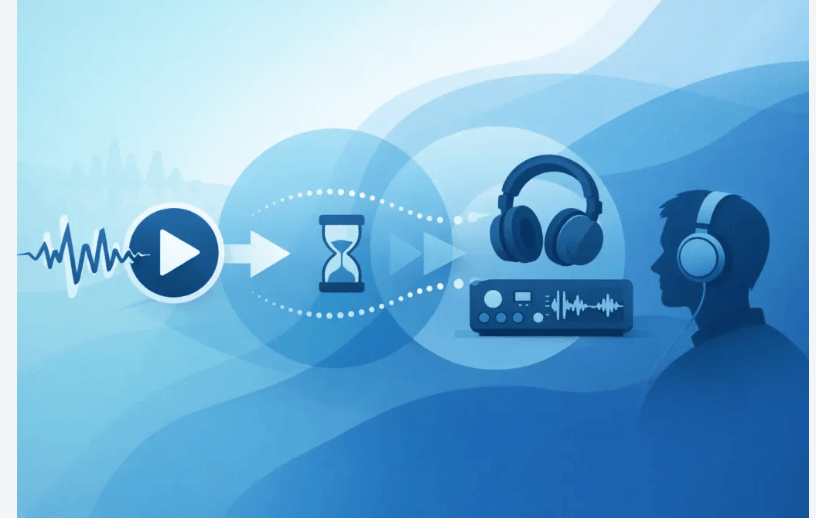
Headset latency is the delay between a sound being generated by your gaming device and that sound reaching your ears through the headset. It is normally measured in milliseconds.
For example, if a game generates a gunshot and your headset reproduces it a short time afterward, the difference between those two events is audio latency.
The amount of latency depends on the complete audio signal path, including the connection type, digital processing, wireless transmission, and the headset itself.
For everyday gaming, small amounts of delay may be difficult to notice. In competitive or timing-sensitive games, however, even relatively small delays can become more relevant.
What Does Headset Latency Actually Mean?
Latency is essentially travel time for an audio signal.
When something happens in a game, the audio signal has to move through several stages before you hear it. The process can involve:
- The game generating the audio
- Your computer or console processing the signal
- Digital-to-analog conversion where applicable
- Wired or wireless transmission
- Additional headset processing
- The headset drivers reproducing the sound
The total delay across these stages contributes to the final audio latency.
This is why the latency number associated with a headset doesn’t always represent the entire delay experienced during gameplay. Other parts of the system can contribute additional milliseconds.
Where Does Headset Latency Come From?
The source of latency depends heavily on the headset’s connection and internal processing.
Wired Analog Connections
A traditional 3.5mm analog connection is generally considered one of the lowest-latency options because the audio signal can travel directly from the source’s audio hardware through the cable to the headset.
Independent measurements commonly place total latency for analog connections in the low-millisecond range, making the delay extremely difficult to notice during normal gameplay.
USB Wired Connections
USB headsets use a digital connection, which means additional processing and conversion occur within the audio chain.
However, USB latency is generally stable and predictable. The presence of digital processing doesn’t automatically mean a USB headset will have problematic delay.
2.4GHz Wireless
Modern gaming headsets frequently use dedicated 2.4GHz wireless technology rather than standard Bluetooth.
These proprietary wireless systems are designed specifically for low-latency gaming and typically use a USB transmitter or dongle connected to the gaming device.
Well-designed 2.4GHz systems can achieve latency low enough that the difference from a wired connection is difficult for many players to notice during normal gameplay.
Bluetooth
Bluetooth can introduce more variable latency.
Unlike dedicated gaming wireless protocols, Bluetooth was not originally designed specifically around competitive gaming requirements. Latency can vary depending on the headset, Bluetooth codec, device, and implementation.
Some Bluetooth gaming modes can reduce delay, but performance remains inconsistent enough that Bluetooth should not automatically be assumed to provide the same responsiveness as a dedicated gaming wireless connection.
How Much Headset Latency Is Noticeable?
There isn’t one exact number at which every person suddenly starts noticing latency.
Human perception varies, and the type of game also matters.
As a general practical guideline:
- 1–5 ms: Extremely low and generally difficult to notice.
- 10–20 ms: Still relatively small, although some highly sensitive competitive players may notice a difference.
- 50 ms or more: Delay becomes increasingly noticeable, particularly in fast-paced gameplay.
- 100 ms or more: Audio delay can become clearly distracting in timing-sensitive games.
These figures shouldn’t be treated as universal perception thresholds. Individual sensitivity, game design, display latency, and other system delays all influence the experience.
For a single-player RPG, a small delay may have virtually no practical impact. In a competitive FPS or rhythm game, the same delay can be more noticeable because audio timing is closely connected to player reactions.
Why Latency Matters in Competitive Gaming
Competitive games often rely on audio as a source of immediate information.
A player may use:
- Footsteps to identify an approaching opponent
- Gunfire to determine where combat is occurring
- Reload sounds to recognize an enemy’s actions
- Movement cues to understand positioning
- Audio effects to react to events outside the player’s field of view
When these sounds arrive late, the information is technically still correct, but it may reach the player after the ideal reaction window.
This doesn’t mean every competitive gamer needs the lowest possible latency. Rather, low and consistent latency helps keep audio synchronized with the action happening on screen.
Latency Can Stack Across Your Setup
One of the most important things to understand about gaming latency is that your headset isn’t necessarily responsible for the entire delay.
Audio latency can exist alongside other forms of system delay.
For example, a gaming setup may include:
- Game processing delay
- Audio processing
- Headset transmission delay
- Display latency
- Controller input latency
- Wireless interference
- Additional software processing
These delays can contribute to the overall response time experienced by the player.
This is why looking at a headset’s advertised latency number alone doesn’t always tell you exactly how responsive the complete gaming setup will feel.
Why Independent Latency Testing Matters
Manufacturers often advertise terms such as “low latency,” “gaming mode,” or “ultra-low latency.” These descriptions can be useful, but they don’t necessarily provide a standardized measurement of real-world performance.
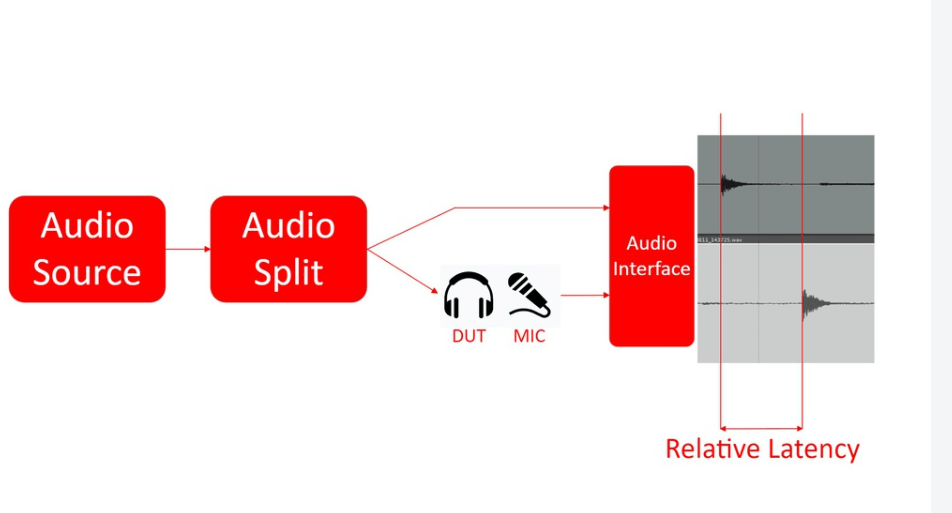
Independent testing is more useful when it measures end-to-end latency using controlled equipment and consistent methodology.
Professional testing may use equipment such as oscilloscopes and audio-analysis tools to measure the time between an audio signal being generated and the headset producing the corresponding output.
This type of measurement provides a more objective picture of performance than relying solely on marketing terminology.
For consumers researching a gaming headset, independently measured results can therefore provide valuable context when advertised specifications are unclear.
Does Wireless Always Mean Higher Latency?
Not necessarily.
Older wireless audio technologies often had noticeable delays, but modern gaming headsets have improved considerably.
Dedicated 2.4GHz wireless systems are specifically designed to prioritize fast transmission and stable connections. As a result, some modern wireless gaming headsets can deliver latency that is low enough for competitive gaming.
The more important distinction is between purpose-built gaming wireless technology and general-purpose wireless audio. Bluetooth performance can vary significantly, while dedicated gaming wireless systems are designed around the responsiveness requirements of gaming.
What Can Cause Additional Wireless Delay?
Wireless performance can be influenced by factors outside the headset’s basic specifications.
Distance From the Receiver
Greater distance between the headset and its wireless receiver can weaken the connection.
Physical Obstructions
Walls, furniture, and other obstacles can interfere with the wireless signal.
Radio Interference
Other wireless devices operating nearby can potentially interfere with the connection and contribute to instability or dropouts.
Wireless Implementation
Different manufacturers use different wireless hardware and protocols, so two headsets using the same broad wireless frequency can still have different latency characteristics.
These factors don’t necessarily create a large delay in every setup, but they can affect connection stability and real-world performance.
Does Headset Latency Matter for Every Gamer?
No. The importance of latency depends heavily on the type of gaming you do.
Competitive FPS Players
Latency can matter because footsteps, gunfire, and movement cues may influence split-second decisions.
Fighting Game Players
Timing is fundamental to fighting games, making synchronization between visual and audio events more important.
Rhythm Game Players
Audio timing is central to gameplay, so noticeable delay can interfere directly with the player’s ability to respond to musical cues.
Racing Game Players
Small delays may matter when audio feedback is used alongside visual information during fast reactions.
RPG and Story-Driven Games
Small latency differences are usually much less important when gameplay isn’t dependent on precise audio timing.
This makes low latency a use-case-specific feature rather than a universal requirement.
What Is End-to-End Latency?
End-to-end latency refers to the total delay from the original audio event or signal to the moment the sound is reproduced by the headset.
This measurement is more useful than looking at only one part of the audio chain.
For example, a headset might have a fast wireless transmission system but introduce additional processing elsewhere. Measuring the entire path captures the actual delay experienced by the listener.
That’s why independent end-to-end testing can be more informative than simply comparing manufacturer specifications.
Common Misconceptions About Headset Latency
“Wireless Headsets Are Always Slow”
Modern dedicated 2.4GHz gaming wireless technology can achieve very low latency. Wireless does not automatically mean noticeable delay.
“Bluetooth Is Always Unusable for Gaming”
Bluetooth can work adequately for casual gaming, but latency varies significantly between devices and implementations. Its performance is simply less predictable for timing-sensitive gaming.
“The Lowest Number Is Always Better”
Extremely low latency is useful, but the difference between already-low measurements may have little practical impact for many players.
“Headset Latency Is the Only Delay”
It isn’t. Audio processing, display response, controller input, and other system components can contribute to the overall timing experience.
“Gaming Mode Guarantees Low Latency”
A “gaming mode” label doesn’t provide a standardized performance guarantee. Actual measurements are more informative.
Frequently Asked Questions
What is good headset latency for gaming?
For most gamers, latency below roughly 20 ms is considered very low and unlikely to create an obvious delay. Competitive players may prefer even lower measurements, but the practical difference depends on the game and individual sensitivity.
Is wired always lower latency than wireless?
Wired analog connections generally offer extremely low and consistent latency. However, modern 2.4GHz wireless gaming headsets can also achieve sufficiently low latency for demanding gaming and may feel effectively instantaneous to many players.
Why does Bluetooth have higher latency?
Bluetooth wasn’t originally designed specifically for competitive gaming, and its latency depends on factors such as the codec, device, headset implementation, and connection conditions. Dedicated 2.4GHz gaming systems are designed specifically to reduce transmission delay.
Can I trust latency numbers listed on a headset’s packaging?
It’s better to treat manufacturer figures as a starting point rather than definitive proof. Independent testing that measures real-world end-to-end latency provides stronger evidence of actual performance.
Does headset latency matter for single-player games?
Usually, small differences matter very little in single-player games. Latency becomes more important when gameplay depends heavily on precise timing or rapid audio-visual reactions.
Can wireless interference increase headset latency?
Wireless interference can affect connection stability and may contribute to dropouts or inconsistent performance. The impact depends on the wireless technology and surrounding environment.
What is the difference between latency and lag?
Latency specifically describes a delay between an action or signal and its result. “Lag” is a broader term commonly used to describe delays or responsiveness problems in games and networked systems.
Conclusion
Headset latency is the delay between an audio signal being generated and the sound reaching your ears. Small differences rarely matter for casual gaming, but low and consistent latency becomes more valuable in competitive and timing-sensitive games.
Wired connections remain highly responsive, while modern 2.4GHz wireless technology can also provide very low gaming latency. Bluetooth performance is more variable, making independent testing especially useful when evaluating a headset.
Choose With Confidence
When shopping for a gaming headset, look beyond “low-latency” marketing claims and consider independently measured performance, connection type, and the games you actually play. The right balance can give you responsive audio without paying for specifications that don’t matter to your gaming experience.