How to Use a Ring Video Doorbell Pro 2: A Complete Beginner’s Step-by-Step Guide
Learn how to set up, install, and use the Ring Video Doorbell Pro 2 with this beginner-friendly step-by-step guide to monitor your home, customize motion alerts, and enhance your home security.
By TechScaleMedia Editorial · Updated July 2026 · 11 min read
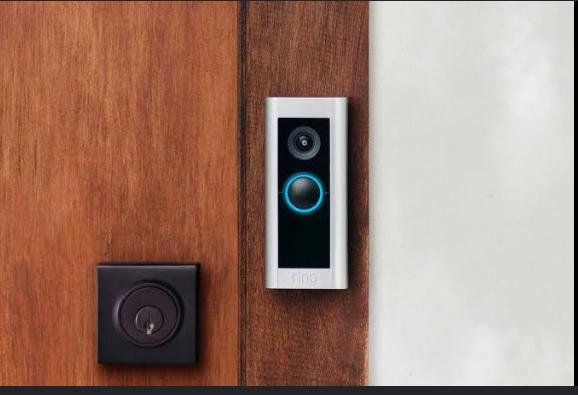
The Ring Video Doorbell Pro 2 is a smart home security device that lets you monitor your front door from anywhere using your smartphone. With features like HD video, two-way audio, motion detection, customizable motion zones, real-time notifications, and live video streaming, it helps homeowners improve security while staying connected to visitors whether they’re home or away.
Although the Ring Video Doorbell Pro 2 is designed for easy installation and daily use, many first-time users experience difficulties with Wi-Fi setup, motion sensitivity, notification settings, or video quality. Learning the correct setup process ensures your doorbell delivers reliable security, clear video footage, and timely alerts.
This guide explains how to use the Ring Video Doorbell Pro 2, from installation and app setup to troubleshooting common issues and following best practices for long-term performance.
Want to monitor your front door with confidence? Follow this step-by-step guide to set up your Ring Video Doorbell Pro 2 and enjoy smarter home security.
How do you use the Ring Video Doorbell Pro 2?
Quick Answer
Using the Ring Video Doorbell Pro 2 is easy:
- Install the doorbell.
- Connect it to power.
- Download the Ring app.
- Pair the doorbell with your account.
- Connect to Wi-Fi.
- Configure motion and notification settings.
- Monitor your front door from anywhere.
Prerequisites
Before you begin, make sure you have:
- Ring Video Doorbell Pro 2
- Compatible smartphone or tablet
- Stable Wi-Fi connection
- Ring mobile app
- Existing doorbell wiring or compatible power supply
- Screwdriver and mounting hardware
- User manual
Step-by-Step Instructions
Follow these simple steps to install, configure, and use your Ring Video Doorbell Pro 2 for reliable home security and real-time monitoring.
Step 1: Install the Doorbell
Turn off power to your existing doorbell.
Remove the old doorbell if necessary.
Mount the Ring Video Doorbell Pro 2 using the supplied bracket and screws.
Reconnect the wiring according to the installation instructions.
Step 2: Restore Power
Turn the power back on.
Wait for the Ring Doorbell to start.
The indicator light will show when the device is ready for setup.
Step 3: Download the Ring App
Install the Ring app on your smartphone or tablet.
Create a Ring account or sign in if you already have one.
Step 4: Add Your Doorbell
Open the Ring app.
Tap Set Up a Device.
Scan the QR code located on the doorbell or packaging.
Follow the setup instructions until registration is complete.
Step 5: Connect to Wi-Fi
Select your home Wi-Fi network.
Enter your network password.
Wait for the doorbell to complete the connection.
Step 6: Configure Security Settings
Customize settings including:
- Motion sensitivity
- Motion zones
- Notification alerts
- Video quality
- Privacy zones
- Two-way communication
Save your preferred settings.
Step 7: Test the Doorbell
Press the doorbell button.
Confirm:
- Notifications arrive on your phone.
- Live video loads properly.
- Two-way audio functions correctly.
- Motion detection works as expected.
What Tips Help You Get Better Security with the Ring Video Doorbell Pro 2?
Tips
Following these tips helps improve security and device performance.
Customize Motion Zones
Limit motion detection to important areas and reduce unnecessary alerts.
Use Strong Wi-Fi Coverage
A stable internet connection improves video quality and notification speed.
Enable Motion Alerts
Receive instant notifications whenever movement is detected.
Review Recorded Events Regularly
Check recent activity to stay informed about visitors and deliveries.
Keep the Camera Lens Clean
Clean the lens regularly for sharper video quality.
Adjust Motion Sensitivity
Fine-tune detection settings to reduce false notifications.
Update the Ring App
Install updates to access the latest features and security improvements.
What Common Mistakes Should You Avoid?
Common Mistakes
Installing Too High or Too Low
Improper mounting height can reduce motion detection accuracy.
Ignoring Wi-Fi Signal Strength
Weak connectivity may delay notifications or interrupt live video.
Setting Motion Sensitivity Too High
Overly sensitive settings may generate excessive alerts.
Forgetting to Test Notifications
Always verify that alerts reach your smartphone.
Blocking the Camera View
Keep decorations, plants, or furniture away from the camera’s field of view.
Skipping Firmware Updates
Software updates improve security and overall performance.
Ignoring Privacy Settings
Configure privacy zones to avoid recording unwanted areas.
How Can You Troubleshoot Common Ring Video Doorbell Pro 2 Problems?
Troubleshooting
Problem: Doorbell Won’t Connect to Wi-Fi
Solution
- Restart your router.
- Verify the Wi-Fi password.
- Move the router closer if possible.
Problem: Live View Isn’t Loading
Solution
- Check your internet connection.
- Restart the Ring app.
- Restart the doorbell.
Problem: Motion Alerts Aren’t Working
Solution
- Review motion sensitivity settings.
- Confirm notifications are enabled.
- Test the motion zones.
Problem: Poor Video Quality
Solution
- Clean the camera lens.
- Improve Wi-Fi signal strength.
- Reduce network congestion.
Problem: Two-Way Audio Doesn’t Work
Solution
- Grant microphone permissions.
- Check smartphone volume.
- Restart the app.
Problem: Doorbell Appears Offline
Solution
- Check the power supply.
- Restart your Wi-Fi router.
- Reconnect the device through the Ring app.
What Are the Best Practices for Long-Term Performance?
Best Practices
Keep Firmware Updated
Install updates whenever available to improve security and functionality.
Clean the Camera Monthly
Remove dust, fingerprints, and debris using a microfiber cloth.
Check Wi-Fi Performance
Maintain strong wireless coverage near your front door.
Review Notification Settings
Adjust alerts as your household needs change.
Inspect the Mounting Hardware
Ensure screws remain secure over time.
Monitor Device Health
Use the Ring app to review connection status and device diagnostics.
Test the Doorbell Regularly
Periodically confirm video, audio, and notifications operate correctly.
Frequently Asked Questions
Can I view my Ring Doorbell when I’m away from home?
Yes. As long as the device is connected to Wi-Fi, you can access live video through the Ring app.
Does the Ring Video Doorbell Pro 2 record continuously?
Recording capabilities depend on your Ring subscription plan and device settings.
Can multiple family members access the doorbell?
Yes. You can share access with trusted household members through the Ring app.
Why am I receiving too many motion alerts?
Reduce motion sensitivity or customize your motion detection zones.
Does the Ring Doorbell work at night?
Yes. It includes night vision for monitoring in low-light conditions.
Can I talk to visitors through the app?
Yes. Two-way audio allows you to communicate with visitors remotely.
How often should I clean the camera?
Cleaning the lens once a month helps maintain clear video quality.
Conclusion
The Ring Video Doorbell Pro 2 makes home monitoring easier by combining high-definition video, intelligent motion detection, and remote access into one powerful security device. By installing it correctly, customizing its settings, and maintaining a reliable internet connection, you can receive timely alerts and monitor your front door from virtually anywhere.
Regular firmware updates, routine cleaning, and reviewing your security settings will help keep your Ring Video Doorbell Pro 2 performing at its best. Whether you’re expecting deliveries, welcoming guests, or enhancing your home’s security, this smart doorbell provides added convenience and peace of mind.
Stay Connected to Your Front Door—Wherever You Are
Your Ring Video Doorbell Pro 2 helps you keep an eye on what matters most, whether you’re relaxing at home or traveling miles away. Set it up, personalize your security preferences, and enjoy smarter home monitoring with instant alerts and reliable front-door protection every day.