How to Use a Magnetic Phone Charger: A Complete Beginner’s Step-by-Step Guide
Learn how to use a magnetic phone charger with this complete beginner-friendly step-by-step guide to connect your device securely, charge efficiently, and get the best performance from your magnetic charging setup.
By TechScaleMedia Editorial · Updated July 2026 · 11 min read
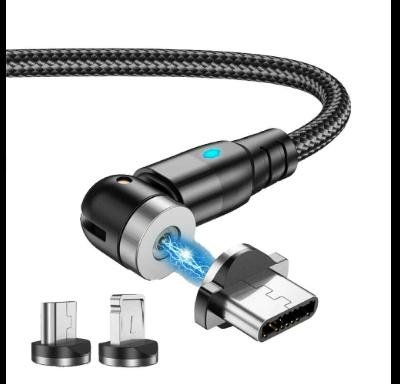
A Magnetic Phone Charger offers a fast, convenient, and cable-free way to keep your smartphone powered throughout the day. Unlike standard wireless chargers that require careful positioning, magnetic chargers automatically align with compatible devices using built-in magnets, ensuring a secure connection and consistent charging performance. They’re especially popular with MagSafe-compatible iPhones and Android phones using compatible magnetic cases or adapters.
While magnetic chargers are designed for simplicity, many users experience charging interruptions due to incompatible phone cases, poor magnetic alignment, or incorrect power adapters. Understanding how to properly set up and use a magnetic charger helps you achieve faster charging, better efficiency, and a more reliable everyday charging experience.
This guide explains how to use a Magnetic Phone Charger, from setting up the charger and aligning your device correctly to troubleshooting common charging issues and following best practices for long-term use.
Ready to enjoy effortless magnetic charging? Follow this step-by-step guide to get the best performance from your Magnetic Phone Charger.
How do you use a Magnetic Phone Charger?
Quick Answer
Using a Magnetic Phone Charger is easy:
- Connect the charger to a compatible power adapter.
- Place the charger on a stable surface.
- Remove incompatible phone accessories if necessary.
- Align your phone with the magnetic charging pad.
- Allow the magnets to lock into position.
- Confirm wireless charging has started.
- Remove your phone by gently lifting it away after charging.
Prerequisites
Before you begin, make sure you have:
- Magnetic Phone Charger
- Compatible smartphone (MagSafe or magnetic-compatible)
- USB-C charging cable (if required)
- Recommended fast charging power adapter
- Magnetic-compatible phone case (optional)
- Stable charging surface
Step-by-Step Instructions
Follow these simple step-by-step instructions to set up and use a magnetic phone charger safely for fast, secure, and hassle-free charging.
Step 1: Connect the Charger to a Power Source
Attach the charging cable to the magnetic charger.
Plug the charger into the recommended wall adapter.
Using the correct adapter ensures optimal charging performance.
Step 2: Prepare Your Smartphone
Remove any accessories that may interfere with charging, such as:
- Thick protective cases
- Metal card holders
- Magnetic wallets
- Metal phone rings
If you’re using a magnetic-compatible case, ensure it’s properly installed.
Step 3: Place the Charger on a Stable Surface
Position the charger on:
- A bedside table
- Office desk
- Kitchen counter
- Workstation
Avoid uneven or slippery surfaces.
Step 4: Align Your Phone with the Magnetic Charger
Hold your phone close to the charging pad.
The built-in magnets will automatically guide the phone into the correct charging position.
Wait until the phone locks securely in place.
Step 5: Confirm Charging Has Started
Check your phone for:
- Wireless charging animation
- Charging icon
- Battery percentage increase
If charging doesn’t begin, reposition the phone slightly.
Step 6: Use Your Phone While Charging (If Needed)
Many magnetic chargers allow you to:
- Watch videos
- Join video calls
- Read messages
- Browse the web
without losing the magnetic connection.
Step 7: Remove Your Phone Safely
When charging is complete:
- Hold the charger with one hand.
- Gently lift the phone away.
- Disconnect the charger if it won’t be used for an extended period.
What Tips Help You Get the Best Performance from a Magnetic Phone Charger?
Tips
Following these tips will improve charging speed and convenience.
Use a Magnetic-Compatible Phone Case
Certified magnetic cases provide better alignment and stronger magnetic attachment.
Keep the Charging Surface Clean
Dust and fingerprints may reduce charging efficiency.
Clean both the charger and the back of your phone regularly.
Use the Recommended Power Adapter
Fast wireless charging requires an adapter that meets the charger’s power requirements.
Center the Phone Properly
Allow the magnets to naturally align the phone instead of forcing its position.
Charge on a Flat Surface
Using the charger on a stable surface prevents accidental movement during charging.
Avoid Extreme Heat
Charge your phone in a cool, well-ventilated environment.
Disconnect Accessories Before Charging
Magnetic wallets and thick accessories can interfere with charging performance.
What Common Mistakes Should You Avoid?
Common Mistakes
Using Non-Magnetic Cases
Standard cases without magnetic support may weaken alignment and charging efficiency.
Connecting a Low-Power Adapter
An underpowered adapter can significantly reduce charging speed.
Forcing the Phone into Position
Allow the magnets to position the phone naturally.
Ignoring Dirt on the Charging Surface
Dust buildup can reduce charging consistency.
Charging Near Excessive Heat
High temperatures may slow wireless charging.
Leaving Metal Objects Nearby
Coins, keys, or other metal objects should not be placed on the charging surface.
Frequently Disconnecting During Charging
Repeatedly removing the phone before charging is complete may reduce convenience and efficiency.
How Can You Troubleshoot Common Magnetic Phone Charger Problems?
Troubleshooting
Problem: Phone Doesn’t Attach Magnetically
Solution
- Confirm your phone supports magnetic charging.
- Install a compatible magnetic case.
- Remove incompatible accessories.
Problem: Wireless Charging Doesn’t Start
Solution
- Reposition the phone.
- Verify the charger is connected to power.
- Check the power adapter.
Problem: Charging Is Slower Than Expected
Solution
- Use a higher-wattage adapter.
- Remove thick cases.
- Clean the charging surface.
Problem: Phone Gets Warm
Solution
- Charge in a cooler environment.
- Remove heavy protective cases.
- Avoid direct sunlight during charging.
Problem: Magnetic Connection Feels Weak
Solution
- Remove accessories between the charger and phone.
- Clean the magnetic surface.
- Verify case compatibility.
Problem: Charger Doesn’t Power On
Solution
- Test another power outlet.
- Replace the charging cable if necessary.
- Inspect the USB-C connector.
What Are the Best Practices for Long-Term Performance?
Best Practices
Keep the Magnetic Surface Clean
Regular cleaning helps maintain strong magnetic alignment.
Use Manufacturer-Recommended Accessories
Certified adapters and cables improve charging reliability.
Protect the Charging Cable
Avoid sharply bending or pulling the cable.
Store the Charger Carefully
Keep the charger in a dry, dust-free location when not in use.
Avoid Dropping the Charger
Strong impacts may damage internal charging components.
Inspect the Cable Regularly
Replace worn or damaged cables immediately.
Charge in a Well-Ventilated Area
Proper airflow helps maintain efficient wireless charging performance.
Frequently Asked Questions
Can I use a magnetic charger with any smartphone?
No. Your phone must support magnetic wireless charging or use a compatible magnetic case or adapter.
Does a magnetic charger charge faster than a regular wireless charger?
Charging speed depends on the charger, power adapter, and your phone’s wireless charging capabilities.
Can I use my phone while it’s attached to the charger?
Yes. Magnetic alignment helps keep the phone securely connected while you browse, watch videos, or make video calls.
Why won’t my phone stay attached?
Your phone case may not support magnetic charging, or accessories may be interfering with the magnetic connection.
Is magnetic charging safe for my phone?
Yes. Quality magnetic chargers include built-in safety features to protect compatible devices.
Should I remove my phone case before charging?
Only if the case is too thick or not designed for magnetic wireless charging.
Can I leave my phone on the charger overnight?
Yes. Most modern magnetic chargers include safety protections that help prevent overcharging.
Conclusion
A Magnetic Phone Charger combines the convenience of wireless charging with the precision of magnetic alignment, making it easier than ever to keep your smartphone powered throughout the day. By using compatible accessories, positioning your phone correctly, and following proper charging practices, you can enjoy faster, more reliable charging with minimal effort.
Routine cleaning, careful cable management, and using the recommended power adapter will help maintain consistent charging performance for years. Whether you’re charging at home, in the office, or on your bedside table, a Magnetic Phone Charger offers a clean, organized, and user-friendly charging solution.
Upgrade to a Smarter, Cable-Free Charging Experience
Make everyday charging faster and more convenient with a Magnetic Phone Charger. Set it up correctly, pair it with compatible accessories, and enjoy seamless magnetic alignment that keeps your smartphone powered with less effort and fewer cables.