How to Use a Solar Powered Phone Charger: A Complete Beginner’s Step-by-Step Guide
Learn how to use a solar powered phone charger with this complete beginner’s step-by-step guide to charge your devices efficiently, maximize sunlight, and keep your phone powered wherever you go.
By TechScaleMedia Editorial · Updated July 2026 · 11 min read
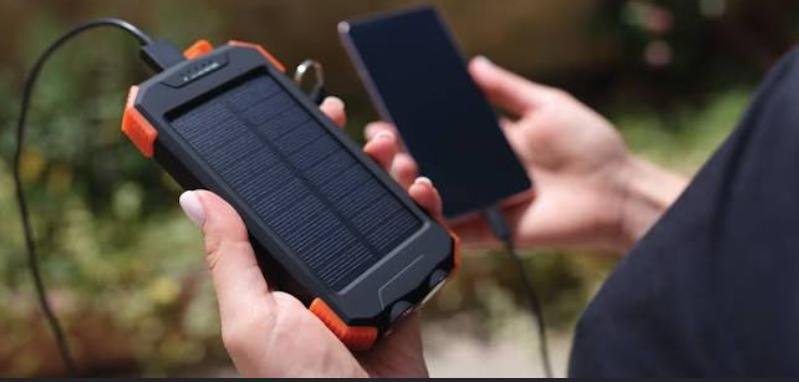
A Solar Powered Phone Charger is a practical charging solution for outdoor enthusiasts, travelers, campers, hikers, and emergency preparedness. Unlike conventional chargers that rely solely on electrical outlets, solar chargers harness sunlight to generate power, allowing you to recharge smartphones and other USB-powered devices even in remote locations. Many models also include a built-in rechargeable battery, making them useful for both daily use and emergency situations.
While solar chargers are easy to operate, many users expect them to charge devices as quickly as traditional wall chargers or don’t position the solar panels correctly for maximum efficiency. Understanding how to use a solar charger properly helps improve charging performance, extend battery life, and ensure dependable power whenever you’re away from an electrical outlet.
This guide explains how to use a Solar Powered Phone Charger, from charging it with sunlight and powering your devices to troubleshooting common issues and following best practices for reliable outdoor performance.
Planning your next outdoor adventure? Follow this guide to make the most of your Solar Powered Phone Charger and stay connected wherever you go.
How do you use a Solar Powered Phone Charger?
Quick Answer
Using a Solar Powered Phone Charger is simple:
- Fully charge the internal battery before your trip (if applicable).
- Place the solar panel in direct sunlight.
- Position the panel for maximum sun exposure.
- Allow the charger to collect solar energy.
- Connect your smartphone using a compatible USB cable.
- Verify charging has started.
- Store the charger safely after use.
Prerequisites
Before you begin, make sure you have:
- Solar Powered Phone Charger
- Compatible USB charging cable
- Smartphone or USB-powered device
- Direct sunlight
- Clean solar panels
- Outdoor carrying bag or backpack (recommended)
Step-by-Step Instructions
Follow these simple steps to set up, position, and use a solar-powered phone charger efficiently so you can keep your devices powered wherever you go.
Step 1: Fully Charge the Internal Battery Before Traveling
If your solar charger includes a built-in battery, fully charge it using a wall outlet before leaving home.
This ensures you have backup power available even during cloudy weather.
Step 2: Place the Solar Charger in Direct Sunlight
Lay the solar panel on a flat surface where it receives uninterrupted sunlight.
Avoid placing it:
- Under trees
- Inside tents
- Behind glass windows
- In shaded areas
Direct sunlight provides the best charging performance.
Step 3: Position the Solar Panel Correctly
Adjust the panel so it faces the sun as directly as possible.
Reposition it periodically throughout the day to maximize energy collection.
Step 4: Allow the Battery to Recharge
Give the charger enough time to build sufficient battery power before connecting your phone.
Charging times vary depending on:
- Sunlight intensity
- Panel size
- Battery capacity
- Weather conditions
Step 5: Connect Your Smartphone
Plug your smartphone into the charger using a compatible USB cable.
Most chargers support:
- USB-C
- USB-A
- Micro-USB (on some models)
Confirm your device begins charging.
Step 6: Monitor the Charging Process
Watch for:
- Charging icon
- Battery percentage increase
- LED charging indicators
- Stable cable connection
Avoid moving the solar panel while charging whenever possible.
Step 7: Store the Charger Properly
After use:
- Disconnect your devices.
- Fold the solar panels (if foldable).
- Clean the panels.
- Store the charger in a dry, protective case.
What Tips Help You Get the Best Charging Performance from a Solar Powered Phone Charger?
Tips
Following these tips helps maximize solar charging efficiency.
Charge the Internal Battery Before Outdoor Trips
Use wall charging before traveling so the charger starts with a full battery reserve.
Use Direct Sunlight Whenever Possible
Bright, direct sunlight generates significantly more power than cloudy conditions.
Keep the Solar Panels Clean
Dust, dirt, and leaves reduce solar charging efficiency.
Wipe the panels regularly with a soft cloth.
Reposition the Panel Throughout the Day
As the sun moves, adjust the panel’s angle to maintain optimal sunlight exposure.
Use Short Charging Cables
Shorter cables reduce energy loss and improve charging efficiency.
Charge During Peak Sunlight Hours
Late morning through early afternoon typically provides the strongest solar energy.
Carry the Charger on Your Backpack
Many foldable solar chargers can be attached to backpacks while hiking for continuous charging.
What Common Mistakes Should You Avoid?
Common Mistakes
Expecting Wall-Charger Speeds
Solar charging depends on weather and sunlight intensity, so charging is usually slower than using a wall outlet.
Leaving the Panel in the Shade
Even partial shade can greatly reduce charging performance.
Charging Through Windows
Glass filters sunlight and lowers solar efficiency.
Ignoring Weather Conditions
Cloudy or rainy weather significantly reduces solar power generation.
Folding the Panels While Charging
Keep the panels fully unfolded during charging for maximum energy collection.
Using Dirty Solar Panels
Dust and debris reduce the amount of sunlight reaching the solar cells.
Storing the Charger While Wet
Allow the charger to dry completely before storing it.
How Can You Troubleshoot Common Solar Powered Phone Charger Problems?
Troubleshooting
Problem: Phone Isn’t Charging
Solution
- Check the USB cable.
- Confirm the charger has sufficient battery power.
- Move the panel into direct sunlight.
Problem: Solar Charging Is Very Slow
Solution
- Reposition the solar panel.
- Clean the panel surface.
- Wait for stronger sunlight.
Problem: Internal Battery Won’t Charge
Solution
- Recharge using a wall outlet.
- Inspect charging ports.
- Check for battery damage.
Problem: LED Indicators Don’t Turn On
Solution
- Expose the panel to brighter sunlight.
- Recharge using USB power.
- Inspect for physical damage.
Problem: Charging Stops Suddenly
Solution
- Check cable connections.
- Ensure the panel remains in direct sunlight.
- Disconnect and reconnect your phone.
Problem: Solar Panel Appears Dirty
Solution
- Clean the surface gently with a microfiber cloth.
- Avoid harsh cleaning chemicals.
What Are the Best Practices for Long-Term Performance?
Best Practices
Keep the Solar Panels Clean
Regular cleaning helps maintain maximum charging efficiency.
Store in a Dry Environment
Protect the charger from excessive moisture during storage.
Recharge the Internal Battery Periodically
Even when not in use, recharge the battery every few months to maintain battery health.
Avoid Excessive Heat
Do not leave the charger inside a hot vehicle for extended periods.
Protect the USB Ports
Keep charging ports free from sand, dust, and moisture.
Inspect Before Every Outdoor Trip
Check the panels, cables, and battery before leaving for camping or hiking.
Handle Foldable Panels Carefully
Fold and unfold the panels gently to prevent damage to hinges or wiring.
Frequently Asked Questions
Can a solar charger fully charge a smartphone?
Yes. Many solar chargers can fully charge a smartphone, although charging time depends on sunlight conditions and battery capacity.
Does a solar charger work on cloudy days?
Yes, but charging will be much slower because less sunlight reaches the solar panels.
Should I charge the internal battery before camping?
Yes. Starting your trip with a fully charged battery provides backup power when sunlight is limited.
Can I leave the charger outside all day?
Yes, but protect it from heavy rain and bring it indoors after use.
Can I charge other devices besides smartphones?
Yes. Many solar chargers can power tablets, GPS devices, wireless earbuds, cameras, and other USB-powered electronics.
Why is my phone charging slowly?
Solar charging speed depends on sunlight intensity, panel size, and your device’s charging requirements.
How often should I clean the solar panels?
Clean them whenever dust, dirt, or debris is visible to maintain peak charging performance.
Conclusion
A Solar Powered Phone Charger is an excellent companion for camping, hiking, road trips, emergency preparedness, and outdoor adventures. By positioning the solar panels correctly, keeping them clean, and understanding how sunlight affects charging performance, you can enjoy dependable renewable power wherever you travel.
Regular maintenance, proper storage, and following the best practices in this guide will help extend the life of your solar charger and ensure reliable performance for years. Whether you’re exploring the outdoors or preparing for emergencies, a Solar Powered Phone Charger provides a convenient way to keep your essential devices powered.
Stay Powered Wherever Your Adventures Take You
Now that you know how to use your Solar Powered Phone Charger, you’re ready to harness renewable energy to keep your devices charged during camping trips, hikes, road journeys, and emergencies. Use the sunlight wisely, maintain your charger properly, and enjoy dependable portable power even when you’re far from the nearest electrical outlet.