How to Use a Wireless Car Charger: A Complete Beginner’s Step-by-Step Guide
Learn how to use a wireless car charger with this beginner-friendly step-by-step guide to set it up correctly, charge your phone safely, and get the best performance while driving.
By TechScaleMedia Editorial · Updated July 2026 · 11 min read
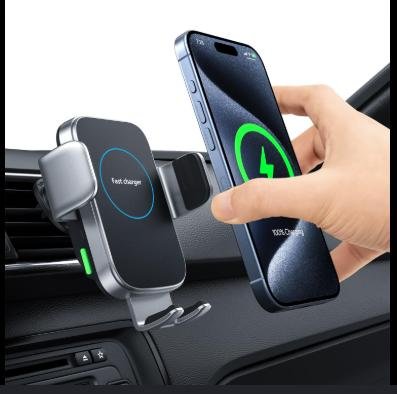
A Wireless Car Charger makes it easy to keep your smartphone powered while driving without dealing with tangled charging cables. Whether you’re using GPS navigation, streaming music, taking hands-free calls, or commuting to work, a wireless car charger provides continuous charging while keeping your phone securely mounted for convenient viewing. Many modern chargers also feature automatic clamping, fast wireless charging, and adjustable mounting options for dashboards, windshields, or air vents.
Although wireless car chargers are designed for convenience, many users experience slow charging, incorrect phone alignment, unstable mounts, or charging interruptions while driving. Understanding the correct installation and setup process helps you enjoy consistent charging, better phone accessibility, and a safer driving experience.
This guide explains how to use a Wireless Car Charger, from installing the mount and aligning your phone correctly to troubleshooting charging problems and following best practices for everyday driving.
Want a clutter-free driving experience? Follow this step-by-step guide to set up your Wireless Car Charger correctly and keep your phone powered on every journey.
How do you use a Wireless Car Charger?
Quick Answer
Using a Wireless Car Charger is simple:
- Install the charger securely inside your vehicle.
- Connect the charger to a power source.
- Adjust the viewing angle.
- Place your compatible smartphone on the charging pad.
- Ensure the phone aligns with the charging coil.
- Confirm wireless charging has started.
- Remove the phone safely after your trip.
Prerequisites
Before you begin, make sure you have:
- Wireless Car Charger
- Compatible Qi-enabled smartphone
- USB-C or USB-A power cable (included with most chargers)
- Car power adapter or USB charging port
- Dashboard, windshield, or air vent mounting location
- Vehicle owner’s manual (recommended)
Step-by-Step Instructions
Follow these simple steps to set up, position, and use your wireless car charger for safe, fast, and hassle-free charging while driving.
Step 1:Choose the Best Mounting Location
Select a location that allows easy access without blocking your view of the road.
Common mounting options include:
- Air vent
- Dashboard
- Windshield
Ensure the charger remains stable while driving.
Step 2: Install the Mount
Attach the mount according to the manufacturer’s instructions.
Check that:
- The mount is firmly secured.
- It does not interfere with driving controls.
- The charger can support your phone’s weight.
Step 3: Connect the Charger to Power
Connect the charging cable to:
- Your car’s USB port, or
- A compatible 12V car charger adapter.
The charger should power on automatically.
Step 4: Adjust the Viewing Angle
Position the charger so the screen remains easy to see while driving.
This makes navigation and hands-free calling more convenient without distracting you from the road.
Step 5: Place Your Smartphone on the Charger
If your charger features automatic clamping, place the phone against the charging pad and allow the arms to close automatically.
For manual models, adjust the grips until the phone is held securely.
Step 6: Check Charging Alignment
Ensure the center of your phone aligns with the charger’s wireless charging coil.
A properly aligned phone provides:
- Faster charging
- Stable charging
- Less heat generation
Step 7: Begin Driving
Verify that the wireless charging icon appears on your phone.
During your trip:
- Keep the phone securely mounted.
- Avoid unnecessary adjustments while driving.
- Remove the phone only after parking.
What Tips Help You Get the Best Wireless Charging Performance in Your Car?
Tips
Following these tips will improve charging efficiency and driving convenience.
Remove Thick Phone Cases
Bulky cases or metal accessories can interfere with wireless charging.
Keep the Charging Surface Clean
Dust and debris between the charger and phone may reduce charging efficiency.
Use a Fast Car Power Adapter
A Quick Charge or Power Delivery adapter helps support fast wireless charging.
Position Your Phone Carefully
Even small alignment adjustments can improve charging speed.
Secure Loose Charging Cables
Use cable clips or organizers to prevent cables from dangling while driving.
Avoid Direct Sunlight
High temperatures inside parked vehicles may reduce charging efficiency.
Use Landscape Mode for Navigation
If supported by your mount, landscape orientation can make GPS navigation easier to view.
What Common Mistakes Should You Avoid?
Common Mistakes
Mounting the Charger Too Low
Poor placement can make navigation difficult and increase driver distraction.
Using an Unsupported Phone
Wireless charging only works with Qi-compatible devices.
Ignoring Phone Alignment
Incorrect positioning may stop charging completely.
Leaving Metal Objects Between the Charger and Phone
Coins, magnetic plates, or credit cards may interfere with charging.
Using a Low-Power Car Adapter
Insufficient power may result in slow or inconsistent charging.
Frequently Adjusting the Mount While Driving
Always make adjustments before starting your journey.
Forgetting to Tighten the Mount
A loose mount may allow the phone to fall during sudden braking or rough roads.
How Can You Troubleshoot Common Wireless Car Charger Problems?
Troubleshooting
Problem: Phone Isn’t Charging
Solution
- Verify your phone supports Qi wireless charging.
- Reposition the phone.
- Check the power connection.
Problem: Charging Starts and Stops
Solution
- Adjust phone alignment.
- Remove thick phone cases.
- Check the charging cable.
Problem: Charger Doesn’t Power On
Solution
- Inspect the USB cable.
- Test another vehicle power outlet.
- Replace the car charging adapter if necessary.
Problem: Phone Gets Too Warm
Solution
- Avoid charging in direct sunlight.
- Remove heavy protective cases.
- Improve airflow inside the vehicle.
Problem: Mount Feels Loose
Solution
- Tighten the mounting mechanism.
- Reinstall the mount.
- Clean the mounting surface before reattaching.
Problem: Automatic Arms Won’t Close
Solution
- Restart vehicle power.
- Check for obstructions.
- Review the manufacturer’s reset instructions.
What Are the Best Practices for Long-Term Performance?
Best Practices
Clean the Charging Pad Regularly
Remove dust and fingerprints using a soft microfiber cloth.
Inspect Mounting Components
Check the vent clip, suction cup, or dashboard adhesive periodically.
Protect the Charger from Extreme Heat
Whenever possible, park in shaded areas to reduce prolonged heat exposure.
Replace Damaged Charging Cables
Worn cables may reduce charging reliability.
Keep Firmware Updated (If Supported)
Some smart wireless chargers receive firmware updates through companion apps.
Check the Mount Before Every Trip
Confirm that both the charger and your phone remain securely attached.
Handle the Mount Gently
Avoid forcing the adjustment joints, which may shorten their lifespan.
Frequently Asked Questions
Can every smartphone use a wireless car charger?
No. Your smartphone must support Qi wireless charging or a compatible wireless charging standard.
Why is my phone charging slowly?
Slow charging may result from poor alignment, a low-power car adapter, or a thick phone case.
Can I use wireless charging with a phone case?
Yes, but thin, non-metallic cases generally provide the best charging performance.
Does wireless charging damage my phone battery?
No. Quality wireless chargers include built-in safety protections for compatible devices.
Can I use GPS while charging wirelessly?
Yes. Wireless car chargers are designed to keep your phone charged while using navigation apps.
Why does my charger stop charging over bumps?
The phone may lose alignment with the charging coil. Ensure the mount securely holds your device.
Should I unplug the charger when not driving?
While not always necessary, disconnecting the charger during extended periods of non-use can help reduce unnecessary power draw.
Conclusion
A Wireless Car Charger offers a safer and more convenient way to keep your smartphone powered while driving. By installing the mount correctly, aligning your phone with the charging coil, and using a compatible fast-charging power source, you can enjoy uninterrupted charging for navigation, music streaming, and hands-free communication.
Routine cleaning, proper installation, and following the best practices outlined in this guide will help maintain reliable charging performance and extend the lifespan of your charger. Whether you’re commuting daily or heading out on a long road trip, a Wireless Car Charger keeps your phone accessible, organized, and ready for every mile.
Drive Smarter with Hassle-Free Wireless Charging
Your Wireless Car Charger can do more than simply power your phone—it can make every drive safer, more organized, and more convenient. Install it correctly, optimize your charging setup, and enjoy effortless access to navigation, calls, and entertainment every time you get behind the wheel.