How to Use LambdaTest: A Complete Beginner’s Guide
Testing websites across different browsers, operating systems, and devices can be time-consuming and expensive. Without proper cross-browser testing, your website may work perfectly in one browser but break in another, leading to poor user experiences and missed bugs. Managing multiple testing environments locally also increases maintenance costs and slows development.
By TechScaleMedia Editorial · Updated July 2026 · 11 min read
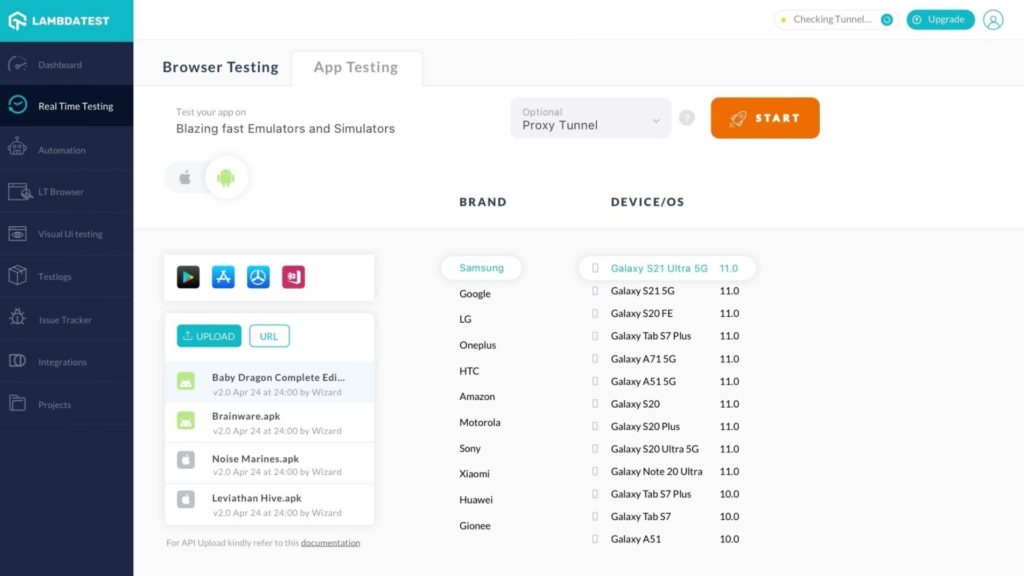
That’s where LambdaTest helps. LambdaTest is a cloud-based testing platform that lets you perform manual and automated cross-browser testing on 2,000+ browsers, browser versions, operating systems, and real devices from a single dashboard. It supports popular automation frameworks like Selenium, Cypress, Playwright, TestCafe, and Appium, integrates with CI/CD pipelines and project management tools, and helps development and QA teams identify bugs faster without maintaining local testing infrastructure.
Whether you’re a QA engineer, developer, tester, or DevOps professional, LambdaTest makes it easier to test, debug, and deliver high-quality web applications.
Ready to improve your cross-browser testing? Follow the step-by-step guide below to learn how to use LambdaTest effectively. Sign Up Now
Quick Answer
Using LambdaTest involves creating an account, choosing live or automated testing, connecting your website or application, selecting browsers and operating systems, running manual or automated tests, reviewing test results, logging bugs, and integrating your workflow with CI/CD tools. Once configured, LambdaTest helps you test web applications across thousands of browser and device combinations from the cloud.
Prerequisites
Before getting started, you’ll need:
- A LambdaTest account
- Your website or web application URL
- Basic knowledge of website testing
- A stable internet connection
- Selenium, Cypress, Playwright, or another automation framework (optional)
Create a Workflow Manually (Recommended for Beginners)
If you’re new to cross-browser testing, running your first test on LambdaTest is the best way to understand how the platform actually works.
Step 1: Create Your LambdaTest Account
Visit the LambdaTest website and click Sign Up.
Create your account using your email address or a supported sign-in method.
After verifying your account, log in to the LambdaTest dashboard where you can access live testing, automation, bug tracking, and integrations.
Step 2: Choose a Testing Method
LambdaTest offers two primary testing options:
- Live Interactive Testing for manual browser testing.
- Automated Testing using frameworks like Selenium, Cypress, Playwright, TestCafe, or Appium.
Choose the option that best matches your testing requirements.
Step 3: Configure Your Test Environment
Select the environment where you want to test your application.
Choose:
- Browser
- Browser version
- Operating system
- Device type (where applicable)
- Screen resolution
LambdaTest provides access to more than 2,000 browser and operating system combinations hosted in the cloud.
Step 4: Run Live Cross-Browser Tests
Enter your website URL and launch a live browser session.
Interact with your website just as a real user would.
During testing you can:
- Navigate pages
- Test forms
- Check layouts
- Verify responsiveness
- Inspect browser compatibility
This helps identify browser-specific issues before deployment.
Step 5: Run Automated Tests
If you use test automation, connect LambdaTest with your preferred testing framework.
Supporting frameworks include:
- Selenium
- Cypress
- Playwright
- TestCafe
- Appium
Run your automated test suite using LambdaTest’s cloud infrastructure without maintaining your own testing grid.
Step 6: Capture and Report Bugs
If you discover an issue during testing, use LambdaTest’s built-in bug reporting tools.
You can:
- Capture screenshots
- Record videos
- Add comments
- Log bugs
- Share test sessions
LambdaTest automatically includes browser, operating system, screen resolution, and session details to simplify bug reporting.
Step 7: Integrate with Your Workflow
Enter your weLambdaTest integrates with over 100 development tools.
Popular integrations include:
- GitHub
- GitLab
- Jenkins
- CircleCI
- Azure DevOps
- Jira
- Slack
- Trello
- Datadog
These integrations help automate testing and streamline collaboration across development teams.
Step 8: Review Test Results
After testing is complete, review your reports from the LambdaTest dashboard.
Analyze:
- Test results
- Screenshots
- Video recordings
- Browser compatibility
- Error logs
- Performance insights
Use these reports to fix issues before releasing your application.
Now You’re Ready to Start Testing with LambdaTest
Run your first cross-browser test in minutes and let LambdaTest simplify browser compatibility testing across multiple devices and platforms.
Tips to Get the Most Out of LambdaTest
These expert tips will help you perform faster, more reliable, and more efficient cross-browser testing with LambdaTest:
- Test your website on multiple browsers before every release.
- Automate repetitive test cases using Selenium or Cypress.
- Integrate LambdaTest with your CI/CD pipeline.
- Capture screenshots and videos for faster debugging.
- Test responsive layouts on different screen sizes.
- Review test reports after every execution.
Common LambdaTest Mistakes to Avoid
LambdaTest is easy to use, but small configuration mistakes can affect your testing results. Avoid these common errors.
- Testing on only one browser.
- Ignoring mobile browser compatibility.
- Skipping automated regression testing.
- Not reviewing failed test logs.
- Forgetting to integrate testing into your CI/CD workflow.
Best Practices for Building Reliable Automations
Once your test suites are running, these long-term practices keep your testing workflows organized, scalable, and easy to maintain.
- Test across multiple browsers and operating systems.
- Automate regression testing whenever possible.
- Integrate testing into every deployment pipeline.
- Review screenshots and videos for failed tests.
- Keep your test suites updated as your application evolves.
- Use bug reporting tools to improve collaboration.
Troubleshooting Common LambdaTest Issues
If your automation isn’t working as expected, these quick fixes can help.
Live Session Won’t Start
Check your internet connection and verify your selected browser configuration.
Automated Tests Fail
Review your test scripts, framework configuration, and automation capabilities.
Browser Compatibility Issues
Run tests on multiple browser versions to identify browser-specific problems.
Integrations Aren’t Working
Verify your integration settings and reconnect the third-party service if necessary.
Frequently Asked Questions
What is LambdaTest?
LambdaTest is a cloud-based platform for manual and automated cross-browser testing of web applications across 2,000+ browser and operating system combinations.
Is LambdaTest free?
Yes. LambdaTest offers a free plan that includes limited testing resources and free automation testing minutes. Paid plans provide additional testing capacity and advanced features.
Can LambdaTest run Selenium tests?
Yes. LambdaTest supports Selenium, Cypress, Playwright, TestCafe, Appium, and several other automation frameworks.
Is LambdaTest suitable for beginners?
Yes. Its intuitive interface makes it easy for beginners to perform manual testing while also supporting advanced automation for experienced teams.
Does LambdaTest support CI/CD?
Yes. LambdaTest integrates with popular CI/CD tools such as Jenkins, GitHub Actions, GitLab CI, CircleCI, and Azure DevOps.
Conclusion
LambdaTest simplifies cross-browser testing by providing cloud-based access to thousands of browser, operating system, and device combinations without requiring local infrastructure. Whether you’re performing manual testing, running automated test suites, or integrating testing into your CI/CD pipeline, LambdaTest helps you identify compatibility issues early and deliver higher-quality web applications faster.
Ready to Test Your Web Applications with Confidence?
Start using LambdaTest today by creating your free account, launching your first live browser session, and exploring automated testing with your preferred framework. As your projects grow, integrate LambdaTest with your CI/CD pipeline and collaboration tools to build a faster, more reliable testing workflow.