How to Use a Smart Air Conditioner (Split / Window): A Complete Beginner’s Step-by-Step Guide
Learn how to set up, connect, and control a smart split or window air conditioner with this beginner-friendly step-by-step guide to maximize comfort, energy efficiency, and smart home convenience.
By TechScaleMedia Editorial · Updated July 2026 · 11 min read
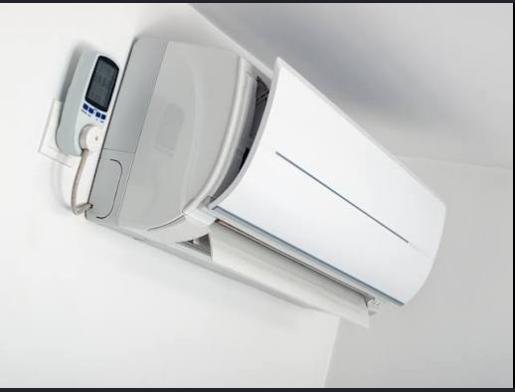
A Smart Air Conditioner (Split / Window) gives you greater control over your indoor comfort by allowing you to adjust temperature, fan speed, operating modes, and schedules through a smartphone app or voice assistant. Unlike conventional air conditioners, smart ACs can automate cooling based on your daily routine, monitor energy consumption, and even let you control your home’s climate remotely. Whether you’re trying to improve comfort during hot weather or reduce electricity costs, a smart air conditioner offers a convenient and energy-efficient solution.
Although smart air conditioners are designed for ease of use, many users struggle with Wi-Fi setup, remote control features, automation schedules, or optimizing cooling performance. Understanding the correct setup process helps you enjoy reliable cooling while making the most of your smart AC’s intelligent features.
This guide explains how to use a Smart Air Conditioner (Split /Window), from connecting it to your home network to creating schedules, troubleshooting common issues, and following best practices for long-term performance.
Ready to enjoy smarter climate control? Follow this step-by-step guide to set up your Smart Air Conditioner and keep your home comfortable with less effort.
How do you use a Smart Air Conditioner (Split / Window)?
Quick Answer
Using a Smart Air Conditioner is simple:
- Install or power on the air conditioner.
- Connect it to your Wi-Fi network.
- Download the companion app.
- Pair the AC with your account.
- Adjust cooling settings.
- Create automatic schedules.
- Monitor and control the AC remotely.
Prerequisites
Before you begin, make sure you have:
- Smart Air Conditioner (Split or Window)
- Stable Wi-Fi connection
- Smartphone or tablet
- Companion mobile app
- Home Wi-Fi password
- User manual
- Power outlet or installed AC unit
Step-by-Step Instructions
Follow these simple steps to set up, connect, and use your smart split or window air conditioner for efficient cooling and convenient remote control.
Step 1: Turn On the Air Conditioner
Power on the air conditioner using the remote control or power button.
Wait until the display indicates the system is ready for setup.
Step 2: Connect the AC to Wi-Fi
Access the Wi-Fi settings on the air conditioner.
Select your home network.
Enter the Wi-Fi password and wait until the connection is successful.
Step 3: Install the Mobile App
Download the manufacturer’s official app on your smartphone or tablet.
Create an account or sign in.
Step 4: Pair the Air Conditioner
Open the app and select Add Device.
Follow the on-screen instructions to detect and register your smart air conditioner.
Wait until pairing is complete.
Step 5: Configure Cooling Preferences
Customize your preferred settings, including:
- Temperature
- Fan speed
- Cooling mode
- Sleep mode
- Energy-saving mode
Save your preferred configuration.
Step 6: Create Smart Schedules
Program the AC to operate automatically.
For example:
- Turn on before you arrive home.
- Reduce cooling while you’re away.
- Activate Sleep Mode at night.
- Turn off automatically after bedtime.
Step 7: Control Your Air Conditioner Remotely
Use the mobile app to:
- Adjust temperature
- Turn the AC on or off
- Monitor operating status
- Modify schedules
- Switch operating modes
What Tips Help You Get Better Cooling Performance?
Tips
Following these tips can improve comfort while reducing energy consumption.
Keep Doors and Windows Closed
Prevent cool air from escaping while the AC is running.
Use Energy-Saving Mode
Activate Eco Mode whenever maximum cooling isn’t necessary.
Clean the Air Filters Regularly
Dirty filters reduce airflow and cooling efficiency.
Set a Comfortable Temperature
Avoid extremely low temperature settings, as they increase electricity usage.
Schedule Cooling in Advance
Program the AC to cool your room before you arrive instead of running continuously.
Pair with Voice Assistants
Control your AC hands-free using compatible smart home platforms.
Monitor Energy Usage
Review consumption reports through the companion app if available.
What Common Mistakes Should You Avoid?
Common Mistakes
Setting Extremely Low Temperatures
Lower settings don’t cool the room instantly and may increase electricity costs.
Forgetting to Clean Filters
Blocked filters reduce cooling performance and airflow.
Ignoring Firmware Updates
Software updates improve performance and add new features.
Blocking Air Vents
Furniture or curtains may restrict airflow.
Leaving the AC Running in Empty Rooms
Use schedules or timers to avoid unnecessary energy consumption.
Using Weak Wi-Fi
Poor connectivity may interrupt remote control features.
Skipping Regular Maintenance
Routine servicing helps extend the life of your air conditioner.
How Can You Troubleshoot Common Smart Air Conditioner Problems?
Troubleshooting
Problem: Air Conditioner Won’t Connect to Wi-Fi
Solution
- Restart your router.
- Verify the Wi-Fi password.
- Move the router closer if needed.
Problem: Mobile App Can’t Find the AC
Solution
- Restart the app.
- Confirm both devices are on the same Wi-Fi network.
- Repeat the pairing process.
Problem: AC Isn’t Cooling Properly
Solution
- Clean the air filters.
- Check the temperature setting.
- Ensure doors and windows are closed.
Problem: Remote Control Isn’t Responding
Solution
- Replace the batteries.
- Point the remote directly at the unit.
- Remove any obstacles.
Problem: Smart Features Stop Working
Solution
- Restart the air conditioner.
- Update the mobile app.
- Install available firmware updates.
Problem: Water Is Leaking
Solution
- Check the drainage system.
- Clean the drain line if necessary.
- Contact a technician if the issue continues.
What Are the Best Practices for Long-Term Performance?
Best Practices
Clean the Filters Monthly
Regular cleaning improves airflow and cooling efficiency.
Schedule Annual Servicing
Professional maintenance helps detect issues early.
Keep Firmware Updated
Install software updates whenever available.
Monitor Electricity Usage
Use built-in energy reports to identify savings opportunities.
Inspect Outdoor Units
Remove leaves, dust, or debris that may restrict airflow.
Protect the Remote Control
Store it in a safe location when not in use.
Use Smart Scheduling Throughout the Year
Adjust cooling schedules seasonally to improve comfort and efficiency.
Frequently Asked Questions
Can I control my Smart Air Conditioner when I’m away from home?
Yes. Once connected to Wi-Fi, you can control it remotely through the companion app.
Does a Smart Air Conditioner save electricity?
Yes. Features like scheduling, timers, and Eco Mode help reduce unnecessary energy consumption.
Can I use voice commands?
Yes. Many smart air conditioners support popular voice assistants.
Why won’t my AC connect to Wi-Fi?
Check your internet connection, verify your password, and restart the setup process.
How often should I clean the air filter?
Most manufacturers recommend cleaning it every two to four weeks, depending on usage.
What should I do if cooling performance decreases?
Clean the filters, inspect airflow, and schedule professional maintenance if necessary.
Can multiple family members control the air conditioner?
Yes. Many companion apps allow multiple authorized users to manage the same device.
Conclusion
A Smart Air Conditioner (Split / Window) makes home cooling more convenient by combining remote access, intelligent scheduling, and energy-saving features into one easy-to-use system. By completing the setup correctly, maintaining clean filters, and taking advantage of automation, you can enjoy a comfortable indoor environment while reducing unnecessary energy consumption.
Routine maintenance, software updates, and thoughtful scheduling will help your smart air conditioner deliver reliable cooling for years to come. Whether you’re relaxing at home or managing your AC remotely, smart climate control gives you greater flexibility and convenience.
Stay Cool, Save Energy, and Control Comfort Your Way
Transform the way you cool your home with your Smart Air Conditioner. Explore its smart scheduling, remote access, and energy-saving features to create a comfortable living space that works around your lifestyle—keeping you cool while helping you use energy more efficiently every season.