How to Use a Biometric Safe / Smart Security Box: A Complete Beginner’s Step-by-Step Guide
Learn how to set up, use, and maintain a biometric safe or smart security box to protect your valuables with advanced security features.
By TechScaleMedia Editorial · Updated July 2026 · 11 min read
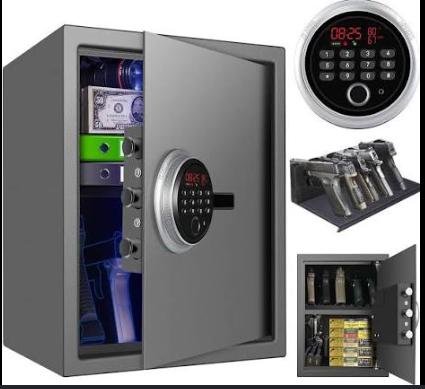
A Biometric Safe / Smart Security Box provides a secure and convenient way to protect valuables such as cash, jewelry, passports, important documents, firearms (where legally permitted), electronic devices, and other personal belongings. Unlike traditional safes that rely on keys or combination locks, biometric safes use fingerprint recognition and smart security features to provide fast access while reducing the risk of unauthorized entry. Many models also support PIN codes, backup keys, mobile apps, and access logs for added flexibility.
Although biometric safes are designed to be easy to use, many first-time owners encounter difficulties when registering fingerprints, setting up backup access methods, or understanding security settings. Learning the proper setup process helps ensure reliable access while keeping your valuables protected.
This guide explains how to use a Biometric Safe / Smart Security Box, from initial setup and fingerprint registration to troubleshooting common issues and following best practices for long-term performance.
Looking for a smarter way to secure your valuables? Follow this step-by-step guide to set up your Biometric Safe and enjoy fast, reliable, and secure access whenever you need it.
How do you use a Biometric Safe / Smart Security Box?
Quick Answer
Using a Biometric Safe is simple:
- Install the batteries or connect the power supply.
- Set up the administrator account.
- Register your fingerprints.
- Create a backup PIN code.
- Test the unlocking methods.
- Store your valuables securely.
- Lock the safe after every use.
Prerequisites
Before you begin, make sure you have:
- Biometric Safe / Smart Security Box
- Fresh batteries or power adapter (if applicable)
- Backup keys
- User manual
- Smartphone (for app-enabled models)
- Clean, dry fingers for fingerprint registration
Step-by-Step Instructions
Follow these simple steps to set up your biometric safe or smart security box, register fingerprints, configure security settings, and securely store your valuables.
Step 1: Install the Batteries
Open the battery compartment and insert the recommended batteries.
If your safe uses an external power adapter, connect it according to the manufacturer’s instructions.
Confirm the safe powers on successfully.
Step 2: Set Up the Administrator Account
During the initial setup, create the administrator profile.
The administrator can:
- Register fingerprints
- Change security settings
- Add or remove users
- Reset access credentials
Keep administrator information confidential.
Step 3: Register Your Fingerprints
Follow the registration process shown on the safe or companion app.
Scan the same finger multiple times from slightly different angles to improve recognition accuracy.
Register additional authorized fingerprints if needed.
Step 4: Create a Backup PIN
Set a strong numeric PIN code.
Avoid easily guessed combinations such as:
- 123456
- Birthdays
- Consecutive numbers
Store the PIN securely.
Step 5: Test All Unlocking Methods
Before storing valuables, verify that:
- Fingerprint recognition works.
- The PIN unlocks the safe.
- Backup keys function properly.
Repeat fingerprint registration if necessary.
Step 6: Organize Your Valuables
Place items neatly inside the safe.
Avoid overloading the interior, as this may interfere with proper door closure.
Step 7: Lock the Safe
Close the door securely.
Verify that the locking mechanism has fully engaged before leaving the safe unattended.
What Tips Help You Improve Security with a Biometric Safe?
Tips
Following these tips helps maximize both security and convenience.
Register Multiple Fingerprints
Save fingerprints from more than one finger in case of cuts or injuries.
Keep the Fingerprint Sensor Clean
Regularly wipe the sensor with a soft microfiber cloth.
Replace Batteries Before They Are Fully Drained
Low batteries may affect lock performance.
Store Backup Keys Separately
Never keep backup keys inside the safe.
Test Access Monthly
Verify fingerprint recognition and backup methods periodically.
Enable App Notifications
If supported, activate alerts for unauthorized access attempts.
Secure the Safe Properly
Bolt the safe to a wall or floor if recommended by the manufacturer.
What Common Mistakes Should You Avoid?
Common Mistakes
Using Weak PIN Codes
Simple codes reduce overall security.
Ignoring Low Battery Warnings
Replace batteries promptly to avoid lockouts.
Registering Wet or Dirty Fingers
Clean, dry fingers improve fingerprint recognition accuracy.
Forgetting Backup Access Methods
Always verify backup keys and PIN codes remain accessible.
Leaving the Safe Unlocked
Always confirm the safe is locked before leaving.
Skipping Firmware Updates
Update smart safes regularly to improve security and functionality.
Overloading the Safe
Too many items may prevent the door from closing correctly.
How Can You Troubleshoot Common Biometric Safe Problems?
Troubleshooting
Problem: Fingerprint Isn’t Recognized
Solution
- Clean the fingerprint sensor.
- Wash and dry your finger.
- Register the fingerprint again.
Problem: Safe Won’t Open
Solution
- Use the backup PIN.
- Try the backup key.
- Replace the batteries if necessary.
Problem: Keypad Doesn’t Respond
Solution
- Install fresh batteries.
- Restart the safe if supported.
- Check battery installation.
Problem: Door Won’t Lock
Solution
- Rearrange items inside the safe.
- Inspect the locking mechanism.
- Ensure the door closes completely.
Problem: Mobile App Won’t Connect
Solution
- Enable Bluetooth or Wi-Fi.
- Restart the app.
- Pair the safe again.
Problem: Low Battery Warning Appears
Solution
- Replace all batteries with new ones.
- Test all unlocking methods after replacement.
What Are the Best Practices for Long-Term Performance?
Best Practices
Replace Batteries Regularly
Don’t wait until the batteries are completely depleted.
Clean the Safe Periodically
Keep both the exterior and fingerprint sensor free of dust.
Review Authorized Users
Remove fingerprint access for users who no longer require entry.
Inspect the Locking Mechanism
Check that the bolts move smoothly without obstruction.
Update Smart Features
Install firmware updates whenever available.
Store in a Dry Location
Avoid excessive humidity that could affect electronic components.
Test Emergency Access
Regularly confirm that backup keys and PIN codes still function correctly.
Frequently Asked Questions
How many fingerprints can I register?
The number varies by model, but many biometric safes support multiple authorized users.
What happens if the batteries die?
Most safes include backup keys or emergency power options for access.
Can multiple family members use the safe?
Yes. Many biometric safes allow several fingerprints to be registered.
Is fingerprint recognition secure?
Yes. Modern biometric sensors provide fast and secure authentication when properly configured.
How often should I replace the batteries?
Replace them whenever a low battery warning appears or according to the manufacturer’s recommendations.
Can I still unlock the safe without my fingerprint?
Yes. Most models also support PIN codes and backup keys.
Should I bolt the safe down?
Yes. If possible, secure the safe to a solid surface to improve protection against theft.
Conclusion
A Biometric Safe / Smart Security Box combines advanced fingerprint recognition with modern security features to provide fast, convenient, and reliable protection for your valuables. By registering fingerprints correctly, creating secure backup access methods, and performing routine maintenance, you can enjoy dependable security while ensuring quick access whenever needed.
Regular battery replacement, periodic testing, and keeping the fingerprint sensor clean will help maintain consistent performance for years to come. Whether you’re protecting important documents, jewelry, or personal belongings, a biometric safe offers peace of mind with the convenience of keyless access.
Protect What Matters Most with Smarter Security
Your valuables deserve more than ordinary protection. Set up your Biometric Safe / Smart Security Box properly, keep your security settings up to date, and enjoy the confidence that comes from knowing your most important belongings are protected by modern biometric technology.