How to Use a Smart Bird Feeder with AI Camera: A Complete Beginner’s Step-by-Step Guide
Learn how to use a smart bird feeder with an AI camera to identify birds, receive real-time alerts, capture photos and videos, and enjoy birdwatching with this easy step-by-step beginner’s guide.
By TechScaleMedia Editorial · Updated July 2026 · 11 min read
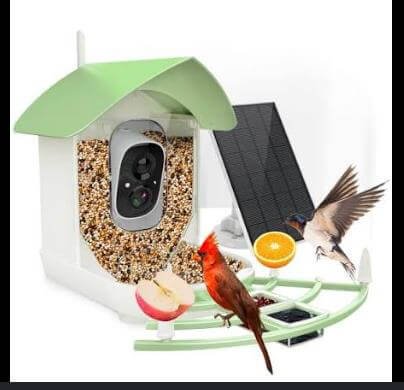
Watching birds visit your backyard is rewarding, but identifying different species and capturing those moments can be challenging. A Smart Bird Feeder with AI Camera makes birdwatching more interactive by combining automatic feeding with HD video, AI-powered bird identification, motion detection, and smartphone connectivity. These smart feeders let you monitor bird activity in real time, receive instant notifications, and build a record of the birds visiting your outdoor space. However, proper setup is essential for attracting more birds and getting clear photos and videos. Choosing the right location, connecting the feeder to Wi-Fi, positioning the camera correctly, and using suitable bird seed all help improve performance. Whether you’re a beginner, a bird enthusiast, or an educator, this step-by-step guide explains everything you need to know—from installation and app setup to maintenance, troubleshooting, and best practices—so you can enjoy a smarter and more engaging birdwatching experience.
Ready to discover the birds visiting your backyard? Follow this step-by-step guide to set up your Smart Bird Feeder and enjoy intelligent birdwatching from anywhere.
How do you use a Smart Bird Feeder with AI Camera?
Quick Answer
Using a Smart Bird Feeder is easy:
- Assemble the bird feeder.
- Install the companion app.
- Connect the feeder to Wi-Fi.
- Fill the feeder with bird seed.
- Mount it outdoors.
- Adjust the AI camera.
- Monitor bird activity through the app.
Prerequisites
Before you begin, make sure you have:
- Smart Bird Feeder with AI Camera
- Bird seed suitable for local birds
- Smartphone or tablet
- Companion mobile app
- Wi-Fi connection
- Mounting hardware
- Power adapter or charged battery (or solar panel if included)
- User manual
Step-by-Step Instructions
Follow these simple steps to set up your smart bird feeder with an AI camera, connect it to the app, and start identifying and recording birds in your backyard.
Step 1: Assemble the Bird Feeder
Unpack all components.
Attach:
- Seed container
- Feeding tray
- Camera module
- Roof or cover
- Solar panel (if included)
Ensure every component is securely installed.
Step 2: Charge or Power the Camera
Fully charge the battery if applicable.
If your model uses solar charging, position the solar panel where it receives adequate sunlight.
Power on the camera.
Step 3: Install the Mobile App
Download the manufacturer’s companion app.
Create your account.
Enable:
- Wi-Fi
- Notifications
- Camera permissions
Step 4: Connect the Camera to Wi-Fi
Open the app.
Tap Add Device.
Follow the pairing instructions.
Confirm that live video appears in the app.
Step 5: Fill the Bird Feeder
Open the seed compartment.
Add bird seed recommended for your local bird species.
Close the lid securely to protect the seed from moisture.
Step 6: Mount the Feeder Outdoors
Install the feeder:
- On a pole
- On a tree
- On a fence
- On a wall bracket
Choose a quiet location that provides birds with a clear landing area.
Avoid placing the feeder too close to busy walkways.
Step 7: Monitor Bird Activity
Use the mobile app to:
- Watch live video
- Receive motion alerts
- Identify bird species using AI
- Save photos and videos
- Review recent visits
What Tips Help You Capture Better Bird Visits?
Tips
Following these tips helps improve bird activity and camera performance.
Choose the Right Bird Seed
Use seed blends suitable for birds commonly found in your area.
Place the Feeder in a Quiet Location
Birds are more likely to visit areas with minimal disturbance.
Clean the Feeding Tray Regularly
Fresh feeding areas encourage healthy bird activity.
Keep the Camera Lens Clean
A clean lens provides sharper photos and videos.
Position the Solar Panel Properly
Maximize sunlight exposure for longer battery life.
Enable Motion Notifications
Receive alerts whenever birds arrive.
Be Patient
It may take several days before birds become comfortable visiting a newly installed feeder.
What Common Mistakes Should You Avoid?
Common Mistakes
Installing the Feeder in Heavy Traffic Areas
Constant activity may discourage birds.
Overfilling the Seed Hopper
Excess seed may become stale or damp.
Forgetting to Clean Old Seed
Spoiled seed may discourage bird visits.
Blocking the Camera View
Branches or decorations can obstruct video recording.
Ignoring Battery Levels
Recharge or monitor solar charging regularly.
Mounting Too Close to Predators
Avoid locations easily accessible to cats or other predators.
Skipping Firmware Updates
Software updates often improve AI recognition and camera performance.
How Can You Troubleshoot Common Smart Bird Feeder Problems?
Troubleshooting
Problem: Camera Won’t Connect to Wi-Fi
Solution
- Restart the feeder.
- Verify your Wi-Fi credentials.
- Move the feeder within network range.
Problem: AI Isn’t Identifying Birds
Solution
- Clean the camera lens.
- Improve lighting.
- Update the companion app.
Problem: Birds Aren’t Visiting
Solution
- Relocate the feeder.
- Try a different bird seed.
- Give birds time to discover the feeder.
Problem: Motion Alerts Don’t Work
Solution
- Enable notifications.
- Adjust motion sensitivity.
- Restart the camera.
Problem: Video Quality Is Poor
Solution
- Clean the lens.
- Improve lighting.
- Check your Wi-Fi connection.
Problem: Battery Drains Quickly
Solution
- Position the solar panel for better sunlight.
- Reduce unnecessary recordings.
- Recharge the battery fully.
What Are the Best Practices for Long-Term Performance?
Best Practices
Refill Fresh Seed Frequently
Replace old seed before it spoils.
Clean the Feeder Every Week
Maintain a hygienic feeding environment.
Wipe the Camera Lens Regularly
Dust and pollen can reduce image quality.
Update the Camera Firmware
Install updates whenever available.
Monitor Battery Health
Recharge rechargeable batteries before they become fully depleted.
Inspect Mounting Hardware
Ensure the feeder remains securely attached.
Review AI Bird Logs
Track bird species and activity over time through the companion app.
Frequently Asked Questions
Can the AI identify different bird species?
Yes. Many smart bird feeders use AI to recognize and identify common bird species.
Does the feeder require Wi-Fi?
Wi-Fi is generally required for remote viewing, notifications, and AI features.
Can I watch birds live from my phone?
Yes. Most models provide live video through the companion app.
What type of bird seed should I use?
Use seed appropriate for the bird species common to your region.
Is the feeder weather resistant?
Most outdoor smart bird feeders are designed to withstand normal weather conditions, but always follow the manufacturer’s recommendations.
How often should I clean the feeder?
Weekly cleaning helps maintain bird health and encourages repeat visits.
Can multiple family members use the app?
Many companion apps support shared device access for multiple users.
Conclusion
A Smart Bird Feeder with AI Camera makes it easy to attract birds while identifying species and monitoring activity from your smartphone. By installing the feeder in a suitable location, keeping it clean, using fresh bird seed, and maintaining the camera and software, you can enjoy reliable performance and better wildlife observations throughout the year. Regular maintenance also helps ensure clear video, accurate AI recognition, and a healthy feeding environment.
Ready to make every bird visit more memorable? Set up your Smart Bird Feeder with AI Camera today, attract more backyard birds, and enjoy real-time birdwatching from anywhere.
Turn Every Bird Visit into a Memorable Discovery
Your Smart Bird Feeder with AI Camera lets you experience nature like never before. Keep your feeder stocked, your camera ready, and your app connected to capture beautiful bird visits and enjoy an ever-growing collection of backyard wildlife moments.