How to Use Shark / Levoit / Winix Air Purifiers: A Complete Beginner’s Step-by-Step Guide
Learn how to use Shark, Levoit, and Winix air purifiers with this complete beginner’s step-by-step guide to set up your device, choose the right settings, replace filters, and improve your indoor air quality.
By TechScaleMedia Editorial · Updated July 2026 · 11 min read
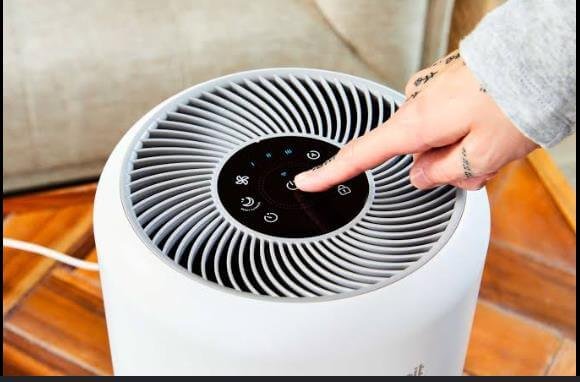
Indoor air often contains dust, allergens, pet dander, smoke, and other pollutants that can affect the comfort of your home. Shark, Levoit, and Winix Air Purifiers are designed to improve air quality using advanced features such as True HEPA filters, activated carbon filters, smart air quality sensors, Auto Mode, and Sleep Mode. While these air purifiers are easy to operate, setting them up correctly is essential for achieving the best performance. Proper filter installation, correct placement, and choosing the right operating mode can improve purification efficiency and extend filter life. Whether you’re using an air purifier to reduce allergens, eliminate household odors, or maintain cleaner indoor air, this beginner-friendly guide covers everything you need to know. From initial setup and daily operation to maintenance, troubleshooting, and best practices, you’ll learn how to get the most from your Shark, Levoit, or Winix air purifier and enjoy fresher, healthier air every day.
Looking for cleaner indoor air every day? Follow this step-by-step guide to set up your Shark, Levoit, or Winix Air Purifier and enjoy a fresher, healthier home environment.
How do you use Shark, Levoit, or Winix Air Purifiers?
Quick Answer
Using these air purifiers is easy:
- Unpack the purifier.
- Install the filters.
- Place the purifier correctly.
- Plug it into a power outlet.
- Select your preferred operating mode.
- Allow continuous air circulation.
- Replace filters when notified.
Prerequisites
Before you begin, make sure you have:
- Shark, Levoit, or Winix Air Purifier
- HEPA filter
- Activated carbon filter (if included)
- Power outlet
- User manual
- Flat, stable surface
- Adequate room ventilation
Step-by-Step Instructions
Follow these simple steps to set up, operate, and maintain your Shark, Levoit, or Winix air purifier for cleaner, healthier indoor air.
Step 1: Unpack the Air Purifier
Remove the purifier from its packaging.
Take out all accessories.
Inspect the appliance for any shipping damage.
Step 2: Install the Filters
Open the filter compartment.
Remove all protective plastic wrapping from:
- HEPA filter
- Carbon filter
- Pre-filter (if included)
Insert each filter according to the directional markings.
Close the filter cover securely.
Step 3: Position the Air Purifier
Place the purifier:
- At least several inches away from walls
- Away from curtains or furniture
- On a level floor or stable surface
- In the room where you spend the most time
Ensure that both air intake and air outlet remain unobstructed.
Step 4: Connect the Power
Plug the purifier into an electrical outlet.
Press the Power button.
Verify that the control panel lights up.
Step 5: Select an Operating Mode
Choose the mode that fits your needs, such as:
- Auto Mode
- Sleep Mode
- Low Fan Speed
- Medium Fan Speed
- High Fan Speed
- Turbo Mode
If your model includes an air quality sensor, Auto Mode will automatically adjust the fan speed.
Step 6: Monitor Air Quality
Observe the display or indicator lights.
Many models provide:
- Air quality color indicators
- Fan speed status
- Filter life reminders
- Timer settings
Allow the purifier to operate continuously for the best results.
Step 7: Perform Routine Maintenance
Clean the exterior regularly.
Vacuum washable pre-filters if applicable.
Replace HEPA and carbon filters according to the manufacturer’s schedule.
Reset the filter indicator after replacement if required.
What Tips Help Improve Indoor Air Quality?
Tips
Following these tips helps your purifier perform more efficiently.
Keep Interior Doors Open When Appropriate
This helps improve air circulation between connected spaces.
Use Auto Mode Daily
Automatic adjustments optimize purification while saving energy.
Vacuum Frequently
Reducing dust helps extend filter life.
Close Windows During Heavy Pollution
Limiting outdoor pollutants improves purification effectiveness.
Replace Filters Promptly
Fresh filters maintain strong airflow and cleaning efficiency.
Position the Purifier Near Pollution Sources
Use it close to pet areas, cooking spaces, or frequently occupied rooms.
Run the Purifier Overnight
Continuous nighttime operation helps maintain cleaner bedroom air.
What Common Mistakes Should You Avoid?
Common Mistakes
Forgetting to Remove Plastic from New Filters
Wrapped filters cannot clean the air properly.
Blocking the Air Intake
Furniture and walls may reduce airflow.
Turning the Purifier Off Too Often
Consistent operation provides better long-term air quality.
Ignoring Filter Replacement Alerts
Old filters reduce purification performance.
Placing the Unit in Tight Corners
Restricted airflow limits efficiency.
Using Incorrect Replacement Filters
Always use filters compatible with your specific model.
Neglecting Routine Cleaning
Dust accumulation can reduce airflow over time.
How Can You Troubleshoot Common Air Purifier Problems?
Troubleshooting
Problem: Purifier Won’t Start
Solution
- Check the power connection.
- Ensure the filter cover is fully closed.
- Verify the outlet is working properly.
Problem: Filter Indicator Won’t Reset
Solution
- Install a new filter.
- Hold the filter reset button according to the manufacturer’s instructions.
Problem: Airflow Seems Weak
Solution
- Clean the pre-filter.
- Replace clogged filters.
- Remove nearby obstructions.
Problem: Air Quality Indicator Doesn’t Change
Solution
- Allow the purifier additional operating time.
- Check sensor cleanliness.
- Improve room ventilation if necessary.
Problem: Excessive Noise
Solution
- Place the purifier on a flat surface.
- Lower the fan speed.
- Check for loose filter installation.
Problem: Unpleasant Odors Continue
Solution
- Replace the activated carbon filter.
- Identify and remove the odor source.
- Increase the fan speed temporarily.
What Are the Best Practices for Long-Term Performance?
Best Practices
Replace HEPA Filters as Recommended
Following the maintenance schedule ensures optimal performance.
Clean Pre-Filters Frequently
Washable or vacuumable pre-filters help extend HEPA filter life.
Keep Air Sensors Dust-Free
Clean sensors improve automatic air quality detection.
Operate the Purifier Every Day
Daily use maintains consistently cleaner indoor air.
Avoid Covering the Air Outlet
Unrestricted airflow improves purification efficiency.
Store Replacement Filters Properly
Keep unused filters sealed until installation.
Perform Monthly Maintenance Checks
Inspect filters, vents, and controls to keep the purifier operating efficiently.
Frequently Asked Questions
Can I run my Shark, Levoit, or Winix air purifier all day?
Yes. These air purifiers are designed for continuous operation.
How often should I replace the filters?
Replacement intervals depend on the model, filter type, and usage. Follow the manufacturer’s recommendations.
Does Auto Mode save energy?
Yes. Auto Mode adjusts the fan speed based on indoor air quality, helping improve efficiency.
Can an air purifier help reduce pet odors?
Yes. Activated carbon filters help absorb many household odors, including those from pets.
Where should I place my air purifier?
Position it in an open area with good airflow and away from walls or large furniture.
Why is the filter light still on after replacing the filter?
The filter indicator usually needs to be reset manually after installing a new filter.
Can I use the purifier while sleeping?
Yes. Most models include a Sleep Mode that operates quietly while continuing to clean the air.
Conclusion
Shark, Levoit, and Winix Air Purifiers make it easy to maintain cleaner indoor air by reducing dust, allergens, odors, and other airborne pollutants. By installing the filters correctly, placing the purifier in the right location, and following a regular maintenance schedule, you can keep it performing efficiently for years. Consistent operation and timely filter replacements help ensure the best possible air quality throughout your home.
Ready to enjoy fresher indoor air? Set up your Shark, Levoit, or Winix Air Purifier today, follow the recommended maintenance routine, and create a cleaner, healthier living space for you and your family.
Turn Every Room Into a Cleaner, Healthier Space
Your Shark, Levoit, or Winix Air Purifier is more than just an appliance—it’s a simple way to create a fresher home for you and your family. Keep it running, maintain it regularly, and experience the difference that consistently clean indoor air can make every day.