How to Use the GL.iNet GL-MT3000 (Beryl AX): Complete Setup Guide for Travelers (2026)
Connecting to the internet while traveling isn’t always as simple as it should be. Hotel WiFi often limits the number of connected devices, public networks can pose security risks, and logging in repeatedly on every phone, laptop, or tablet quickly becomes inconvenient. If you travel frequently for work or leisure, having a portable router can make your internet connection more secure, consistent, and easier to manage.
By TechScaleMedia Editorial · Updated July 2026 · 11 min read
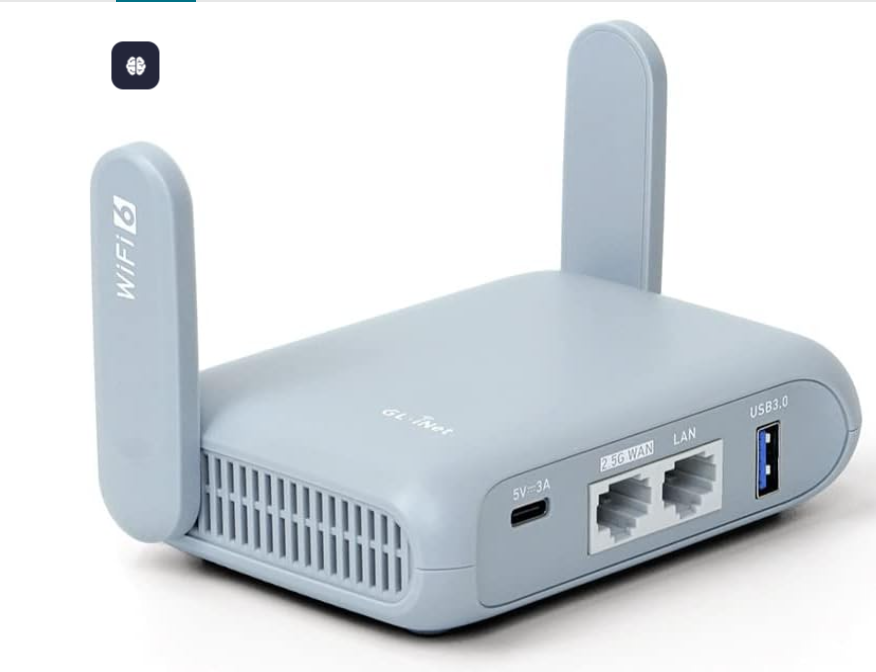
The GL.iNet GL-MT3000, also known as the Beryl AX router, is a compact Wi-Fi 6 (802.11ax) travel router built for exactly these situations. Powered by the MediaTek MT7981 chipset and running OpenWrt firmware, it combines fast wireless performance with advanced networking features like WireGuard VPN, OpenVPN support, USB tethering, and multiple operating modes. Whether you’re staying in a hotel, working from an Airbnb, or traveling in an RV, it allows all of your devices to connect through one private network.
In this guide, you’ll learn how to set up the GL.iNet travel router, configure its internet connection, enable VPN protection, and take advantage of the features that make it one of the best Wi-Fi 6 travel routers available today. You’ll also find practical tips, troubleshooting advice, and buying guidance to help you decide whether it’s the right fit for your needs.
How Do You Use GL.iNet GL-MT3000?
Quick Answer
Setting up the GL-MT3000 Beryl AX takes only a few minutes. Power on the router with a USB-C adapter or compatible power bank, connect your phone or laptop to its Wi-Fi network, and open the GL.iNet admin panel in your browser. From there, use the setup wizard to connect to hotel WiFi, Ethernet, or USB tethering. If you want additional privacy, configure WireGuard VPN or OpenVPN, then connect all your devices to the router’s secure network.
Prerequisites
Before starting the setup process, gather the following:
- GL.iNet GL-MT3000 router
- USB-C power adapter or compatible power bank
- Laptop, smartphone, or tablet
- Internet source (hotel WiFi, Ethernet, or mobile hotspot)
- VPN configuration file or login details (optional)
- Ethernet cable (if using a wired connection)
Taking a few minutes to prepare everything beforehand makes the setup process much smoother.
Why Choose the GL.iNet GL-MT3000?-MT3000?
Unlike a standard home router, the Beryl AX Wi-Fi 6 router is designed for mobility. It creates a secure wireless network almost anywhere while remaining small enough to fit inside a backpack or laptop bag.
Instead of reconnecting every device whenever you change locations, you only need to configure the router once. Your laptop, phone, tablet, or streaming device can then connect automatically through your own private network.
Who Is It Best For?
This router is a practical choice for:
- Frequent travelers
- Remote workers
- Digital nomads
- Business professionals
- RV and camping enthusiasts
- Airbnb guests
- Anyone using public WiFi regularly
It’s especially useful if you often work with sensitive information or simply want a safer alternative to unsecured public networks.
Create a Workflow Manually (Recommended for Beginners)
If you’re new to travel routers, setting up your first GL.iNet GL-MT3000 is the best way to understand how the platform actually works. The initial configuration is beginner-friendly and typically takes less than 10 minutes.
Step 1: Power On the Router
Connect the router to a USB-C power source using either the included adapter or a compatible power bank.
The router doesn’t contain a built-in battery, so it must remain connected to an external power source during use. A power bank is particularly useful when working in airports, trains, or other places where electrical outlets may not be available.
Wait until the LED indicators stop flashing before moving to the next step.
Tip: If you’re preparing for a trip, power on the router at home first and install any available firmware updates before you leave. This helps avoid setup delays and ensures you have the latest security improvements.
Step 2: Connect Your Device
Once the router has started, connect your laptop, phone, or tablet using one of these methods:
- Wi-Fi
- Gigabit Ethernet
The default wireless network name and password are printed on the label attached to the router.
After connecting, your device is ready for the initial configuration.
Step 3: Access the GL.iNet Admin Panel
Open your preferred web browser and enter the router’s default administration address.
During the first login, you’ll be asked to:
- Create an administrator password
- Select your language
- Complete the initial setup wizard
The GL.iNet admin panel is well organized, making it easy to configure networking features without needing advanced technical knowledge. Most settings can be adjusted through the graphical interface, while experienced users can access additional OpenWrt options if needed.
Step 4: Configure Your Internet Connection
The next step is connecting the router to an internet source.
The GL-MT3000 supports several connection methods:
- Hotel WiFi
- Ethernet WAN
- USB tethering from a smartphone
- Existing wireless networks using Repeater Mode
If you’re staying at a hotel, connect the router to the hotel’s wireless network and complete any required captive portal login. Once the connection is established, every device connected to your router can share that internet connection without repeating the login process individually.
This approach is particularly convenient if you travel with multiple devices, such as a laptop, smartphone, tablet, smartwatch, or streaming stick.
Step 5: Configure a VPN for Secure Browsing
One of the main reasons travelers choose the GL.iNet GL-MT3000 is its built-in VPN support. When you’re connected to hotel, airport, or café WiFi, a VPN encrypts your internet traffic, adding an extra layer of privacy on public networks.
The router supports both WireGuard VPN and OpenVPN, allowing every connected device to use the same secure connection without installing VPN software individually.
How to Set Up a VPN
- Log in to the GL.iNet admin panel.
- Open the VPN section.
- Choose WireGuard or OpenVPN.
- Import your VPN configuration file or enter your account details.
- Save the settings and activate the connection.
If your VPN provider supports both protocols, WireGuard is generally the better option because it typically delivers faster speeds and lower latency. However, actual performance depends on your VPN service and internet connection.
Tip: Test your VPN connection before traveling to confirm everything is working correctly.
Step 6: Select the Right Operating Mode
The Beryl AX router supports several networking modes, making it easy to adapt to different environments.
Router Mode
Creates a private WiFi network from a wired internet connection. This mode works well in hotels, apartments, or temporary offices with Ethernet access.
Repeater Mode
Connects to an existing wireless network and shares that connection with all of your devices. It’s one of the most useful options when using hotel WiFi because you only need to complete the login process once through the router.
Access Point Mode
Extends an existing wired network by creating a new wireless access point. This is useful in meeting rooms, vacation rentals, or locations where WiFi coverage is limited.
Choosing the appropriate mode helps you get the best performance while keeping setup simple.
Step 7: Personalize Your Network
After your internet connection is active, you can customize the router to match your preferences.
Useful options include:
- Creating a Guest Network for visitors
- Adjusting Firewall Settings
- Monitoring connected devices through the Device Management Dashboard
- Tracking network activity with Bandwidth Monitoring
- Setting Parental Controls
- Enabling AdGuard Home for network-wide ad blocking
These tools improve both security and network management without requiring advanced networking knowledge.
Thinking about buying the GL.iNet GL-MT3000?
Compare the latest prices, warranty options, and available bundles before purchasing to find the best value for your budget.
How Can You Get More from GL.iNet GL-MT3000?
Tips
The GL.iNet travel router is designed for more than vacations. Its combination of Wi-Fi 6 performance, VPN support, and flexible networking modes makes it suitable for a variety of situations.
It’s a grate fit for:
- Connecting multiple devices in hotels
- Creating a secure network in an Airbnb
- Working remotely from shared spaces
- Internet access during RV or camping trips
- Streaming movies while traveling
- Protecting personal data on public WiFi
- Sharing a mobile hotspot through USB tethering
Rather than reconnecting each device every time you change locations, the router creates a single private network that travels with you.
If secure, reliable internet is important while you’re away from home, compare current GL.iNet GL-MT3000 prices, warranty options, and available bundles before making your purchase. This helps you choose the package that best matches your travel needs.
How Can You Avoid Common GL.iNet GL-MT3000 Errors?
Common Mistakes
Although the GL.iNet GL-MT3000 (Beryl AX) is designed to be simple to configure, some users may run into connection or setup issues. Most problems can be fixed with a few basic checks.
Problem: Hotel WiFi is not connecting
Solution
Use Repeater Mode, connect to the hotel network, and complete the captive portal login if required.
Problem: VPN connection fails
Solution
Check your VPN credentials, configuration file, and confirm that your VPN service supports the selected protocol.
Problem: Internet speed feels slow
Solution
Test both 2.4GHz and 5GHz bands, move closer to the router, and check your original internet speed.
Problem: Cannot open the admin panel
Solution
Confirm your device is connected to the router network and restart the router if necessary.
Problem: USB tethering does not work
Solution
Enable mobile hotspot or USB tethering settings on your phone and reconnect the cable.
Problem: Connected devices cannot access the internet
Solution
Check the router’s internet status page and confirm the WAN connection is active.
If a problem continues, a firmware update or network reset may help restore normal operation.
How Can You Get Best Performance from GL.iNet GL-MT3000?
Best Practices
Following a few simple practices can improve reliability and security when using the Beryl AX Wi-Fi 6 router.
Keep Firmware Updated
Check for available firmware updates regularly. Updates can improve stability, fix bugs, and add compatibility improvements.
Use WireGuard When Available
For VPN users, WireGuard is often preferred because of its lightweight design and efficient performance. However, your VPN provider and connection quality will still affect results.
Secure Your Router
Always:
- Change the default administrator password.
- Use a strong WiFi password.
- Avoid sharing your private network details publicly.
- Review connected devices regularly.
Choose the Right WiFi Band
Use:
- 5GHz for activities that need higher speed, such as video calls and streaming.
- 2.4GHz when you need better range or improved signal through walls.
Prepare Before Traveling
Before leaving home:
- Test the router.
- Update firmware.
- Save VPN settings.
- Confirm your charging setup works.
A quick test before your trip can prevent connectivity problems later.
Who Should Buy the GL.iNet GL-MT3000?
The GL.iNet GL-MT3000 Beryl AX is a strong choice if you regularly need a private, portable internet connection.
It Is Best For:
Frequent Travelers
People who often use hotel, airport, or public WiFi.
Remote Workers
Professionals who need a reliable connection while working away from home.
Digital Nomads
Users who move between locations and need consistent networking.
Privacy-Focused Users
Anyone who wants VPN protection across multiple devices.
RV and Camping Users
Travelers who need a compact networking solution on the road.
Who Should Skip It?
This router may not be the right choice if:
- You need whole-home WiFi coverage.
- You want a router with a built-in battery.
- You need a permanent replacement for a home router.
- You prefer a completely plug-and-play device with no advanced settings.
Understanding your usage needs will help you decide whether the Beryl AX is the right fit.
Is the GL.iNet GL-MT3000 Worth Buying?
The GL.iNet GL-MT3000 offers a strong combination of portability, performance, and flexibility. Its Wi-Fi 6, VPN support, OpenWrt firmware, and multiple connection options make it especially useful for travelers and remote professionals.
Pros:
- Compact and travel-friendly design
- Wi-Fi 6 performance
- WireGuard and OpenVPN support
- OpenWrt customization
- USB tethering support
- Gigabit Ethernet connectivity
- Power bank compatibility
- User-friendly management interface
Cons:
- Requires external power
- Advanced settings may take time for beginners to learn
- Not designed as a replacement for a full home router
Frequently Asked Questions
Is GL.iNet Beryl AX good for VPN?
Yes. The Beryl AX supports WireGuard VPN and OpenVPN, allowing users to secure their connection across multiple devices through one router.
How do I set up GL-MT3000 for hotel WiFi?
Connect the router to the hotel network using Repeater Mode, complete any required login page, and then connect your devices to the router’s private WiFi network.
Can GL-MT3000 run WireGuard VPN?
Yes. WireGuard is built into the router’s VPN features and can be configured through the GL.iNet interface.
Does GL-MT3000 support OpenWrt?
Yes. The router uses OpenWrt firmware, providing additional customization options for advanced users.
Can I use GL-MT3000 with a power bank?
Yes. The router uses USB-C power and can work with compatible power banks.
What’s the difference between GL-MT3000 and Slate AX?
The GL-MT3000 focuses on portability, while the Slate AX offers a larger design aimed at users who need more coverage.
Conclusion
The GL.iNet GL-MT3000 (Beryl AX) is a practical choice for travelers who want more control, security, and flexibility than a typical portable router provides.
With Wi-Fi 6 performance, built-in VPN support, OpenWrt flexibility, and a compact design, it works well for hotel stays, remote work, Airbnb trips, and mobile lifestyles.
It may not replace a powerful home router, but for creating a secure personal network while traveling, it offers a well-balanced combination of features and convenience.
Ready to improve your network setup?
Before buying, compare current pricing, available bundles, and warranty options to make sure the GL-MT3000 matches your specific travel and connectivity needs.