How to Use a Matter Protocol Smart Home Hub: A Complete Beginner’s Step-by-Step Guide
Learn how to set up and use a Matter Protocol Smart Home Hub to connect, manage, and automate compatible smart devices with this complete beginner-friendly step-by-step guide.
By TechScaleMedia Editorial · Updated July 2026 · 11 min read
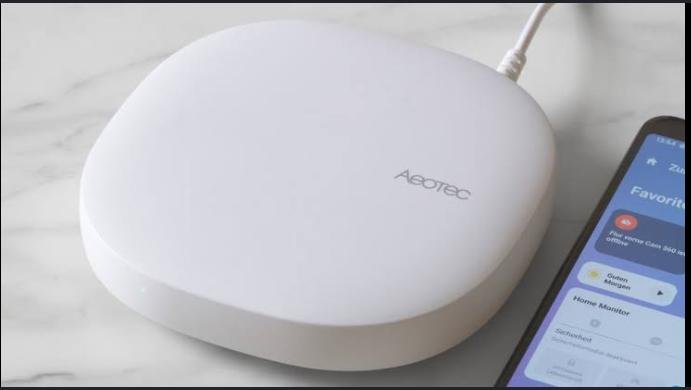
A Matter Protocol Smart Home Hub serves as the central controller for compatible smart home devices, allowing products from different manufacturers to communicate seamlessly. Instead of managing multiple apps for smart lights, locks, plugs, thermostats, and sensors, a Matter-compatible hub creates a unified ecosystem that simplifies setup, automation, and everyday control. Whether you’re building your first smart home or expanding an existing one, a Matter hub helps improve compatibility, reliability, and local device communication.
Although Matter simplifies smart home connectivity, many beginners struggle with pairing devices, connecting the hub to their home network, organizing rooms, or creating automations. Understanding the proper setup process helps you build a stable, secure, and easy-to-manage smart home.
This guide explains how to use a Matter Protocol Smart Home Hub, from connecting the hub and adding smart devices to troubleshooting common issues and following best practices for reliable smart home automation.
Ready to bring all your smart devices together? Follow this step-by-step guide to set up your Matter Protocol Smart Home Hub and create a smarter, more connected home.
How do you use a Matter Protocol Smart Home Hub?
Quick Answer
Using a Matter Protocol Smart Home Hub is simple:
- Connect the hub to power.
- Connect it to your home network.
- Install the companion app.
- Add the Matter hub to your account.
- Pair compatible Matter devices.
- Organize devices into rooms.
- Create automations and routines.
- Control your smart home from one place.
Prerequisites
Before you begin, make sure you have:
- Matter Protocol Smart Home Hub
- Stable Wi-Fi or Ethernet connection
- Smartphone or tablet
- Companion smart home app
- Matter-compatible smart devices
- User account for the smart home platform
Step-by-Step Instructions
Follow these simple steps to set up your Matter Protocol Smart Home Hub, connect compatible devices, and start managing your smart home with ease.
Step 1: Connect the Smart Hub to Power
Place the Matter hub in a central location within your home.
Connect it to a power outlet using the supplied adapter.
Wait until the status light indicates the hub is ready.
Step 2: Connect the Hub to Your Home Network
Depending on your hub, connect using:
- Wi-Fi
- Ethernet cable
Allow the hub to complete the network connection before continuing.
Step 3: Install the Companion App
Download the manufacturer’s smart home app on your smartphone or tablet.
Sign in or create an account if required.
Step 4: Add the Hub
Open the app and select Add New Device.
Follow the on-screen instructions to detect and register the Matter hub.
Wait until setup completes successfully.
Step 5: Pair Your Matter Devices
Turn on each Matter-compatible device.
Use the app to scan the Matter QR code or enter the setup code.
Repeat this process for:
- Smart bulbs
- Smart plugs
- Door locks
- Thermostats
- Sensors
- Smart switches
Step 6: Organize Devices
Assign every device to a room such as:
- Living Room
- Bedroom
- Kitchen
- Garage
- Office
Organizing devices makes voice control and automation much easier.
Step 7: Create Automations
Set up routines such as:
- Turn lights on at sunset.
- Lock doors at bedtime.
- Turn off unused devices.
- Adjust the thermostat automatically.
- Activate a “Good Morning” scene.
Test each automation to ensure everything works correctly.
What Tips Help You Build a More Reliable Smart Home?
Tips
Following these tips helps improve performance and simplify smart home management.
Place the Hub Near the Center of Your Home
A central location improves communication with connected devices.
Name Devices Clearly
Use names like:
- Kitchen Light
- Front Door Lock
- Bedroom Lamp
This makes voice commands easier.
Group Similar Devices
Organize devices into rooms or categories for faster control.
Keep Your Wi-Fi Stable
A reliable internet connection helps maintain consistent performance.
Update Device Firmware
Install updates whenever available to improve compatibility and security.
Test Automations Regularly
Run your routines occasionally to ensure everything operates correctly.
Add Devices Gradually
Connect a few devices at a time to simplify setup and troubleshooting.
What Common Mistakes Should You Avoid?
Common Mistakes
Placing the Hub Too Far Away
Poor placement can reduce communication with nearby devices.
Mixing Unsupported Devices
Verify every device supports Matter before attempting setup.
Skipping Firmware Updates
Outdated software may cause pairing or automation problems.
Using Weak Wi-Fi
An unstable network can interrupt smart home communication.
Giving Devices Confusing Names
Simple names make automation and voice control much easier.
Adding Too Many Devices at Once
Set up devices gradually to identify problems more easily.
Ignoring App Notifications
Many updates include important security improvements.
How Can You Troubleshoot Common Matter Smart Hub Problems?
Troubleshooting
Problem: Hub Won’t Connect to Wi-Fi
Solution
- Restart the router.
- Move the hub closer.
- Re-enter the Wi-Fi password.
Problem: Device Won’t Pair
Solution
- Reset the smart device.
- Verify Matter compatibility.
- Scan the setup QR code again.
Problem: Automation Doesn’t Run
Solution
- Review automation settings.
- Confirm devices remain online.
- Restart the hub if necessary.
Problem: Devices Appear Offline
Solution
- Check power connections.
- Verify Wi-Fi stability.
- Refresh the smart home app.
Problem: Voice Commands Don’t Work
Solution
- Confirm account linking.
- Check device names.
- Sync the smart home platform again.
Problem: Hub Doesn’t Respond
Solution
- Restart the hub.
- Install firmware updates.
- Check the power connection.
What Are the Best Practices for Long-Term Performance?
Best Practices
Keep Firmware Updated
Regular updates improve stability, compatibility, and security.
Back Up Your Smart Home Configuration
If supported, save your automation settings.
Review Connected Devices Regularly
Remove devices you no longer use.
Protect Your Smart Home Account
Enable two-factor authentication whenever available.
Restart the Hub Occasionally
Periodic restarts can improve long-term performance.
Keep the Hub in an Open Area
Avoid placing it inside cabinets or behind large electronics.
Monitor Your Smart Home Network
Regularly check that connected devices remain online and responsive.
Frequently Asked Questions
What is a Matter Protocol Smart Home Hub?
It is a central controller that connects and manages Matter-compatible smart home devices from multiple brands.
Do I need the internet to use a Matter hub?
Many Matter functions operate locally, but internet access may be required for remote control and software updates.
Can I connect devices from different manufacturers?
Yes. One of Matter’s biggest advantages is cross-brand compatibility.
Why won’t my smart device pair?
Ensure it supports Matter, reset the device, and follow the pairing instructions again.
Can I control my home with voice assistants?
Yes. Many Matter hubs work with popular voice assistants when properly configured.
Is Matter more secure than older smart home systems?
Matter includes modern security standards designed to improve device protection and communication.
How many devices can I connect?
The number depends on your hub model and manufacturer specifications.
Conclusion
A Matter Protocol Smart Home Hub makes it easier than ever to manage compatible smart devices from different brands through one centralized platform. By properly setting up your hub, organizing your devices, and creating useful automations, you can build a smart home that’s efficient, convenient, and easy to control.
Routine firmware updates, thoughtful device organization, and maintaining a reliable home network will help ensure smooth performance as your smart home grows. Whether you’re automating lighting, security, or everyday routines, a Matter hub provides the foundation for a connected home experience.
Build a Smarter Home—One Device at a Time
Your Matter Protocol Smart Home Hub is more than just a controller—it’s the foundation of a connected lifestyle. Start by adding your essential smart devices, create routines that fit your daily schedule, and gradually expand your smart home with confidence as your needs evolve.