How to Use a 3-in-1 Charging Station: A Complete Beginner’s Step-by-Step Guide
Learn how to use a 3-in-1 charging station with this beginner-friendly step-by-step guide to charge your phone, smartwatch, and wireless earbuds safely and efficiently.
By TechScaleMedia Editorial · Updated July 2026 · 11 min read
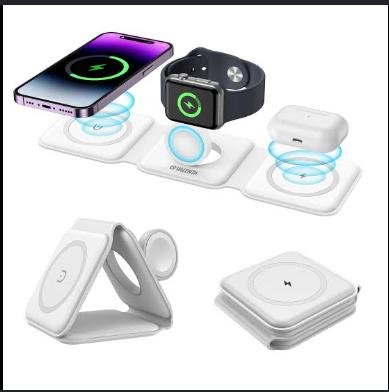
A 3-in-1 Charging Station is the perfect charging solution for users who own multiple wireless devices, especially those within the Apple or Samsung ecosystem. Instead of managing separate chargers and tangled cables, a 3-in-1 charging station lets you charge your smartphone, smartwatch, and wireless earbuds simultaneously from a single, organized charging dock. Its compact design makes it ideal for bedside tables, office desks, and travel setups while reducing cable clutter.
Although setting up a 3-in-1 charging station is relatively simple, many users encounter problems such as incorrect device placement, slow wireless charging, incompatible adapters, or charging interruptions. Learning the correct setup process helps ensure efficient charging, protects your devices, and creates a cleaner, more organized workspace.
This guide explains how to use a 3-in-1 Charging Station, from assembling the charger and positioning your devices correctly to troubleshooting common issues and following best practices for everyday use.
Looking for a cleaner way to charge all your devices? Follow this guide to organize your charging routine and enjoy the convenience of powering multiple devices from one charging station.
How do you use a 3-in-1 Charging Station?
Quick Answer
Using a 3-in-1 Charging Station is easy:
- Connect the charging station to power.
- Place it on a stable surface.
- Connect the recommended power adapter.
- Position your smartphone on the wireless charging pad.
- Place your smartwatch on its charging module.
- Set your earbuds on the charging area.
- Confirm all three devices are charging.
- Remove your devices when charging is complete.
Prerequisites
Before you begin, make sure you have:
- 3-in-1 Charging Station
- Compatible power adapter
- USB-C charging cable (if required)
- Wireless charging-compatible smartphone
- Compatible smartwatch
- Wireless charging earbuds
- Flat, stable surface
Step-by-Step Instructions
Follow these simple steps to set up and use your 3-in-1 charging station to charge your phone, smartwatch, and wireless earbuds safely and efficiently.
Step 1: Choose the Right Location
Place the charging station on a flat, stable surface such as:
- Bedside table
- Office desk
- Study table
- Nightstand
Keep it close to a wall outlet for convenient cable management.
Step 2: Connect the Charging Station to Power
Connect the supplied USB-C cable to the charging station.
Plug the recommended power adapter into a wall outlet.
Using the correct adapter ensures all charging zones receive sufficient power.
Step 3: Position Your Smartphone
Place your smartphone on the wireless charging pad.
Ensure the charging coil aligns properly with the station.
If your station supports magnetic alignment, allow the magnets to position the phone automatically.
Step 4: Place Your Smartwatch on the Charging Module
Attach your smartwatch to the designated charging puck.
The watch should snap securely into place if magnetic charging is supported.
Wait for the charging indicator to appear.
Step 5: Charge Your Wireless Earbuds
Place the earbuds case on the dedicated wireless charging area.
Check that the charging LED activates.
Adjust the position if charging doesn’t begin immediately.
Step 6: Verify All Devices Are Charging
Confirm:
- Smartphone charging icon
- Smartwatch charging indicator
- Earbuds charging LED
If one device isn’t charging, reposition it slightly.
Step 7: Remove Devices After Charging
Once fully charged:
- Remove each device carefully.
- Disconnect the charging station if it won’t be used for an extended period.
- Keep the charging surface clean for future use.
What Tips Help You Keep Your Charging Station Organized and Efficient?
Tips
Following these tips helps improve charging performance and keep your workspace clutter-free.
Use the Recommended Power Adapter
A higher-wattage adapter ensures stable power delivery to all three charging zones.
Align Devices Carefully
Correct placement improves charging efficiency and reduces interruptions.
Keep Your Nightstand Organized
Position the charging station near your bedside to charge all devices overnight.
Remove Metal Accessories
Magnetic plates, wallets, or metal phone rings may interfere with wireless charging.
Clean the Charging Surface Frequently
Dust and fingerprints can affect charging performance.
Keep Charging Cables Hidden
Use cable clips or organizers to create a cleaner workspace.
Charge All Devices Together Before Bed
Developing a nightly charging routine ensures every device is ready the next morning.
What Common Mistakes Should You Avoid?
Common Mistakes
Using an Underpowered Adapter
A low-wattage adapter may prevent simultaneous charging.
Misaligning the Smartphone
Incorrect positioning may stop wireless charging.
Leaving Thick Cases on Devices
Bulky or metal cases can reduce charging efficiency.
Placing Objects on the Charging Surface
Coins, keys, or other metal items may interfere with charging.
Ignoring Heat Build-Up
Allow adequate airflow around the charging station.
Pulling the Cable Repeatedly
Avoid placing stress on the USB-C connector.
Charging on Unstable Surfaces
Use a level surface to keep devices securely positioned.
How Can You Troubleshoot Common 3-in-1 Charging Station Problems?
Troubleshooting
Problem: Smartphone Isn’t Charging
Solution
- Reposition the phone.
- Remove thick cases.
- Verify wireless charging compatibility.
Problem: Smartwatch Doesn’t Charge
Solution
- Align the watch correctly.
- Clean the charging contacts.
- Confirm compatibility.
Problem: Earbuds Won’t Charge
Solution
- Reposition the charging case.
- Check the charging indicator.
- Remove protective covers if necessary.
Problem: Only One Device Charges
Solution
- Use the recommended power adapter.
- Disconnect and reconnect the charging station.
- Verify all devices support wireless charging.
Problem: Charging Is Slow
Solution
- Remove unnecessary accessories.
- Improve device alignment.
- Use the original charging adapter.
Problem: Charging Stops Unexpectedly
Solution
- Inspect the power cable.
- Restart the charging station.
- Reposition the affected device.
What Are the Best Practices for Long-Term Performance?
Best Practices
Clean the Charging Station Weekly
Remove dust using a soft microfiber cloth.
Use Original Power Accessories
Manufacturer-recommended adapters provide optimal charging performance.
Avoid Excessive Heat
Keep the charging station away from direct sunlight and heaters.
Keep Liquids Away
Prevent water or beverages from reaching the charging surface.
Inspect Cables Regularly
Replace worn charging cables before they fail.
Keep Firmware Updated (If Supported)
Some smart charging stations receive firmware updates through companion apps.
Store Carefully During Travel
Pack the charging station inside a protective electronics case to prevent scratches and impact damage.
Frequently Asked Questions
Can I charge three devices simultaneously?
Yes. A 3-in-1 Charging Station is specifically designed to charge your smartphone, smartwatch, and wireless earbuds at the same time.
Does my phone need wireless charging support?
Yes. Your smartphone must support Qi wireless charging or MagSafe-compatible charging.
Why isn’t my smartwatch charging?
Check the alignment and confirm your watch model is compatible with the charging station.
Can I leave my devices on the charging station overnight?
Yes. Most quality charging stations include built-in safety features that help prevent overcharging.
Will a phone case affect wireless charging?
Thin cases usually work well, while thick or metal cases may interfere with charging.
Can I travel with a 3-in-1 Charging Station?
Yes. Many models are compact enough for business trips and vacations.
Is it safe to charge all three devices every day?
Yes. Using a high-quality charging station and recommended power adapter makes daily charging safe for compatible devices.
Conclusion
A 3-in-1 Charging Station is an excellent way to simplify your daily charging routine by powering your smartphone, smartwatch, and wireless earbuds from a single location. By positioning your devices correctly, using the recommended power adapter, and maintaining a clean charging surface, you can enjoy reliable wireless charging while keeping your desk or bedside table organized.
Regular maintenance, proper device alignment, and following the best practices in this guide will help ensure dependable performance for years. Whether you’re working, traveling, or winding down for the night, a 3-in-1 Charging Station keeps your essential devices fully charged and always within reach.
Simplify Your Daily Charging Routine
Transform the way you charge your devices with a 3-in-1 Charging Station. Create a clutter-free setup, power all your essential gadgets in one place, and enjoy the convenience of starting every day with your phone, smartwatch, and earbuds fully charged and ready to go.