How to Use a GaN 100W+ USB-C Charger (Foldable Prongs): A Complete Beginner’s Step-by-Step Guide
Learn how to use a 100W+ GaN USB-C charger with foldable prongs safely and efficiently, from choosing the right cable to fast-charging your laptops, tablets, and smartphones.
By TechScaleMedia Editorial · Updated July 2026 · 11 min read
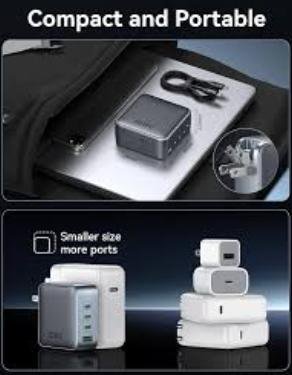
A GaN 100W+ USB-C Charger with Foldable Prongs is a compact yet powerful charging solution designed for professionals, students, travelers, and remote workers who need fast charging without carrying bulky adapters. Powered by Gallium Nitride (GaN) technology, these chargers deliver high-speed charging for laptops, tablets, smartphones, gaming handhelds, and other USB-C devices while generating less heat than traditional chargers. The foldable prongs make them even more portable, allowing them to fit easily into backpacks, laptop sleeves, and travel organizers.
While using a GaN charger is straightforward, many users don’t know how to optimize charging speeds, choose the correct USB-C port, safely travel with the charger, or ensure compatibility with high-powered devices. Understanding these basics helps protect your electronics and ensures reliable charging wherever you go.
This guide explains how to use a GaN 100W+ USB-C Charger (Foldable Prongs), from setting it up and charging multiple devices to maximizing travel convenience, troubleshooting common problems, and maintaining the charger for years of dependable performance.
Ready to simplify your travel charging setup? Follow this step-by-step guide to get the most from your GaN 100W+ USB-C Charger.
How do you use a GaN 100W+ USB-C Charger with Foldable Prongs?
Quick Answer
Using a GaN 100W+ USB-C Charger is easy:
- Unfold the charging prongs.
- Plug the charger into a wall outlet.
- Connect a compatible USB-C charging cable.
- Attach your laptop, smartphone, or other device.
- Confirm fast charging is active.
- Disconnect the charger safely after use.
- Fold the prongs before storing it.
Prerequisites
Before you begin, make sure you have:
- GaN 100W+ USB-C Charger with foldable prongs
- Certified USB-C charging cable
- Compatible laptop, smartphone, tablet, or gaming device
- Wall outlet
- Travel pouch or electronics organizer (recommended)
Step-by-Step Instructions
Follow these simple steps to safely set up, connect, and use your GaN 100W+ USB-C charger with compatible devices for fast and efficient charging.
Step 1: Unfold the Charging Prongs
Carefully unfold the built-in power prongs until they lock into position.
Inspect them for dust or damage before plugging the charger into a power outlet.
Step 2: Plug the Charger into a Wall Outlet
Insert the charger directly into a properly grounded wall outlet.
Avoid plugging it into loose sockets or overloaded extension boards whenever possible.
Step 3: Connect the Appropriate Charging Cable
Choose a USB-C cable that supports your device’s charging requirements.
For best results:
- Use USB-C Power Delivery (PD) cables.
- Select cables rated for 100W or higher when charging laptops.
Step 4: Connect Your Device
Attach the charging cable to your device.
Compatible devices include:
- Laptops
- Smartphones
- Tablets
- Portable gaming consoles
- Wireless headphones
- Power banks
Your device should begin charging automatically.
Step 5: Verify Fast Charging
Check your device for:
- Fast charging notification
- Charging icon
- Battery percentage increasing
- Power indicator (if available)
If fast charging doesn’t activate, verify cable compatibility.
Step 6: Use It While Traveling
The compact design makes the charger ideal for:
- Hotels
- Airports
- Coffee shops
- Offices
- University campuses
Keep the charger connected to stable power sources for consistent performance.
Step 7: Fold and Store the Charger
After charging:
- Disconnect the charging cable.
- Remove the charger from the outlet.
- Fold the prongs inward.
- Store the charger inside a travel pouch or laptop bag.
This protects both the charger and nearby electronics during transport.
What Tips Help You Travel Safely with a GaN 100W+ USB-C Charger?
Tips
Following these tips helps improve convenience and charging efficiency.
Fold the Prongs Before Packing
Foldable prongs reduce the risk of scratching laptops, tablets, or other accessories inside your bag.
Carry One High-Quality USB-C Cable
A certified USB-C cable capable of high-wattage charging can replace multiple chargers while traveling.
Use the Charger for Multiple Devices
Instead of carrying separate adapters, use one charger for your laptop, smartphone, earbuds, and tablet.
Keep the Charger Easily Accessible
Store it in the front compartment of your backpack or travel organizer for quick access at airports or cafés.
Check Power Compatibility Before International Travel
Most GaN chargers support worldwide voltage, but you may still need a travel plug adapter.
Avoid Tight Cable Bends
Loosely coil charging cables to prevent damage during transport.
Keep the Charger Dry
Store the charger away from liquids and excessive humidity while traveling.
What Common Mistakes Should You Avoid?
Common Mistakes
Packing the Charger with Unfolded Prongs
Exposed prongs may damage other electronics inside your travel bag.
Using Low-Quality Charging Cables
Poor-quality cables may prevent fast charging or overheat during use.
Plugging into Loose Wall Outlets
Loose outlets may interrupt charging or damage the charger over time.
Wrapping Cables Too Tightly
Tightly wound cables can weaken internal wiring.
Leaving the Charger Connected Unnecessarily
Disconnect the charger after use to conserve energy.
Ignoring Device Power Requirements
Some laptops require high-power USB-C cables to achieve maximum charging speed.
Dropping the Charger Frequently
Although durable, repeated impacts may damage internal components.
How Can You Troubleshoot Common GaN 100W+ USB-C Charger Problems?
Troubleshooting
Problem: Fast Charging Isn’t Working
Solution
- Verify your device supports fast charging.
- Use a certified USB-C PD cable.
- Reconnect the charger.
Problem: Charger Doesn’t Power On
Solution
- Test another wall outlet.
- Check for damaged prongs.
- Inspect the charging cable.
Problem: Laptop Charges Slowly
Solution
- Use a cable rated for 100W Power Delivery.
- Close unnecessary applications while charging.
- Confirm your laptop supports USB-C charging.
Problem: Charger Feels Warm
Solution
- Mild warmth is normal.
- Ensure proper airflow.
- Avoid covering the charger during use.
Problem: Charging Stops Randomly
Solution
- Check cable connections.
- Inspect the charging port for dust.
- Restart charging after reconnecting the cable.
Problem: USB-C Cable Doesn’t Fit Properly
Solution
- Inspect the connector for debris.
- Use another certified cable if necessary.
What Are the Best Practices for Long-Term Performance?
Best Practices
Store with Folded Prongs
Always fold the charging prongs before storing the charger.
Use Certified USB-C Accessories
Pair the charger with high-quality cables that support Power Delivery.
Clean the Charger Occasionally
Use a dry microfiber cloth to remove dust and fingerprints.
Protect It During Travel
Carry the charger inside a padded electronics organizer.
Avoid Extreme Temperatures
Do not leave the charger inside hot vehicles or freezing environments.
Inspect the Prongs Regularly
Check for bent or damaged prongs before plugging into an outlet.
Replace Damaged Cables Immediately
Using damaged charging cables can affect charging performance and safety.
Frequently Asked Questions
Can a 100W GaN charger charge a laptop?
Yes. Most USB-C laptops that support Power Delivery can be charged using a 100W GaN charger.
Why are foldable prongs useful?
Foldable prongs make the charger more compact and reduce the risk of damaging other items during travel.
Can I use this charger for my smartphone?
Yes. The charger automatically supplies the appropriate amount of power for compatible smartphones.
Is GaN technology better than traditional chargers?
Yes. GaN chargers are generally smaller, more energy-efficient, and generate less heat while delivering higher power output.
Can I travel internationally with this charger?
Yes. Most GaN chargers support worldwide voltage, although you may need a country-specific plug adapter.
Why is my device not fast charging?
Check that both your device and charging cable support fast charging and Power Delivery.
Is it safe to leave the charger plugged into the wall?
Although modern chargers include safety protections, unplugging the charger when not in use is recommended.
Conclusion
A GaN 100W+ USB-C Charger with Foldable Prongs combines powerful fast charging with exceptional portability, making it an excellent choice for travelers, students, and professionals. By using certified USB-C cables, understanding your device’s charging requirements, and storing the charger properly after use, you can enjoy reliable performance wherever you work or travel.
Regular cleaning, careful handling, proper cable management, and following the best practices in this guide will help keep your charger operating efficiently for years. Whether you’re charging a laptop during a business trip or powering multiple devices on vacation, a GaN 100W+ USB-C Charger offers a convenient all-in-one charging solution.
Travel Smarter with a GaN 100W+ USB-C Charger
Now that you know how to use your GaN 100W+ USB-C Charger (Foldable Prongs), you’re ready to enjoy fast, reliable charging at home, in the office, or on the go. Pack it safely, use high-quality USB-C accessories, and follow the tips in this guide to keep all your essential devices powered wherever your journey takes you.