How to Use a Pet Activity Tracker (GPS & Health): A Complete Beginner’s Step-by-Step Guide
Learn how to use a pet activity tracker with GPS and health monitoring to track your pet’s location, activity, sleep, and overall well-being with this beginner-friendly step-by-step guide.
By TechScaleMedia Editorial · Updated July 2026 · 11 min read
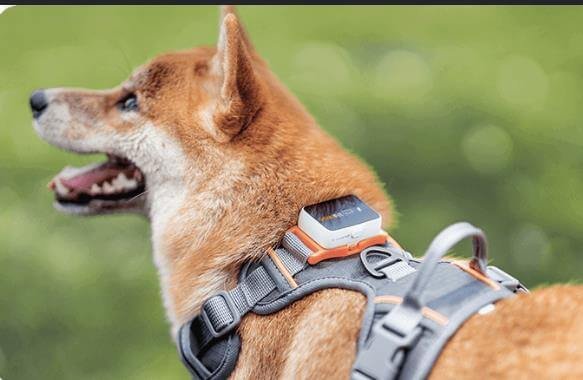
Keeping track of your pet’s location, exercise, and overall health is easier than ever with a Pet Activity Tracker (GPS & Health). These smart devices combine GPS technology with health-monitoring features to provide real-time location tracking, activity reports, sleep insights, and customizable safe zone alerts through a companion mobile app. Whether you have an adventurous dog, an outdoor cat, or a senior pet that needs closer monitoring, a GPS and health tracker offers added security and valuable wellness data. However, proper setup is essential to ensure accurate tracking and reliable performance. Charging the device, attaching it securely, pairing it with the mobile app, and configuring GPS and safe zones all help you get the most from your tracker. This beginner-friendly guide explains everything from installation and activation to troubleshooting, maintenance, and best practices, so you can confidently monitor your pet’s safety and daily activity wherever they go.
Want to keep your pet safe while monitoring their daily health and activity? Follow this step-by-step guide to set up your Pet Activity Tracker and stay connected wherever your pet goes.
How do you use a Pet Activity Tracker (GPS & Health)?
Quick Answer
Using a Pet Activity Tracker is simple:
- Charge the tracker.
- Attach it securely to your pet’s collar.
- Install the companion app.
- Pair the tracker with your smartphone.
- Activate GPS tracking.
- Create safe zones.
- Monitor your pet’s activity and location.
Prerequisites
Before you begin, make sure you have:
- Pet Activity Tracker (GPS & Health)
- Compatible pet collar or harness
- Smartphone or tablet
- Companion mobile app
- GPS or cellular subscription (if required)
- Wi-Fi or mobile internet connection
- USB charging cable
- User manual
Step-by-Step Instructions
Follow these simple steps to set up your pet activity tracker, connect GPS and health monitoring features, and start tracking your pet’s location, activity, and well-being with confidence.
Step 1: Charge the Tracker
Connect the tracker using the supplied charging cable.
Charge it until the battery reaches full capacity.
Disconnect the charger before attaching the device.
Step 2: Attach the Tracker to the Collar
Secure the tracker firmly to your pet’s collar or harness.
Ensure it:
- Fits tightly
- Doesn’t swing excessively
- Doesn’t cause discomfort
Confirm the tracker remains securely attached during movement.
Step 3: Download the Mobile App
Install the manufacturer’s companion app.
Create an account.
Grant permissions for:
- GPS
- Bluetooth
- Notifications
- Location services
Step 4: Pair the Tracker
Turn on the tracker.
Open the mobile app.
Tap Add Device.
Follow the pairing instructions until the tracker appears in your account.
Step 5: Activate GPS Tracking
Enable GPS or cellular tracking (depending on your device).
Wait until the tracker acquires a location signal.
Verify your pet’s location appears on the map.
Step 6: Create Safe Zones
Set up virtual boundaries such as:
- Home
- Backyard
- Dog park
- Family member’s house
Enable notifications when your pet enters or leaves these areas.
Step 7: Monitor Health and Activity
Use the app to review:
- Daily steps
- Exercise duration
- Calories burned (if supported)
- Sleep patterns
- GPS location history
- Activity trends
Adjust your pet’s exercise routine if necessary.
What Tips Help Improve Tracking Accuracy?
Tips
Following these tips help your tracker perform more reliably.
Charge the Tracker Regularly
Maintain sufficient battery for uninterrupted tracking.
Ensure a Proper Collar Fit
A secure attachment improves GPS performance and comfort.
Enable Location Services
Keep GPS enabled on your smartphone for accurate updates.
Review Daily Activity Reports
Monitor exercise habits and identify changes in behavior.
Customize Safe Zone Alerts
Create multiple safe locations for greater flexibility.
Update the Companion App
Install updates to improve performance and security.
Test GPS Before Outdoor Walks
Verify the tracker updates your pet’s location correctly.
What Common Mistakes Should You Avoid?
Common Mistakes
Allowing the Battery to Fully Drain
Low battery can interrupt GPS tracking.
Attaching the Tracker Loosely
Loose installation may cause inaccurate readings or device loss.
Ignoring Software Updates
Updates often improve GPS accuracy and health monitoring.
Creating Safe Zones That Are Too Small
Very small boundaries may trigger unnecessary alerts.
Forgetting to Enable Notifications
Missed alerts reduce the effectiveness of location tracking.
Ignoring Activity Changes
Sudden decreases in activity may indicate health concerns.
Removing the Tracker Too Frequently
Continuous use provides more complete health and location data.
How Can You Troubleshoot Common Pet Activity Tracker Problems?
Troubleshooting
Problem: GPS Location Isn’t Updating
Solution
- Move outdoors for a stronger GPS signal.
- Restart the tracker.
- Check your internet connection.
Problem: Tracker Won’t Pair
Solution
- Restart Bluetooth.
- Recharge the tracker.
- Update the companion app.
Problem: Battery Drains Quickly
Solution
- Reduce GPS refresh frequency.
- Disable unnecessary features.
- Fully recharge the battery.
Problem: Safe Zone Alerts Don’t Work
Solution
- Verify notification settings.
- Adjust the boundary size.
- Confirm location permissions are enabled.
Problem: Activity Data Seems Incorrect
Solution
- Confirm the tracker is securely attached.
- Restart the device.
- Synchronize the tracker again.
Problem: Tracker Disconnects Frequently
Solution
- Keep the app updated.
- Check the cellular or Wi-Fi connection.
- Restart both the tracker and smartphone.
What Are the Best Practices for Long-Term Performance?
Best Practices
Recharge Before Long Walks
Start outdoor activities with a fully charged tracker.
Clean the Device Regularly
Remove dirt, fur, and moisture using a soft cloth.
Inspect the Collar Attachment
Ensure the tracker remains securely fastened.
Review Weekly Activity Reports
Monitor long-term health and exercise trends.
Keep Firmware Updated
Install updates as they become available.
Protect the Charging Port
Keep charging contacts dry and free from debris.
Test GPS Accuracy Periodically
Confirm the tracker continues reporting accurate locations.
Frequently Asked Questions
Can I track my pet in real time?
Yes. Most GPS pet trackers provide live location updates through the companion app.
Does the tracker monitor health?
Many models monitor activity, exercise, sleep, and other wellness indicators.
Does it require a subscription?
Some GPS trackers require a cellular subscription for live tracking features.
Can I create multiple safe zones?
Yes. Many companion apps allow multiple virtual boundaries.
Is the tracker waterproof?
Many models are water-resistant, but always follow the manufacturer’s specifications.
How long does the battery last?
Battery life varies depending on GPS update frequency and usage.
Can multiple family members monitor the same pet?
Many companion apps support shared access for multiple users.
Conclusion
A Pet Activity Tracker (GPS & Health) helps you stay connected to your pet by combining real-time location tracking with valuable activity and wellness insights. By setting up GPS correctly, creating safe zones, and reviewing activity reports regularly, you can better monitor your pet’s health and respond quickly if they wander away. Routine charging, software updates, and proper maintenance will keep your tracker performing reliably over time.
Ready to keep your pet safer and healthier? Set up your Pet Activity Tracker today, monitor their location and daily activity with confidence, and enjoy greater peace of mind wherever your adventures take you.
Stay Connected to Every Step Your Pet Takes
Your Pet Activity Tracker helps you protect your pet while learning more about their daily habits and overall well-being. Set up smart tracking, monitor activity with confidence, and enjoy greater peace of mind knowing your four-legged companion is never far from your reach.