How to Use Rechargeable LED Closet Lights: A Complete Beginner’s Step-by-Step Guide
Learn how to use rechargeable LED closet lights with this beginner-friendly step-by-step guide to install, charge, position, and maintain them for convenient, energy-efficient lighting in closets, cabinets, and other dark spaces.
By TechScaleMedia Editorial · Updated July 2026 · 11 min read
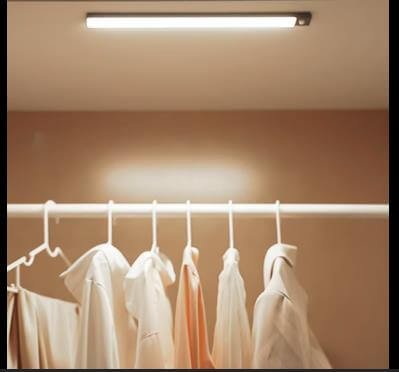
Dark closets, cabinets, and storage areas can make it difficult to find what you need, especially in spaces without built-in lighting. Rechargeable LED Closet Lights offer a simple, wire-free solution by providing bright, energy-efficient illumination exactly where it’s needed. With features such as rechargeable batteries, motion sensors, adjustable brightness, and magnetic mounting, these lights are easy to install and convenient to use throughout your home. However, proper setup is essential to ensure reliable performance, accurate motion detection, and longer battery life. Choosing the right installation location, mounting the light securely, and selecting the appropriate lighting mode can make a significant difference in everyday use. Whether you’re lighting a closet, pantry, wardrobe, staircase, or garage, this beginner-friendly guide explains everything you need to know—from charging and installation to troubleshooting, maintenance, and best practices—so you can enjoy dependable, hands-free lighting for years to come.
Want brighter storage spaces without complicated wiring? Follow this step-by-step guide to install your Rechargeable LED Closet Lights and enjoy convenient hands-free lighting throughout your home.
How do you use Rechargeable LED Closet Lights?
Quick Answer
Using Rechargeable LED Closet Lights is simple:
- Fully charge the light.
- Select a suitable installation location.
- Mount the magnetic strip or adhesive bracket.
- Attach the light fixture.
- Choose the desired lighting mode.
- Test the motion sensor.
- Recharge the battery when needed.
Prerequisites
Before you begin, make sure you have:
- Rechargeable LED Closet Light
- USB charging cable
- Adhesive mounting strip or magnetic bracket
- Clean mounting surface
- Dry cloth
- Measuring tape (optional)
- User manual
Step-by-Step Instructions
Follow these simple steps to install, charge, position, and use your rechargeable LED closet lights for bright, convenient, and energy-efficient lighting.
Step 1: Fully Charge the Light
Connect the light to its USB charging cable.
Charge until the battery indicator shows a full charge.
Disconnect the cable before installation.
Step 2: Select the Installation Location
Choose an area that needs additional lighting, such as:
- Closet
- Wardrobe
- Kitchen cabinet
- Pantry
- Hallway
- Staircase
- Garage shelf
Ensure the location allows the motion sensor to detect movement effectively.
Step 3: Clean the Mounting Surface
Wipe the installation area with a clean, dry cloth.
Remove dust and grease to help the adhesive bond securely.
Allow the surface to dry completely.
Step 4: Install the Mounting Bracket
Attach the supplied adhesive strip or magnetic base.
Press firmly for several seconds.
Allow the adhesive to set according to the manufacturer’s recommendations.
Step 5: Attach the LED Light
Place the light onto the magnetic bracket or mounting base.
Ensure it locks securely into position.
Confirm it can be removed easily for charging.
Step 6: Select the Lighting Mode
Choose the mode that suits your needs, such as:
- Motion Sensor Mode
- Always On Mode
- Night Detection Mode
- Off
Adjust brightness if your model supports multiple levels.
Step 7: Test the Light
Walk into the sensor’s detection range.
Verify that:
- The light turns on automatically.
- Brightness is sufficient.
- The motion sensor responds correctly.
Adjust the position if necessary.
What Tips Help Extend Battery Life and Improve Lighting?
Tips
Following these tips helps maximize performance.
Optimize Motion Sensor Coverage
Position the light where the motion sensor has a clear detection area.
Use Motion Sensor Mode
Automatic activation helps conserve battery power.
Recharge Before the Battery Is Empty
Regular charging helps maintain battery health.
Keep the Sensor Clean
Dust can reduce motion detection accuracy.
Install Multiple Lights for Larger Spaces
Several lights provide more even illumination.
Adjust Brightness When Possible
Lower brightness settings can extend battery life.
Remove the Light Carefully During Charging
Avoid pulling on the mounting bracket or adhesive.
What Common Mistakes Should You Avoid?
Common Mistakes
Installing on Dirty Surfaces
Dust and grease may weaken the adhesive.
Blocking the Motion Sensor
Objects placed in front of the sensor reduce detection performance.
Mounting Too High or Too Low
Improper placement limits lighting coverage.
Forgetting to Recharge the Battery
A depleted battery prevents automatic operation.
Using Indoor Lights Outdoors
Most closet lights are intended for indoor use only unless specified otherwise.
Leaving the Light in Always-On Mode
Continuous lighting drains the battery faster.
Ignoring Adhesive Curing Time
Allow the mounting strip to bond properly before attaching the light.
How Can You Troubleshoot Common Rechargeable LED Closet Light Problems?
Troubleshooting
Problem: Light Won’t Turn On
Solution
- Recharge the battery.
- Check the power switch.
- Verify the lighting mode.
Problem: Motion Sensor Doesn’t Respond
Solution
- Clean the sensor.
- Move within the sensor’s detection range.
- Check that Motion Mode is enabled.
Problem: Adhesive Mount Falls Off
Solution
- Clean the surface again.
- Apply a new adhesive strip.
- Install on a smooth, dry surface.
Problem: Light Flickers
Solution
- Recharge the battery.
- Clean the charging contacts.
- Restart the light.
Problem: Battery Doesn’t Last Long
Solution
- Reduce brightness.
- Use Motion Sensor Mode.
- Fully recharge before use.
Problem: Light Doesn’t Stay Attached
Solution
- Verify proper magnetic alignment.
- Replace worn adhesive if necessary.
- Check that the mounting bracket is secure.
What Are the Best Practices for Long-Term Performance?
Best Practices
Recharge the Battery Regularly
Avoid storing the light with a completely discharged battery.
Clean the Fixture Periodically
Wipe away dust using a soft microfiber cloth.
Inspect the Mounting Bracket
Replace damaged adhesive strips when needed.
Store Indoors
Protect the light from excessive moisture and extreme temperatures.
Test the Motion Sensor Monthly
Ensure reliable automatic operation.
Keep Charging Ports Clean
Remove dust before connecting the charging cable.
Follow the Manufacturer’s Charging Recommendations
Using the correct charging method helps extend battery lifespan.
Frequently Asked Questions
How long does the battery usually last?
Battery life depends on usage, brightness settings, and motion sensor activity.
Can I install the light without drilling?
Yes. Most rechargeable closet lights use adhesive or magnetic mounting systems.
Does the motion sensor work during the day?
Many models activate only in low-light conditions when Motion Mode is selected.
Can I remove the light for charging?
Yes. Magnetic mounting allows easy removal and reattachment.
Where should I install the light?
Closets, cabinets, hallways, staircases, pantries, garages, and wardrobes are common installation locations.
How often should I recharge it?
Recharge whenever the battery indicator shows low power or brightness begins to decrease.
Can I use multiple lights together?
Yes. Installing several lights provides better illumination for larger storage areas.
Conclusion
Rechargeable LED Closet Lights provide a quick and energy-efficient way to brighten closets, cabinets, stairways, and other dark spaces without the need for wiring. By charging the battery regularly, installing the light in the right location, and using motion sensor mode effectively, you can enjoy reliable illumination while maximizing battery life. Routine cleaning and proper maintenance will help keep your lights performing at their best over time.
Ready to brighten your home with hassle-free lighting? Install your Rechargeable LED Closet Lights today, choose the ideal settings for your space, and enjoy convenient, hands-free illumination wherever you need it most.
Brighten Every Corner with Effortless Convenience
Your Rechargeable LED Closet Lights can make everyday tasks easier by bringing instant light to the spaces that need it most. Install them thoughtfully, maintain them regularly, and enjoy a brighter, more organized home without the hassle of complicated wiring.