How to Use a Smart Air Quality Monitor (Formaldehyde): A Complete Beginner’s Step-by-Step Guide
Learn how to set up and use a smart formaldehyde air quality monitor to track indoor air quality, understand VOC readings, and maintain a healthier home environment.
By TechScaleMedia Editorial · Updated July 2026 · 11 min read
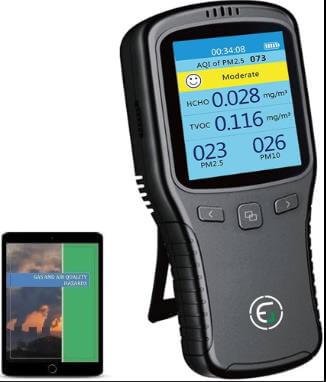
The air inside your home can contain invisible pollutants such as formaldehyde (HCHO), volatile organic compounds (VOCs), fine dust (PM2.5), and other contaminants that may affect your comfort and indoor environment. A Smart Air Quality Monitor (Formaldehyde) helps you track these pollutants in real time, giving you the information you need to improve ventilation and maintain healthier indoor air. However, to get accurate readings, it’s important to place the monitor correctly, connect it properly, and understand how to interpret its data. Whether you’re monitoring a newly renovated room, an office, or your everyday living space, proper setup ensures reliable performance. This beginner-friendly guide walks you through everything you need to know—from powering on the device and connecting it to Wi-Fi to reviewing historical reports, troubleshooting common issues, and following best practices—so you can confidently monitor and improve your indoor air quality.
Want to know exactly what’s in the air you breathe? Follow this step-by-step guide to set up your Smart Air Quality Monitor and monitor your indoor environment with confidence.
How do you use a Smart Air Quality Monitor (Formaldehyde)?
Quick Answer
Using a Smart Air Quality Monitor is easy:
- Fully charge or connect the monitor to power.
- Install the companion app.
- Connect the monitor to Wi-Fi.
- Place it in the correct location.
- Allow the sensors to stabilize.
- Monitor real-time air quality readings.
- Review historical air quality reports.
Prerequisites
Before you begin, make sure you have:
- Smart Air Quality Monitor (Formaldehyde)
- Power adapter or charged battery
- Smartphone or tablet
- Companion mobile app
- Wi-Fi connection
- User manual
- Stable indoor location
Step-by-Step Instructions
Follow these simple steps to set up your smart formaldehyde air quality monitor, connect it, and start tracking indoor air quality accurately in real time.
Step 1: Power On the Monitor
Connect the monitor to its power source or fully charge the battery.
Press the Power button.
Wait for the display to initialize.
Step 2: Install the Mobile App
Download the manufacturer’s companion app.
Create an account or sign in.
Allow permissions for:
- Wi-Fi
- Bluetooth (if required)
- Notifications
Step 3: Connect to Wi-Fi
Open the app.
Select Add Device.
Follow the on-screen instructions to connect the monitor to your wireless network.
Wait until the connection is confirmed.
Step 4: Position the Monitor Properly
Place the monitor:
- At breathing height
- Away from windows
- Away from direct sunlight
- Away from air vents
- Away from kitchens and bathrooms unless monitoring those spaces
Ensure air flows freely around the device.
Step 5: Allow Sensor Stabilization
Leave the monitor running for several minutes.
Some sensors may require additional stabilization time after first setup.
Avoid moving the device during this process.
Step 6: Monitor Air Quality Readings
View measurements such as:
- Formaldehyde (HCHO)
- PM2.5
- VOCs
- Temperature
- Humidity
- Air Quality Index (AQI)
Review the display or mobile app for updates.
Step 7: Review Historical Reports
Open the app to analyze:
- Daily trends
- Weekly reports
- Pollution spikes
- Long-term air quality history
Use this information to improve ventilation and indoor air quality..
What Tips Help You Monitor Indoor Air More Effectively?
Tips
Following these tips helps improve monitoring accuracy.
Place the Monitor in Frequently Used Rooms
Monitor the areas where people spend the most time.
Avoid Frequent Relocation
Keeping the monitor in one location provides more consistent readings.
Check Air Quality at Different Times
Compare readings during cooking, cleaning, or after opening windows.
Keep the Sensors Clean
Dust buildup may affect measurement accuracy.
Enable Mobile Notifications
Receive alerts when pollutant levels increase.
Compare Indoor Air Over Time
Historical data helps identify recurring pollution sources.
Update the Device Software
Firmware updates often improve sensor performance.
What Common Mistakes Should You Avoid?
Common Mistakes
Placing the Monitor Near Windows
Outdoor air may distort indoor readings.
Blocking the Air Intake
Obstructed airflow reduces sensor accuracy.
Moving the Device Constantly
Frequent relocation makes long-term comparisons difficult.
Ignoring Calibration Time
Allow sensors enough time to stabilize after setup.
Forgetting Wi-Fi Connection
Disconnected devices may stop syncing historical data.
Exposing the Monitor to Moisture
Most air quality monitors are designed for dry indoor environments.
Ignoring Air Quality Alerts
Timely action helps maintain healthier indoor air.
How Can You Troubleshoot Common Smart Air Quality Monitor Problems?
Troubleshooting
Problem: Device Won’t Connect to Wi-Fi
Solution
- Restart the monitor.
- Verify your Wi-Fi password.
- Move the monitor closer to the router.
Problem: Air Quality Readings Don’t Change
Solution
- Allow additional stabilization time.
- Check for blocked air vents.
- Restart the monitor.
Problem: App Doesn’t Display Data
Solution
- Verify internet connectivity.
- Refresh device synchronization.
- Update the mobile app.
Problem: Formaldehyde Reading Seems Too High
Solution
- Improve room ventilation.
- Remove possible pollution sources.
- Recheck readings after several hours.
Problem: Notifications Aren’t Working
Solution
- Enable app notifications.
- Check phone notification settings.
- Update the application.
Problem: Screen Is Blank
Solution
- Verify power connection.
- Recharge the battery.
- Restart the device.
What Are the Best Practices for Long-Term Performance?
Best Practices
Clean Air Vents Regularly
Prevent dust from blocking airflow.
Keep Software Updated
Install firmware updates whenever available.
Maintain a Stable Location
Avoid unnecessary movement after installation.
Protect from Direct Sunlight
Heat may affect sensor performance.
Review Air Quality Reports Weekly
Track trends to identify pollution sources.
Keep the Device Powered
Continuous monitoring provides more complete data.
Follow Manufacturer Maintenance Instructions
Routine maintenance helps preserve long-term accuracy.
Frequently Asked Questions
What does a Smart Air Quality Monitor measure?
Many models monitor formaldehyde, VOCs, particulate matter, temperature, humidity, and overall air quality.
Where should I place the monitor?
Position it in an open indoor area away from windows, vents, and direct sunlight.
How long does sensor calibration take?
Calibration time varies by model, but initial readings may stabilize after several minutes or longer according to the manufacturer’s recommendations.
Can I monitor multiple rooms?
Yes, but readings only reflect the location where the monitor is placed unless you use multiple devices.
Why are formaldehyde readings increasing?
New furniture, paint, cleaning products, or poor ventilation may temporarily increase indoor formaldehyde levels.
Does the monitor require Wi-Fi?
Basic monitoring usually works without Wi-Fi, but cloud features and historical reports often require an internet connection.
How often should I clean the monitor?
Clean the exterior and air vents periodically according to the manufacturer’s maintenance instructions.
Conclusion
A Smart Air Quality Monitor (Formaldehyde) makes it easier to understand what’s in the air you breathe by providing real-time insights into pollutants, temperature, humidity, and overall indoor air quality. By placing the device correctly, keeping it updated, and reviewing its readings regularly, you can identify air quality issues early and take action to create a healthier indoor environment.
Ready to take control of your indoor air? Set up your Smart Air Quality Monitor today, monitor your air quality consistently, and use the data to make smarter decisions for a cleaner, healthier home or workplace.
Make Every Breath Count with Smarter Air Monitoring
Your Smart Air Quality Monitor gives you the information you need to create a cleaner, healthier indoor space. Keep monitoring regularly, respond to changing air conditions, and enjoy greater peace of mind knowing you’re making informed decisions about the air around you.