How to Use an Air Purifier (HEPA + Carbon): A Complete Beginner’s Step-by-Step Guide
Learn how to use an air purifier with HEPA and activated carbon filters step by step to improve indoor air quality, reduce allergens, eliminate odors, and keep your home fresh and healthy.
By TechScaleMedia Editorial · Updated July 2026 · 11 min read
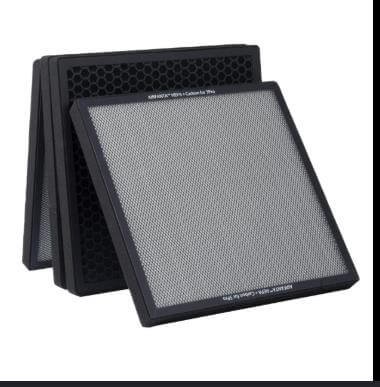
Indoor air can contain dust, allergens, pet dander, smoke, odors, and other pollutants that affect comfort and overall well-being. An Air Purifier with HEPA and Activated Carbon filters is one of the most effective ways to improve indoor air quality by capturing fine airborne particles while absorbing unwanted odors and harmful gases. However, simply plugging in the purifier isn’t enough to achieve the best results. Proper placement, correct filter installation, selecting the right operating mode, and regular maintenance all play a key role in maximizing its performance and extending filter life. Whether you’ve purchased your first air purifier or want to ensure you’re using it correctly, this beginner-friendly guide covers everything you need to know. From setup and daily operation to maintenance tips and troubleshooting, you’ll learn how to keep your purifier running efficiently so you can enjoy cleaner, fresher air every day.
Ready to enjoy cleaner, fresher indoor air? Follow this step-by-step guide to set up your HEPA and Carbon Air Purifier correctly and improve your home’s air quality.
How do you use an Air Purifier (HEPA + Carbon)?
Quick Answer
Using an Air Purifier is simple:
- Place the purifier in the appropriate room.
- Remove all filter packaging.
- Connect it to a power outlet.
- Turn on the purifier.
- Select your preferred fan speed or Auto Mode.
- Allow continuous air circulation.
- Replace filters when recommended.
Prerequisites
Before you begin, make sure you have:
- Air Purifier (HEPA + Carbon)
- HEPA filter
- Activated Carbon filter
- Power outlet
- User manual
- Stable flat surface
- Adequate airflow around the purifier
Step-by-Step Instructions
Follow these simple steps to set up, operate, and maintain your HEPA and activated carbon air purifier for cleaner, fresher indoor air.
Step 1: Choose the Right Location
Place the purifier in the room where you spend the most time.
Position it:
- On a flat surface
- Away from walls
- Away from furniture blocking airflow
- Near the center of the room whenever possible
Leave enough space around the air intake and air outlet.
Step 2: Install the Filters
Open the purifier according to the manufacturer’s instructions.
Remove all protective plastic from:
- HEPA filter
- Carbon filter
Insert the filters in the correct order.
Close the filter compartment securely.
Step 3: Connect the Power
Plug the purifier into a suitable electrical outlet.
Press the Power button.
Verify that the display or indicator lights activate.
Step 4: Select the Operating Mode
Choose the mode that best suits your environment, such as:
- Auto Mode
- Sleep Mode
- Low Speed
- Medium Speed
- High Speed
- Turbo Mode
Allow the purifier to begin circulating air.
Step 5: Let the Purifier Run
For best performance:
- Keep doors and windows closed.
- Allow continuous operation during heavy pollution or allergy seasons.
- Avoid blocking the airflow.
Step 6: Monitor Filter Indicators
Many modern air purifiers include filter replacement reminders.
Check:
- Filter life
- Air quality indicators
- Fan operation
Replace filters when recommended.
Step 7: Clean the Exterior
Turn off and unplug the purifier.
Wipe the exterior using a soft microfiber cloth.
Clean air vents carefully without allowing moisture inside the unit.
What Tips Help Your Air Purifier Clean Air More Efficiently?
Tips
Following these tips helps maximize purification performance.
Keep Doors and Windows Closed
Keep Doors and Windows Closed
Run the Purifier Daily
Consistent operation maintains cleaner indoor air.
Replace Filters on Schedule
Fresh filters provide optimal purification performance.
Vacuum the Room Regularly
Reducing dust helps extend filter life.
Avoid Blocking Airflow
Leave open space around the purifier.
Use Sleep Mode at Night
Sleep Mode provides quieter operation while maintaining air circulation.
Match the Purifier to Room Size
Choose a purifier designed for your room’s square footage.
What Common Mistakes Should You Avoid?
Common Mistakes
Leaving Protective Plastic on the Filters
Always remove all packaging before installation.
Placing the Purifier Against a Wall
Restricted airflow reduces cleaning efficiency.
Turning the Purifier Off Frequently
Continuous operation generally provides better air quality.
Ignoring Filter Replacement Reminders
Old filters lose effectiveness over time.
Blocking Air Intake Vents
Furniture and curtains can reduce airflow.
Using the Wrong Filter Type
Always install compatible replacement filters.
Forgetting Routine Cleaning
Dust buildup may reduce airflow performance.
How Can You Troubleshoot Common Air Purifier Problems?
Troubleshooting
Problem: Purifier Won’t Turn On
Solution
- Check the power outlet.
- Verify the plug connection.
- Ensure the filter compartment is closed properly.
Problem: Weak Airflow
Solution
- Clean the air vents.
- Replace clogged filters.
- Remove objects blocking airflow.
Problem: Strange Odors Continue
Solution
- Replace the activated carbon filter.
- Increase fan speed.
- Eliminate the odor source if possible.
Problem: Filter Indicator Stays On
Solution
- Replace the filter.
- Reset the filter indicator according to the manufacturer’s instructions.
Problem: Purifier Is Noisy
Solution
- Place the purifier on a level surface.
- Reduce the fan speed if appropriate.
- Check for loose filters.
Problem: Poor Air Quality Doesn’t Improve
Solution
- Verify proper room size compatibility.
- Close windows and doors.
- Allow the purifier to run longer.
What Are the Best Practices for Long-Term Performance?
Best Practices
Replace Filters Regularly
Follow the recommended replacement schedule.
Clean the Exterior Weekly
Prevent dust from accumulating around the air intake.
Keep the Unit Away from Moisture
Avoid placing the purifier in excessively damp environments unless designed for them.
Inspect Air Vents Frequently
Ensure unobstructed airflow.
Use Genuine Replacement Filters
Compatible filters help maintain purification efficiency.
Operate the Purifier Consistently
Daily use keeps indoor air cleaner.
Store Properly When Not in Use
If storing the purifier, remove dust and cover it to prevent debris buildup.
Frequently Asked Questions
Does an Air Purifier remove dust?
Yes. HEPA filters capture many airborne dust particles and allergens.
How often should I replace the filters?
Replacement intervals vary depending on usage and manufacturer recommendations.
Can I leave the purifier running all day?
Yes. Many air purifiers are designed for continuous daily operation.
Does the carbon filter remove odors?
Yes. Activated carbon helps absorb household odors, smoke, and certain gases.
Where should I place my air purifier?
Position it in an open area with unrestricted airflow and away from walls or furniture.
Should I keep windows open while using it?
For maximum efficiency, it’s generally recommended to keep windows and doors closed.
How do I know when the filter needs replacing?
Many models include filter replacement indicators, or you can follow the maintenance schedule in the user manual.
Conclusion
Using an Air Purifier (HEPA + Carbon) correctly helps improve indoor air quality by reducing dust, allergens, odors, and other airborne pollutants. By placing the unit in the right location, replacing filters on schedule, and running it consistently, you can keep your purifier performing at its best for years. Following the simple steps and maintenance tips in this guide ensures cleaner, healthier air with minimal effort.
Ready to get the most from your air purifier? Set it up correctly today, follow the recommended maintenance routine, and enjoy fresher, cleaner air in every room of your home.
Breathe Cleaner Air Every Single Day
Your HEPA + Carbon Air Purifier works best when it’s part of your everyday routine. Set it up correctly, maintain it regularly, and enjoy the confidence of knowing you’re creating a fresher, cleaner indoor environment for yourself and everyone in your home.