How to Use a Biometric Bedside Drawer Safe: A Complete Beginner’s Step-by-Step Guide
Learn how to set up, program, and securely use a biometric bedside drawer safe with this beginner-friendly step-by-step guide to protect your valuables while keeping them easily accessible.
By TechScaleMedia Editorial · Updated July 2026 · 11 min read
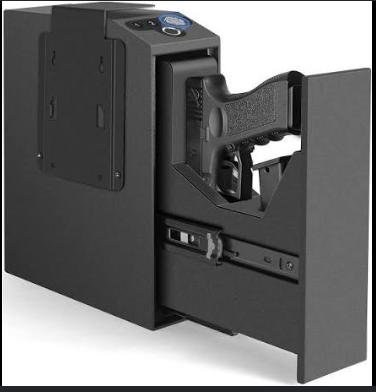
A Biometric Bedside Drawer Safe is a compact security solution designed to keep personal valuables within easy reach while protecting them from unauthorized access. Unlike standard lockboxes, these safes use fingerprint recognition, PIN codes, or backup keys to provide fast access in seconds. Their slim design allows them to fit inside bedside tables, desks, or cabinets, making them ideal for storing passports, jewelry, cash, important documents, medications, electronic devices, and other personal belongings.
While these safes are simple to operate, many users are unsure how to register fingerprints properly, position the safe securely, or maintain reliable performance over time. Learning the correct setup process helps ensure quick access while keeping your valuables protected.
This guide explains how to use a Biometric Bedside Drawer Safe, from installation and fingerprint registration to troubleshooting common issues and following best practices for long-term reliability.
Want convenient access to your valuables without compromising security? Follow this step-by-step guide to set up your Biometric Bedside Drawer Safe the right way.
How do you use a Biometric Bedside Drawer Safe?
Quick Answer
Using a Biometric Bedside Drawer Safe is easy:
- Install the batteries.
- Place the safe securely inside the drawer.
- Register the administrator fingerprint.
- Add additional fingerprints if needed.
- Create a backup PIN code.
- Test all unlocking methods.
- Store your valuables and lock the safe.
Prerequisites
Before you begin, make sure you have:
- Biometric Bedside Drawer Safe
- Fresh batteries
- Backup keys
- User manual
- Clean, dry fingers
- Smartphone (for app-enabled models)
Step-by-Step Instructions
Follow these simple steps to set up and use your biometric bedside drawer safe securely for quick and convenient access to your valuables.
Step 1: Install the Batteries
Open the battery compartment and insert the recommended batteries.
Confirm the safe powers on successfully before continuing.
Step 2: Position the Safe
Place the safe inside your bedside drawer or another secure location.
Ensure there is enough space for the lid or door to open fully.
If your model supports mounting, secure it using the supplied hardware.
Step 3: Register the Administrator Fingerprint
Follow the setup instructions to enroll the administrator fingerprint.
Scan the same finger multiple times from different angles for better recognition accuracy.
Step 4: Add Additional Users
If other trusted family members require access:
- Register their fingerprints.
- Assign user permissions if supported.
- Verify each fingerprint works correctly.
Step 5: Set a Backup PIN
Create a strong PIN code that can be used if fingerprint recognition is unavailable.
Avoid simple combinations or repeated numbers.
Store the PIN securely.
Step 6: Test Every Unlocking Method
Before storing valuables, confirm that:
- Fingerprint recognition works.
- PIN access functions correctly.
- Backup keys unlock the safe.
Repeat setup if necessary.
Step 7: Store Your Belongings
Arrange your valuables neatly inside the safe.
Close the lid completely and verify that the locking mechanism engages properly.
What Tips Help You Get the Best Performance from a Biometric Bedside Drawer Safe?
Tips
Following these tips helps improve both convenience and security.
Register More Than One Finger
Save multiple fingerprints for easier access if one finger is injured or unavailable.
Keep the Sensor Free of Dust
Clean the fingerprint scanner regularly using a soft microfiber cloth.
Replace Batteries Early
Install fresh batteries as soon as you receive a low-battery warning.
Store Backup Keys Separately
Keep emergency keys in another secure location—not inside the safe.
Organize Items Neatly
Avoid stacking items too high, which may interfere with closing the safe.
Check Lock Operation Monthly
Open and close the safe occasionally to ensure smooth operation.
Keep the Drawer Dry
Protect the safe from excessive humidity or liquid spills.
What Common Mistakes Should You Avoid?
Common Mistakes
Registering Poor-Quality Fingerprints
Incomplete scans may reduce fingerprint recognition accuracy.
Ignoring Battery Notifications
Low batteries can prevent the safe from unlocking properly.
Leaving the Safe Unlocked
Always confirm that the locking mechanism has fully engaged.
Storing Backup Keys Inside the Drawer
Keep emergency keys somewhere separate and secure.
Using Weak PIN Codes
Choose a PIN that’s difficult for others to guess.
Overfilling the Safe
Too many items may block the locking mechanism.
Skipping Routine Testing
Regular testing helps identify problems before they’re needed in an emergency.
How Can You Troubleshoot Common Biometric Bedside Drawer Safe Problems?
Troubleshooting
Problem: Fingerprint Isn’t Working
Solution
- Clean the fingerprint scanner.
- Wash and dry your finger.
- Register the fingerprint again.
Problem: Safe Won’t Unlock
Solution
- Enter the backup PIN.
- Use the emergency key.
- Replace the batteries if necessary.
Problem: Battery Warning Appears
Solution
- Replace all batteries immediately.
- Test fingerprint recognition afterward.
Problem: Door Doesn’t Close Properly
Solution
- Rearrange items inside the safe.
- Remove anything blocking the latch.
- Inspect the locking mechanism.
Problem: Keypad Doesn’t Respond
Solution
- Install fresh batteries.
- Restart the safe if supported.
- Check battery orientation.
Problem: Fingerprint Recognition Is Slow
Solution
- Clean the sensor.
- Re-register fingerprints.
- Ensure your finger fully covers the scanner.
What Are the Best Practices for Long-Term Performance?
Best Practices
Replace Batteries Every Year
Even if the batteries still work, replacing them periodically improves reliability.
Clean the Exterior Regularly
Use a soft cloth to remove dust and fingerprints.
Inspect the Lock Mechanism
Ensure the latch opens and closes smoothly.
Update Firmware
Install updates through the companion app if your safe supports them.
Review User Access
Delete fingerprints that are no longer needed.
Secure the Safe Properly
Anchor the safe if mounting hardware is provided.
Perform Routine Function Tests
Test fingerprint, PIN, and backup key access every few months.
Frequently Asked Questions
Can multiple fingerprints be stored?
Yes. Most biometric bedside safes allow multiple authorized fingerprints.
What happens if the batteries die?
Most models include backup keys or emergency power options for access.
Can I mount the safe inside my drawer?
Many models include mounting holes or hardware for added security.
How often should I clean the fingerprint scanner?
Clean it every few weeks or whenever fingerprint recognition becomes inconsistent.
Is the safe suitable for storing important documents?
Yes. Many users store passports, legal papers, jewelry, and other valuables inside.
Can children open the safe?
Only registered users or those with the correct PIN or backup key can access the safe.
How often should I test the safe?
Testing every one to three months helps ensure all unlocking methods continue working properly.
Conclusion
A Biometric Bedside Drawer Safe offers fast, secure, and convenient protection for your everyday valuables while keeping them easily accessible when needed. By registering fingerprints correctly, maintaining fresh batteries, and regularly testing the locking system, you can enjoy dependable security and peace of mind.
Routine maintenance, proper organization, and careful management of backup access methods will help your safe continue performing reliably for years. Whether you’re protecting important documents, personal electronics, or valuable keepsakes, a biometric bedside safe is a practical addition to your home security setup.
Secure Your Essentials Without Sacrificing Convenience
With your Biometric Bedside Drawer Safe, protecting your everyday valuables is both simple and efficient. Complete the setup, keep your access methods updated, and enjoy quick, secure access whenever you need it—while knowing your important belongings stay protected around the clock.