How to Use an Apple Watch Portable Charger Keychain: A Complete Beginner’s Step-by-Step Guide
Learn how to use an Apple Watch portable charger keychain to keep your smartwatch powered anytime, anywhere with this easy beginner’s guide.
By TechScaleMedia Editorial · Updated July 2026 · 11 min read
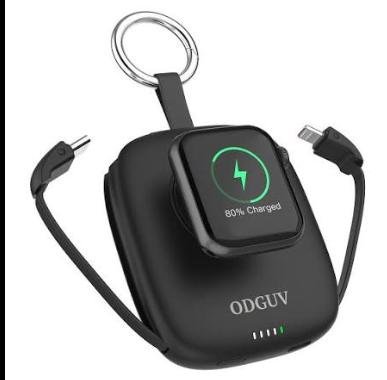
An Apple Watch Portable Charger Keychain is a compact charging accessory designed to keep your Apple Watch powered wherever you are. Whether you’re traveling, commuting, working long hours, or exercising outdoors, this portable charger offers a convenient backup power source without requiring a bulky charging dock. Its lightweight keychain design easily attaches to backpacks, keyrings, handbags, or travel organizers, ensuring you always have a charger within reach.
Although using an Apple Watch Portable Charger Keychain is straightforward, many users experience slow charging, improper alignment, low battery capacity, or compatibility issues. Understanding how to charge the portable charger, correctly position your Apple Watch, and maintain the accessory will help you enjoy dependable charging whenever your watch battery runs low.
This guide explains how to use an Apple Watch Portable Charger Keychain, from preparing the charger and charging your Apple Watch to troubleshooting common issues and following best practices for long-term reliability.
Need a convenient backup charger for your Apple Watch? Follow this step-by-step guide to keep your smartwatch powered wherever your day takes you.
How do you use an Apple Watch Portable Charger Keychain?
Quick Answer
Using an Apple Watch Portable Charger Keychain is easy:
- Fully charge the portable charger.
- Check the remaining battery level.
- Turn on the charger if required.
- Place your Apple Watch on the magnetic charging pad.
- Confirm charging has started.
- Allow the watch to reach your desired battery level.
- Recharge the portable charger after use.
Prerequisites
Before you begin, make sure you have:
- Apple Watch Portable Charger Keychain
- Compatible Apple Watch
- USB-C or Lightning charging cable (depending on the charger model)
- USB wall adapter or laptop
- Travel pouch (optional)
Step-by-Step Instructions
Follow simple steps to charge your Apple Watch quickly and safely using a portable charger keychain.
Step 1: Charge the Portable Charger
Before using it for the first time, connect the charger to a power source using the supplied charging cable.
Wait until the battery indicator confirms the charger is fully charged.
A full battery provides the maximum number of Apple Watch charging sessions.
Step 2: Check the Battery Level
Most portable charger keychains include LED indicators or battery status lights.
Verify there is enough remaining battery before charging your Apple Watch.
Recharge the unit if necessary.
Step 3: Turn On the Charger (If Required)
Some portable chargers activate automatically, while others require pressing a power button.
Check the indicator light to confirm the charger is ready.
Step 4: Position Your Apple Watch
Place the back of your Apple Watch directly onto the magnetic charging surface.
The built-in magnets automatically align the watch into the correct charging position.
Avoid forcing the watch into place.
Step 5: Confirm Charging
Look for the charging symbol on your Apple Watch display.
If charging does not begin:
- Reposition the watch.
- Clean the charging surface.
- Check the battery level of the portable charger.
Step 6: Allow the Watch to Charge
Leave your Apple Watch connected until it reaches your preferred battery level.
Avoid removing the watch repeatedly during charging.
Step 7: Recharge and Store the Keychain Charger
After charging your watch:
- Recharge the portable charger if needed.
- Disconnect all cables.
- Attach it back to your keychain, backpack, or travel organizer for easy access.
What Tips Help You Get the Most from an Apple Watch Portable Charger Keychain?
Tips
Following these tips helps improve charging performance and convenience.
Charge the Portable Charger Before Leaving Home
Always begin your day with a fully charged portable charger, especially before traveling.
Keep the Magnetic Surface Clean
Wipe away dust and fingerprints regularly to maintain strong magnetic contact.
Attach It to Everyday Essentials
Clip the charger to your keys, backpack, or handbag so it’s always available.
Avoid Fully Draining the Portable Charger
Recharge it before the battery becomes completely empty to maintain battery health.
Remove Protective Debris
Ensure nothing blocks the magnetic charging surface before placing your watch.
Store It in a Protective Case During Long Trips
A small electronics pouch helps prevent scratches and accidental damage.
Use It as an Emergency Backup Charger
Portable charger keychains are ideal for topping up your Apple Watch during busy days rather than replacing your primary home charger.
What Common Mistakes Should You Avoid?
Common Mistakes
Forgetting to Recharge the Portable Charger
An empty charger won’t be available when you need emergency power.
Misaligning the Apple Watch
Incorrect positioning prevents proper magnetic charging.
Exposing the Charger to Water
Unless specifically rated for water resistance, keep the charger dry.
Carrying Loose Metal Objects Nearby
Keys or coins may scratch the charging surface.
Ignoring Battery Indicator Lights
Checking battery status before leaving home prevents unexpected power shortages.
Using Damaged Charging Cables
Faulty cables may slow charging or prevent the charger from recharging properly.
Leaving the Charger in Extreme Heat
Avoid storing the charger inside hot vehicles for long periods.
How Can You Troubleshoot Common Apple Watch Portable Charger Keychain Problems?
Troubleshooting
Problem: Apple Watch Isn’t Charging
Solution
- Reposition the watch.
- Clean the magnetic charging surface.
- Recharge the portable charger.
Problem: Portable Charger Won’t Recharge
Solution
- Replace the charging cable.
- Test another wall adapter.
- Inspect the charging port for debris.
Problem: Charging Stops Unexpectedly
Solution
- Ensure the watch remains properly aligned.
- Check the remaining battery level.
- Restart charging.
Problem: Charging Is Slow
Solution
- Fully recharge the portable charger.
- Avoid charging in very hot environments.
- Clean the charging contacts.
Problem: LED Indicator Doesn’t Turn On
Solution
- Recharge the portable charger.
- Hold the power button if applicable.
- Inspect for physical damage.
Problem: Magnetic Connection Feels Weak
Solution
- Clean both the watch and charger.
- Remove any debris between the surfaces.
- Verify compatibility with your Apple Watch model.
What Are the Best Practices for Long-Term Performance?
Best Practices
Recharge the Charger Regularly
Recharge the battery every few months even if it hasn’t been used.
Keep the Charger Clean
Use a dry microfiber cloth to remove dirt and fingerprints.
Store in a Cool, Dry Place
Avoid moisture, direct sunlight, and excessive temperatures.
Protect the Charging Surface
Prevent scratches by storing the charger separately from sharp metal objects.
Inspect the Charging Cable Periodically
Replace damaged cables immediately.
Carry It Securely
Attach the charger firmly to your keychain or travel bag to reduce the risk of losing it.
Check Battery Status Before Traveling
Always verify the charger has sufficient power before long trips.
Frequently Asked Questions
Can this charger fully charge an Apple Watch?
Yes. Most portable charger keychains can provide one or more partial or full charges depending on their battery capacity.
Is it compatible with every Apple Watch?
Compatibility varies by model. Always check the manufacturer’s specifications before purchasing.
Can I carry it on an airplane?
Yes. Most portable Apple Watch chargers are permitted in carry-on luggage, subject to airline battery regulations.
Does it require a charging cable to charge my watch?
No. Once the portable charger itself is charged, it can wirelessly charge your Apple Watch.
Why isn’t my Apple Watch charging?
Check battery level, alignment, and ensure the charger is compatible with your Apple Watch model.
How often should I recharge the portable charger?
Recharge it after use or every few months during storage to maintain battery performance.
Can I leave my Apple Watch on the charger overnight?
Yes. Most quality chargers include safety features to help protect against overcharging.
Conclusion
An Apple Watch Portable Charger Keychain is a practical accessory for anyone who wants reliable backup power while traveling, working, or spending long days away from home. By keeping the charger fully powered, positioning your Apple Watch correctly, and following proper maintenance practices, you can enjoy convenient charging whenever your watch battery needs a boost.
Regular cleaning, careful storage, and routine battery maintenance will help your portable charger perform reliably for years. Whether you’re catching a flight, attending meetings, or exploring new destinations, this compact charger ensures your Apple Watch stays powered whenever you need it most.
Keep Your Apple Watch Ready for Every Moment
A low battery shouldn’t interrupt your schedule. With your Apple Watch Portable Charger Keychain, you can recharge your smartwatch anytime, anywhere and stay connected throughout the day. Keep it charged, carry it with you, and enjoy the confidence of having reliable backup power whenever you need it.