How to Use Astra Web Security: A Beginner’s Step-by-Step Guide
Websites face constant threats from hackers, malware, SQL injection, cross-site scripting (XSS), and distributed denial-of-service (DDoS) attacks. Without proper protection, a security breach can result in data loss, downtime, damaged customer trust, and costly recovery efforts.
By TechScaleMedia Editorial · Updated July 2026 · 11 min read

Astra Web Security is a website security platform that helps protect websites with a cloud-based Web Application Firewall (WAF), malware scanning, vulnerability assessments, and continuous security monitoring. It enables website owners to detect threats early and strengthen their site’s defenses without requiring advanced cybersecurity expertise.
Whether you manage a business website, eCommerce store, or personal blog, this guide will show you exactly how to set up and use Astra Web Security from scratch.
How Do You Set Up and Use Astra Web Security?
Quick Answer
To use Astra web Security:
- Create your Astra Web Security account.
- Add your website to the Astra dashboard.
- Verify domain ownership.
- Configure the Web Application Firewall (WAF).
- Update your DNS settings if required.
- Run your first malware and vulnerability scan.
- Review security recommendations.
- Monitor your website for threats and attacks.
- Fix identified vulnerabilities.
- Keep monitoring your website regularly for ongoing protection.
Prerequisites
Before you begin, make sure you have:
- An Astra Web Security account
- An active Astra subscription
- A registered website or domain
- Access to your DNS provider or domain registrar
- Administrator access to your website
- A stable internet connection
- Basic knowledge of website management
Create a Workflow Manually (Recommended for Beginners)
If you’re new to website security, protecting your first website in Astra Web Security is the best way to understand how the platform actually works.
Step 1: Create Your Astra Web Security Account
Visit the Astra Web Security website and create your account.
During registration:
- Enter your email address.
- Create a secure password.
- Choose your subscription plan.
- Verify your email address.
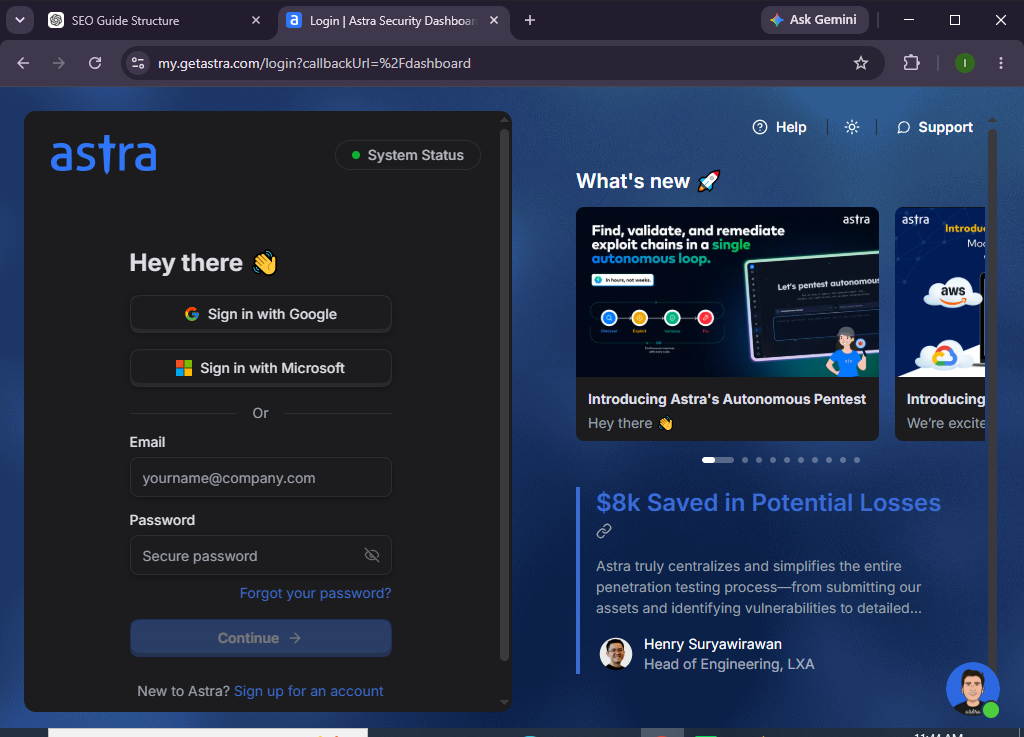
Once registered, sign in to your Astra dashboard.
Step 2: Add Your Website
From the dashboard:
- Click Add Website.
- Enter your website URL.
- Select your website platform.
- Save your website details.
Your website is now ready for security configuration.
Step 3: Verify Website Ownership
To verify ownership:
- Follow Astra’s verification instructions.
- Add the verification record or file.
- Confirm successful verification.
Verification ensures that only authorized users can manage the website.
Step 4: Configure the Web Application Firewall (WAF)
The Web Application Firewall filters malicious traffic before it reaches your website.
To enable it:
- Open the Firewall section.
- Follow the setup instructions.
- Update your DNS settings if required.
- Wait for the firewall to become active.
The WAF begins protecting your website against common web attacks.
Step 5: Run Your First Security Scan
Launch a website scan.
Astra checks for:
- Malware
- SQL Injection (SQLi)
- Cross-Site Scripting (XSS)
- Security vulnerabilities
- Blacklisting issues
- Website misconfigurations
Review the scan results after completion.
Step 6: Review Security Recommendations
After scanning, Astra provides recommendations for improving your website’s security.
Examples include:
- Updating outdated software
- Strengthening login security
- Removing malware
- Fixing vulnerable plugins
- Correcting server misconfigurations
Address high-priority issues first.
Step 7: Enable Continuous Monitoring
Activate continuous monitoring features.
These help detect:
- Malware infections
- Unauthorized file changes
- Website downtime
- Suspicious login attempts
- Firewall events
Continuous monitoring helps identify threats quickly.
Step 8: Protect Login Pages
Strengthen your website’s authentication.
Enable features such as:
- Strong passwords
- Two-factor authentication
- Login protection
- Bot protection
- IP restrictions (where appropriate)
These measures reduce the risk of unauthorized access.
Step 9: Monitor the Security Dashboard
Review your dashboard regularly.
Monitor:
- Firewall activity
- Malware detections
- Security alerts
- Website health
- Scan history
- Vulnerability reports
Prompt action helps minimize security risks.
Step 10: Keep Your Website Secure
Maintain your website by:
- Updating your CMS
- Updating plugins and themes
- Running scheduled scans
- Reviewing firewall logs
- Resolving new vulnerabilities
Routine maintenance helps keep your website protected over time.
Looking for an easier way to secure your website?
Explore Astra Web Security and strengthen your website’s defenses with continuous monitoring, malware protection, and an intelligent web application firewall.
How Can You Improve Your Website Security with Astra?
Tips
- Enable the Web Application Firewall immediately.
- Scan your website regularly.
- Keep your CMS, plugins, and themes updated.
- Use strong administrator passwords.
- Enable two-factor authentication.
- Review firewall activity frequently.
- Back up your website regularly.
- Respond to security alerts promptly.
What Should You Avoid When Using Astra Web Security?
Common Mistakes
- Ignoring vulnerability reports
- Delaying CMS or plugin updates
- Using weak administrator passwords
- Disabling firewall protection
- Ignoring malware alerts
- Installing plugins from untrusted sources
- Failing to create website backups
How Can You Keep Your Website Secure with Astra?
Best Practices
- Enable the Web Application Firewall at all times.
- Update your website software regularly.
- Remove unused plugins and themes.
- Schedule frequent malware scans.
- Monitor firewall logs daily.
- Use strong administrator credentials.
- Enable multi-factor authentication.
- Back up your website before making major changes.
- Review vulnerability reports regularly.
- Perform periodic website security audits.
What Should You Do If Astra Web Security Isn’t Working?
Troubleshooting
Website isn’t protected
- Verify DNS configuration.
- Confirm firewall activation.
- Check your subscription status.
Malware is still detected
- Run another security scan.
- Follow Astra’s cleanup recommendations.
- Update vulnerable software.
Firewall isn’t filtering traffic
- Confirm DNS propagation.
- Verify firewall settings.
- Refresh the dashboard.
Scan won’t complete
- Check your website connection.
- Restart the scan.
- Contact Astra support if the issue persists.
Frequently Asked Questions
What is Astra Web Security?
Astra Web Security is a website security platform that offers a Web Application Firewall, malware scanning, vulnerability detection, and continuous monitoring.
Can Astra protect WordPress websites?
Yes. Astra supports WordPress along with several other website platforms.
Does Astra remove malware?
Yes. Depending on your plan, Astra provides malware detection and cleanup services.
Does Astra protect against hackers?
Astra’s Web Application Firewall helps defend websites against many common attacks, including SQL injection, XSS, bots, and brute-force login attempts.
Can Astra monitor my website 24/7?
Yes. Astra offers continuous monitoring to help detect security threats and suspicious activity.
Is Astra suitable for small businesses?
Absolutely. Astra is designed for bloggers, small businesses, agencies, and enterprise websites.
Conclusion
Astra Web Security helps website owners strengthen their defenses with a cloud-based firewall, malware scanning, vulnerability assessments, and continuous monitoring. Its easy setup process and proactive security features make it easier to protect websites from today’s evolving cyber threats.
By following this guide—creating your account, adding your website, configuring the firewall, scanning for vulnerabilities, enabling continuous monitoring, and reviewing security reports—you can significantly improve your website’s overall security posture.
Your website is one of your most valuable digital assets—keep it protected.
Set up Astra Web Security today, activate continuous website monitoring, and stay ahead of emerging threats with proactive, around-the-clock protection.