

How to Use Integrately:A Beginner's Step-by-Step Guide
Managing multiple applications often involves repetitive tasks like copying data, sending notifications, updating spreadsheets, or creating customer records. These manual processes take time and increase the chance of human error.
Integrately is a no-code automation platform that helps you connect thousands of applications and automate workflows with just a few clicks. It offers ready-made automation templates, making it easy for beginners to build powerful integrations without programming.
Whether you’re a freelancer, marketer, sales professional, business owner, or project manager, Integrately can help you save time and improve productivity.
In this guide, you’ll learn how to create your first automation using Integrately. Ready to create powerful automations in just a few clicks?
How do you use Integrately?
A Quick Answer
To use Integrately:
- 1. Create an Integrately account.
- 2. Select the apps you want to connect.
- 3. Choose a ready-made automation or create your own.
- 4. Connect your app accounts.
- 5. Configure the trigger and actions.
- 6. Test the automation.
- 7. Activate the workflow.
Once enabled, Integrately automatically performs your selected actions whenever the trigger event occurs.
Prerequisites
Before getting started, you’ll need:
- An Integrately account
- A stable internet connection
- Accounts for the applications you want to automate
- API keys or login credentials if required
- A clear understanding of the workflow you want to build
What You'll Need Before Using Integrately
Before creating your first Integrately automation, make sure you have:
- Automate repetitive tasks and save time
- Connect apps with one-click integrations
- Build no-code workflows in minutes
- Securely sync and manage business data
- Ideal for marketers, teams, and businesses
Create a Workflow Manually (Recommended for Beginners)
If you’re new to automation, manually building your first workflow is the best way to understand how Integrately works and automate tasks with confidence.
Create an Integrately Account
Visit the Integrately website.
Click Sign Up.
Register using:
- Google account
- Email address
Verify your account if required.
After signing in, you’ll access the Integrately dashboard.
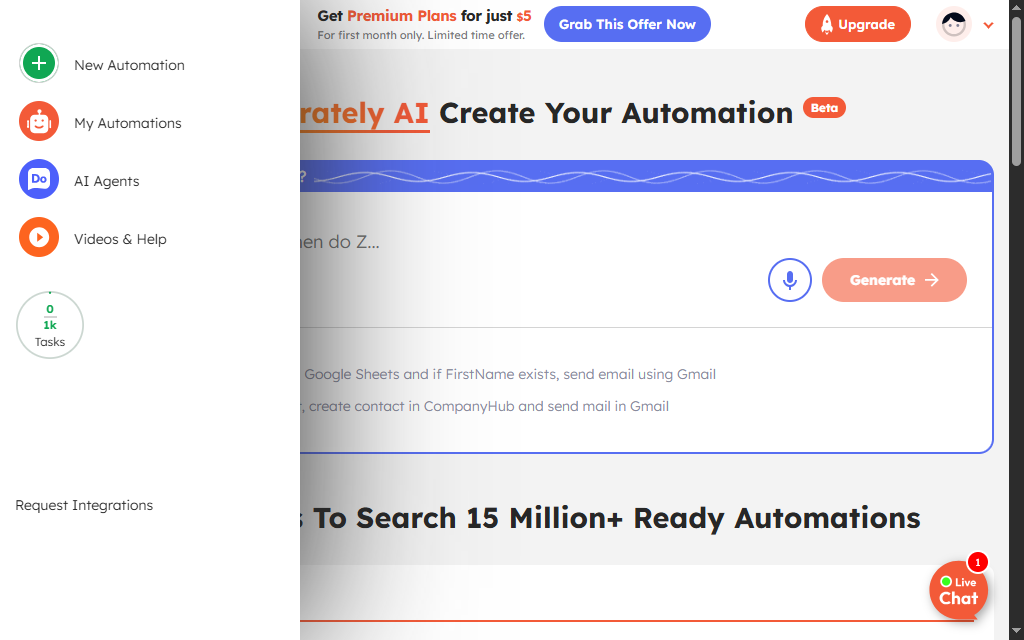
Choose the two apps you want to connect.
For example:
- Gmail → Slack
- Google Sheets → HubSpot
- Shopify → Mailchimp
- Typeform → Notion
- WooCommerce → Google Sheets
Integrately will automatically suggest available automations.
One of Integrately’s biggest advantages is its large library of pre-built automation templates.
Examples include:
- New Google Form → Add row to Google Sheets
- New Shopify Order → Send Slack notification
- New Lead → Create HubSpot contact
- New Email → Save attachment to Google Drive
Select the automation that best matches your needs.
Click Connect Account.
Authorize each application by:
- Signing in
- Granting permissions
- Entering API credentials (if required)
Once connected, your apps are ready to communicate with each other.
Review the automation settings.
Configure:
Trigger
Example:
- New customer
- New order
- New spreadsheet row
- New email
Action
Example:
- Send notification
- Create record
- Update CRM
- Save file
- Send email
Customize the workflow based on your requirements.
Match the information from the trigger app to the destination app.
Example:
Google Form →
HubSpot
- Full Name → Contact Name
- Email → Email Address
- Phone → Phone Number
Dynamic fields ensure information flows automatically between applications.
Click Test.
Confirm that:
- The trigger works correctly.
- Data transfers successfully.
- Connected apps receive the expected information.
- No errors occur during execution.
If needed, edit the workflow before activation.
Activate the Automation
Once everything works correctly:
- Click Turn On Automation
- Save your workflow
Integrately will now automatically run your workflow whenever the trigger event occurs.
What are the best tips for using Integrately effectively?
These expert Integrately tips will help you build smarter, faster, and more reliable workflow automations:
- Use pre-built templates to get started quickly.
- Name automations clearly.
- Test every workflow before enabling it.
- Organize workflows by department or project.
- Monitor automation history regularly.
- Keep connected apps properly authenticated.
What are the most common mistakes to avoid when using Integrately?
Although Integrately is beginner-friendly, small configuration mistakes can prevent your automations from working correctly. Avoid these common errors to build reliable workflows from the start.
Inactive automations will not run even when the trigger conditions are met.
Choosing the wrong trigger can prevent the automation from starting at the correct time.
Incorrectly mapped fields may send incomplete or inaccurate data between connected apps.
Failing to test the workflow can leave errors unnoticed before it goes live.
Expired or revoked app permissions can disconnect integrations and stop automations from working.
Building complex workflows too soon makes them harder to manage, debug, and maintain.
How do you troubleshoot common Integrately issues?
If your Integrately automation isn’t working as expected, these quick troubleshooting tips can help.
Check whether:
- The automation is turned on.
- The trigger event has occurred.
- Connected accounts remain authorized.
Try:
- Reconnecting the app.
- Updating expired credentials.
- Confirming account permissions.
Verify:
- Field mapping
- Required fields
- Source application data
- Destination application settings
Review:
- Execution history
- API limits
- Internet connection
- Third-party application availability
What are the best practices for using Integrately?
Once your Integrately workflows are running successfully, following these best practices will keep your automations organized, scalable, and easy to maintain.
Begin with Begin with simple automations.
Review automation logs regularly.
Protect API keys and credentials.
Update workflows whenever connected apps change.
Use descriptive workflow names.
Test changes before publishing.
Remove unused workflows.
Frequently Asked Questions
1. Is Integrately beginner-friendly?
Yes. Integrately is designed for beginners with thousands of ready-made automation templates and a simple visual interface.
Does Integrately require coding?
No. Integrately is a no-code automation platform that anyone can use.
3. Which apps does Integrately support?
Integrately connects thousands of applications, including Google Workspace, Slack, Shopify, HubSpot, Salesforce, Airtable, Notion, WooCommerce, Mailchimp, Trello, and many others.
4. Can I build custom workflows?
Yes. Although Integrately offers ready-made templates, you can also customize workflows to meet your specific business needs.
5. Is Integrately suitable for businesses?
Yes. Businesses use Integrately for marketing automation, CRM management, customer support, eCommerce, project management, HR, and operations.
6. Can I automate multiple steps?
Yes. Integrately supports multi-step workflows that perform several actions automatically after a trigger event.
Conclusion
Integrately simplifies workflow automation by allowing users to connect thousands of applications without writing code. Its extensive library of ready-made automation templates makes it one of the easiest platforms for beginners to start automating repetitive tasks. Whether you’re managing customer data, sending notifications, or synchronizing information across multiple apps, Integrately helps improve efficiency and reduce manual work.