How to Use Scribd: A Beginner’s Step-by-Step Guide
Learn how to use Scribd step by step to discover, read, save, and organize ebooks, audiobooks, documents, and other digital content with ease.
By TechScaleMedia Editorial · Updated July 2026 · 11 min read

Scribd is a popular digital subscription platform that gives users access to millions of eBooks, audiobooks, magazines, podcasts, sheet music, and documents. Whether you’re an avid reader, lifelong learner, or audiobook enthusiast, Scribd makes it easy to discover and enjoy content from virtually anywhere.
This step-by-step guide explains how to use Scribd, from creating an account to finding content, downloading titles for offline reading, and managing your library.
If you’re looking for an all-in-one digital reading subscription with unlimited access to a vast collection of content, Scribd is a great option.
How Do You Use Scribd?
Quick Answer
To use Scribd:
- Create a Scribd account.
- Choose a subscription plan or start a free trial.
- Download the Scribd app or use the website.
- Browse or search for books and audiobooks.
- Save titles to your library.
- Download content for offline access.
- Read or listen across multiple devices.
- Track your reading history and favorites.
Prerequisites
Before using Scribd, make sure you have:
- A Scribd account
- A stable internet connection
- A smartphone, tablet, or computer
- A valid payment method (for subscription)
- The Scribd app (optional for mobile users)
Step-by-Step Instructions
Follow these simple steps to search for books, read content, save favorites, and make the most of Scribd.
Step 1: Create a Scribd Account
Visit the Scribd website.
Click Sign Up.
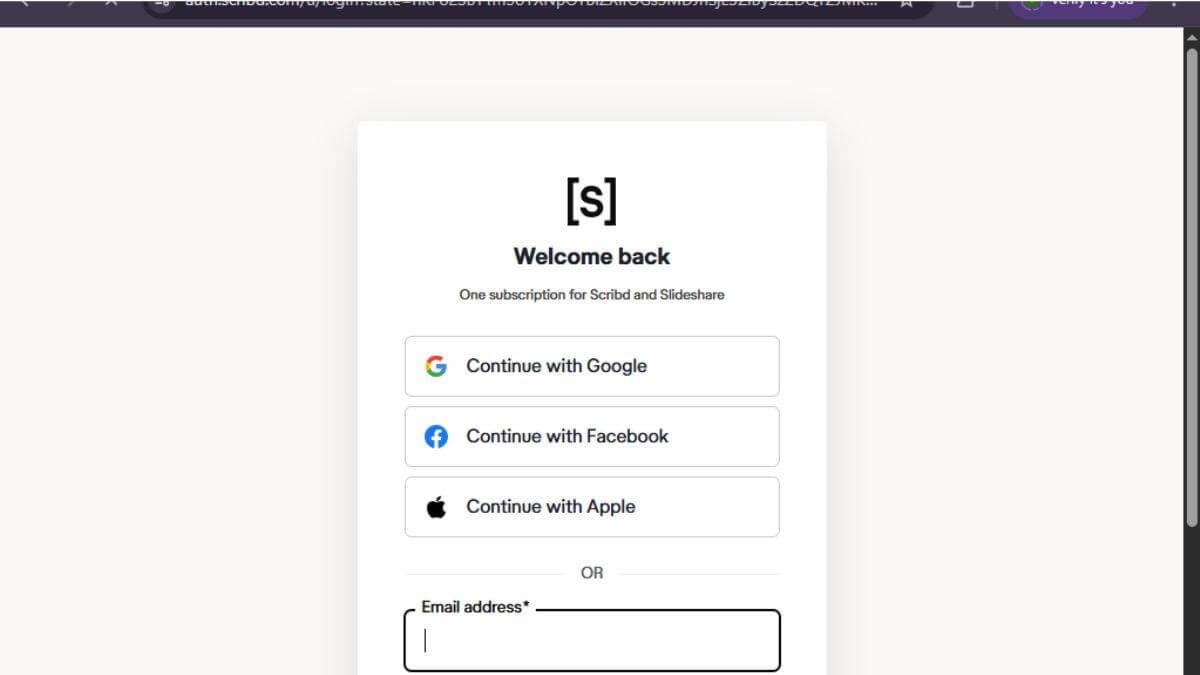
Register using your email address or continue with your Google, Apple, or Facebook account.
Verify your email if requested.
Step 2: Choose a Subscription
Select your preferred subscription plan.
If available, start the free trial before subscribing.
Enter your payment details to activate your membership.
Step 3: Download the Scribd App
Install the Scribd app on your:
- Android device
- iPhone
- iPad
You can also use Scribd directly through your web browser.
Log in with your account.
Step 4: Browse or Search for Content
Use the search bar to find:
- eBooks
- Audiobooks
- Magazines
- Podcasts
- Documents
- Sheet music
Browse categories or personalized recommendations.
Step 5: Save Content to Your Library
Open any title.
Click Save or Add to Library.
Your saved titles will appear in your personal library for quick access.
Step 6: Read or Listen Offline
Download books or audiobooks to your device.
This allows you to enjoy your content without an internet connection.
Downloaded titles remain available until removed from your device.
Step 7: Manage Your Reading Activity
Visit your library to:
- Resume reading
- Continue audiobooks
- View reading history
- Manage downloads
- Remove finished titles
Your progress automatically syncs across supported devices.
What Tips Help You Get the Most Out of Scribd?
Tips
Use these tips to compare listings, check seller ratings and book conditions, and look for shipping costs or discounts to get the best overall deal on AbeBooks.
- Download books before traveling.
- Save interesting titles to your library.
- Explore personalized recommendations.
- Listen to audiobooks while commuting.
- Use bookmarks for important sections.
- Discover new genres through curated collections.
- Keep the app updated for the latest features.
What Common Mistakes Should You Avoid?
Common Mistakes
Avoid these beginner mistakes:
- Forgetting to cancel the free trial if you don’t plan to continue.
- Not downloading books before going offline.
- Using multiple accounts accidentally.
- Ignoring personalized recommendations.
- Skipping app updates.
- Filling your downloads with books you won’t read.
What Should You Do If Scribd Isn’t Working?
Troubleshooting
| Issue | Solution |
| Can’t sign in | Reset your password and verify your email |
| App won’t open | Update or reinstall the Scribd app |
| Download failed | Check your internet connection and storage space |
| Subscription issue | Verify your payment method |
| Audiobook won’t play | Restart the app or re-download the title |
| Library not syncing | Log out and sign back into your account |
What Are the Best Practices for Using Scribd?
Best Practices
- Organize your saved titles regularly.
- Download content before traveling.
- Explore new releases each month.
- Use bookmarks and notes while reading.
- Keep your subscription information updated.
- Listen across multiple devices.
- Review your reading goals to stay consistent.
Frequently Asked Questions
Is Scribd free?
Scribd offers a free trial for eligible users, but continued access requires a paid subscription.
Can I read Scribd books offline?
Yes. Download books and audiobooks to your device for offline access.
Can I use Scribd on multiple devices?
Yes. You can access your Scribd account on compatible smartphones, tablets, and computers.
Does Scribd include audiobooks?
Yes. Scribd offers a large collection of audiobooks alongside eBooks and other digital content.
Can I cancel my subscription anytime?
Yes. You can manage or cancel your subscription through your account settings.
Conclusion
Scribd offers a convenient way to access an extensive library of eBooks, audiobooks, magazines, and more with a single subscription. By organizing your library, downloading content for offline use, and exploring personalized recommendations, you can enjoy an engaging reading and listening experience wherever you are.
Unlock Unlimited Reading with Scribd
Sign up for Scribd today and enjoy instant access to millions of eBooks, audiobooks, magazines, and more. Start exploring new stories, learning new skills, and reading without limits.