How to Use a Smart Coffee Brewer: A Complete Guide to Precision Pour-Over Coffee
Brewing café-quality pour-over coffee at home doesn’t have to be complicated. If you’ve recently purchased a smart coffee brewer, you may be wondering how to choose the right brewing settings, customize your coffee, or consistently achieve rich, balanced flavor with minimal effort. Unlike traditional coffee makers, smart coffee brewers automatically control key variables such as water temperature, flow rate, bloom time, and brewing speed to deliver a more precise and consistent cup. Many models also connect to a companion app, allowing you to create personalized brewing profiles, monitor the brewing process, and save your favorite recipes.
By TechScaleMedia Editorial · Updated July 2026 · 11 min read
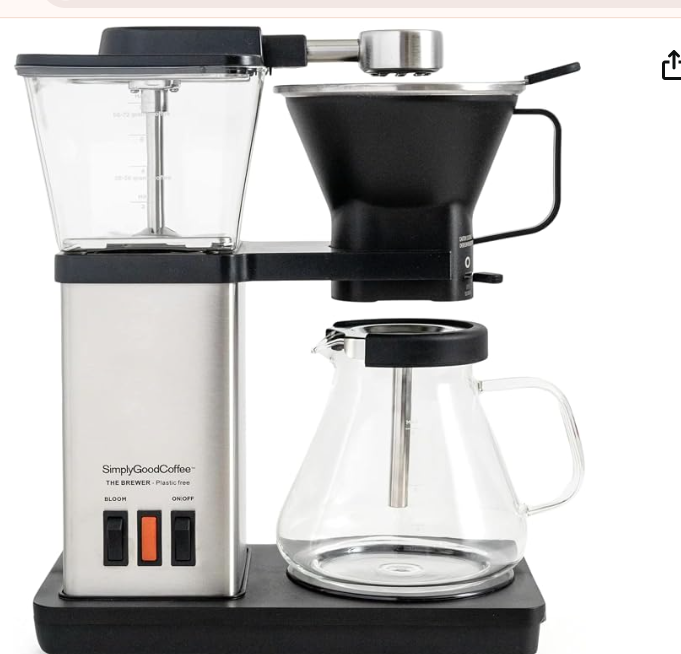
Whether you’re new to specialty coffee or looking to upgrade your home brewing routine, understanding how to use these features can make a noticeable difference in every cup. In this beginner-friendly guide, you’ll learn how to set up your brewer, optimize brewing settings, clean and maintain the machine, troubleshoot common issues, and brew with confidence.
How Do You Use a Smart Coffee Brewer?
Quick Answer
- Fill the water reservoir with filtered water.
- Grind fresh coffee beans.
- Add a filter and ground coffee.
- Set the brewing temperature.
- Select a brew profile.
- Start the brewing cycle.
- Monitor the brew (if using the app).
- Allow the coffee to finish dripping.
- Clean the brew basket after use.
- Descale the machine regularly.
Prerequisites
Before you begin, you’ll need:
- Smart coffee brewer
- Fresh coffee beans
- Burr grinder (recommended)
- Coffee filter
- Filtered water
- Coffee mug or carafe
- Companion app (if supported)
Create a Workflow Manually (Recommended for Beginners)
If you’re new to smart coffee makers, using your first Smart Coffee Brewer is the best way to understand how the appliance actually works.
Step 1: Fill the Water Reservoir
Add fresh, filtered water to the reservoir based on the amount of coffee you want to brew.
Step 2: Grind the Coffee Beans
Grind fresh coffee beans to a medium-coarse consistency, which works best for most pour-over brewers.
Step 3: Add the Filter and Coffee
Place a paper or reusable filter in the brew basket and add the ground coffee. Start with a coffee-to-water ratio of 1:15 to 1:17, then adjust it to suit your taste.
Step 4: Set the Brewing Temperature
Choose your preferred brewing temperature using the control panel or companion app.
Most pour-over coffee brews best between 195°F and 205°F.
Step 5: Select a Brew Profile
Choose one of the preset brewing profiles or create your own by adjusting settings such as bloom time and pour rate.
Different profiles can enhance the flavor characteristics of various coffee beans.
Step 6: Start Brewing
Begin the brew cycle. The brewer will automatically perform the bloom phase followed by controlled pouring to extract the coffee evenly.
Step 7: Monitor the Brewing Process
If your brewer supports app connectivity, you can check the brewing progress, adjust preferences, or save custom profiles for future use.
Step 8: Allow Brewing to Finish
Wait until the coffee has completely finished dripping before serving.
Step 9: Clean the Brew Basket
Remove the used filter and coffee grounds, then rinse the brew basket to keep the brewer clean
Step 10: Descale the Coffee Brewer
Run a descaling solution through the machine according to the manufacturer’s recommendations to remove mineral buildup and maintain brewing performance.
Ready to improve your coffee routine?
Follow the step-by-step instructions below to get the most out of your smart coffee brewer and enjoy consistently delicious pour-over coffee every day.
How Can You Use Smart Coffee Brewer More Efficiently?
Tips
- Store coffee beans in an airtight container to preserve freshness.
- Adjust the coffee-to-water ratio to match your preferred strength.
- Warm your mug or carafe before brewing to help maintain temperature.
- Try different brew profiles with different roast levels.
- Use filtered water for better flavor.
How Can You Avoid Common Smart Coffee Brewer Errors?
Common Mistakes
Using an Incorrect Grind Size
A grind that’s too fine or too coarse can affect extraction and flavor.
Guessing the Coffee-to-Water Ratio
Measure both coffee and water for more consistent results.
Using Hard Water
Mineral-rich water can affect both taste and machine performance.
Interrupting the Brew Cycle
Allow the brewer to finish completely before pouring.
Skipping Descaling
Regular descaling helps maintain heating efficiency and brewing performance.
How Can You Get the Most Value from a Smart Coffee Brewer?
Best Practices
- Measure coffee and water accurately for repeatable results.
- Clean removable parts after each brew.
- Descale the brewer according to the manufacturer’s schedule.
- Keep the software or firmware updated if your brewer supports it.
- Replace water filters when recommended by the manufacturer.
How Can You Troubleshoot Smart Coffee Brewer Effectively?
Troubleshooting
These can be shorter and avoid repeating maintenance advice.
Coffee Tastes Weak
Increase the amount of coffee or select a stronger brew profile.
Coffee Tastes Bitter
Use a coarser grind or reduce the brewing temperature slightly.
The Brewer Won’t Connect to the App
Check your Wi-Fi connection, restart the brewer, and update the companion app if needed.
Brewing Is Slower Than Normal
Run a descaling cycle to remove mineral buildup.
Water Isn’t Dispensing Evenly
Check that the filter is correctly positioned and the brew basket is clean.
Frequently Asked Questions
What is the best temperature for pour-over coffee?
Most specialty coffee brews best between 195°F and 205°F, depending on the roast and personal preference.
Can I use pre-ground coffee?
Yes, but freshly ground beans generally produce better flavor and aroma.
Why does a smart coffee brewer use a bloom cycle?
The bloom phase releases carbon dioxide from freshly ground coffee, helping improve extraction and create a more balanced cup.
How often should I descale my smart coffee brewer?
Most manufacturers recommend descaling every few months, though households with hard water may need to descale more frequently.
Is a smart coffee brewer better than manual pour-over?
A smart coffee brewer offers greater consistency by automatically controlling temperature and water flow, while manual pour-over provides more hands-on control over the brewing process.
Conclusion
A smart coffee brewer takes the guesswork out of preparing exceptional pour-over coffee by automating the most important parts of the brewing process. By using freshly ground coffee, selecting the right brew profile, maintaining an accurate coffee-to-water ratio, and keeping the machine clean, you can consistently enjoy rich flavor and balanced extraction with every cup. Regular descaling, replacing water filters when needed, and keeping the brewer updated with the latest software or firmware will help ensure reliable performance and long-term durability. Whether you’re brewing your first cup of specialty coffee or refining your favorite recipe, following the steps in this guide will help you get the best results from your smart coffee brewer and elevate your daily coffee routine.
Brew Better Coffee Every Day
Unlock the full potential of your smart coffee brewer by following these simple brewing and maintenance techniques. With the right settings and regular care, you’ll enjoy rich, balanced pour-over coffee from the comfort of your home every time.