Xbox Controller vs PS5 DualSense for PC Gaming: Which Is Better?
Your controller can completely change how PC gaming feels. A great gamepad can make racing smoother, combat more comfortable, and long gaming sessions far less tiring—but choosing between an Xbox controller and PS5 DualSense isn’t as simple as picking the one with the bigger name. Both are excellent PC gaming controllers, yet they approach the experience differently.
By TechScaleMedia Editorial · Updated July 2026 · 11 min read
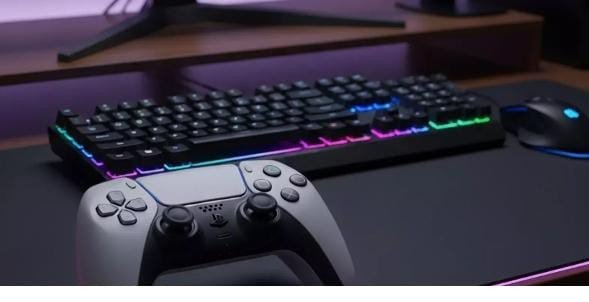
The Xbox Wireless Controller focuses on familiar ergonomics, broad Windows compatibility, and straightforward connectivity. The PS5 DualSense, meanwhile, brings immersive features such as haptic feedback and adaptive triggers to supported PC games. So which one deserves a place beside your gaming PC?
In this Xbox controller vs PS5 DualSense comparison, we’ll break down design, comfort, compatibility, controls, connectivity, features, battery considerations, and gaming performance to help you decide which controller fits your setup and gaming style.
Xbox Controller vs PS5 DualSense: Quick Comparison
| Feature | Xbox Wireless Controller | PS5 DualSense |
|---|---|---|
| PC compatibility | Excellent | Excellent |
| Stick layout | Asymmetrical | Symmetrical |
| Connection | Bluetooth / USB-C | Bluetooth / USB |
| Haptic feedback | Impulse Triggers + rumble | Advanced haptic feedback |
| Adaptive triggers | No | Yes, supported games |
| Built-in microphone | No | Yes |
| Motion controls | No | Yes |
| PC setup | Very straightforward | Straightforward, but feature support varies |
| Best for | General PC gaming | Immersive supported games |
Microsoft lists Bluetooth and USB-C connectivity for Windows PCs on the Xbox Wireless Controller. Sony likewise supports DualSense and DualSense Edge on Windows PCs, although some advanced features depend on individual game support.
Design and Ergonomics
Xbox Wireless Controller
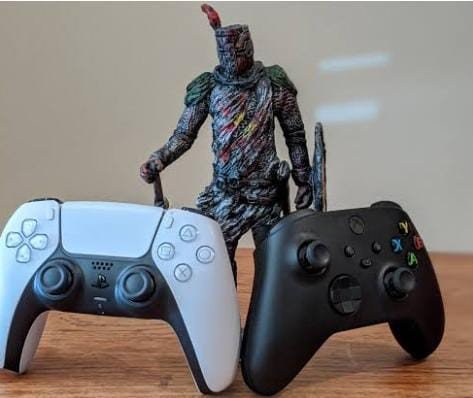
The Xbox controller uses an asymmetrical analog-stick layout and a familiar Xbox button arrangement. Its textured grips and triggers are designed for a secure hold, making it a strong all-purpose choice.
PS5 DualSense
The DualSense uses symmetrical analog sticks and a larger, modern design. Its shape works particularly well for players who prefer PlayStation’s traditional layout.
Winner: Tie — comfort is highly personal.
Features
The biggest difference is immersion.
The Xbox controller offers rumble and Impulse Triggers, while DualSense adds haptic feedback and adaptive triggers in supported games.
This makes DualSense particularly interesting for PC gamers who play titles specifically optimized for its features.
PC Compatibility
For general Windows gaming, Xbox has an advantage because many PC games are designed around Xbox controller input. This can also mean Xbox-style button prompts appear automatically.
DualSense works well on PC too, but advanced features aren’t universal.
Pros and Cons
Xbox Wireless Controller
Pros
- Excellent Windows compatibility
- Familiar PC button prompts
- Comfortable asymmetrical layout
- Bluetooth and USB-C connectivity
- Great all-rounder
Cons
- No adaptive triggers
- Fewer immersive features
- Batteries may need replacing or charging depending on setup
PS5 DualSense
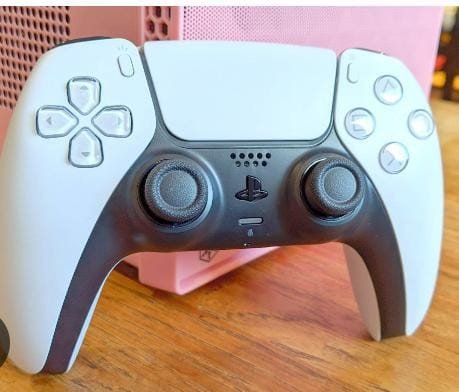
Pros
- Excellent ergonomics
- Haptic feedback
- Adaptive triggers
- Built-in microphone
- Motion controls
Cons
- Advanced features depend on game support
- Some PC features may require USB
- PlayStation layout isn’t preferred by everyone
Ready to level up your PC gaming experience?
Choose the controller that matches your gaming style, comfort, and favorite features. Find the right gamepad and enjoy smoother, more immersive gameplay.
Which Is Better for PC Gaming?
| Game Type | Better Choice |
|---|---|
| General PC gamer | Xbox Controller |
| Game Pass user | Xbox Controller |
| Racing gamer | Either |
| Immersion-focused gamer | DualSense |
| Supported haptic games | DualSense |
| Plug-and-play Windows gaming | Xbox Controller |
| PlayStation fan | DualSense |
Final Verdict
Xbox Controller wins for most PC gamers.
Its broad compatibility and familiar PC integration make it the safer all-around option. DualSense becomes the better choice when you specifically want advanced haptics, adaptive triggers, and PlayStation-style ergonomics in supported games.
Frequently Asked Questions
Is Xbox controller better than DualSense on PC?
For general PC compatibility, Xbox has the edge. DualSense is more appealing if you prioritize immersive features supported by specific games.
Does DualSense work on Windows PC?
Yes. Sony supports DualSense connections on compatible Windows PCs, although individual features can depend on the game.
Which controller is better for Steam?
Both can work well with Steam. Xbox generally provides the most familiar button mapping for Windows games.
Is DualSense worth buying for PC?
Yes, especially if you play games that support its advanced haptics and adaptive triggers.
Conclusion
The Xbox controller vs PS5 DualSense debate ultimately comes down to what you value most from your PC gaming setup. The Xbox Wireless Controller is the practical winner for most players because it combines comfortable ergonomics, familiar controls, and excellent Windows compatibility in a straightforward package. The DualSense takes a different approach by adding haptic feedback, adaptive triggers, motion controls, and other immersive features that can make supported games feel much more dynamic. Neither controller is universally superior, and your preferred stick layout can be just as important as the feature list. If you want a controller that simply works across a wide range of PC games, Xbox is the safer choice. If immersion and advanced feedback are your priorities, DualSense deserves serious consideration.
Upgrade your PC gaming without the guesswork
Choose the controller that matches your games, layout preference, and features you will actually use—and upgrade your PC gaming experience with controls designed around the way you play.