

How to Use Pabbly Connect AI: Complete Beginner's Guide to No-Code Workflow Automation
Managing repetitive tasks across multiple apps can waste valuable time, reduce productivity, and increase the chances of manual errors. Whether you’re capturing leads, updating CRM records, sending emails, syncing customer data, or managing eCommerce orders, handling these processes manually can slow down your business. Pabbly Connect AI solves this problem by providing a powerful no-code workflow automation platform that connects 2,000+ applications and automatically transfers data between them; without requiring any programming skills.
What makes Pabbly Connect stand out is its unlimited automation model, allowing you to create unlimited workflows, connect unlimited apps, and automate business processes without worrying about task limits. It also features Agentic AI, which can generate complete workflows from simple text prompts and integrates with leading AI models like OpenAI GPT-4, Google Gemini, Anthropic Claude, and Perplexity AI. From lead management and email automation to CRM updates, AI content generation, and data synchronization, Pabbly Connect helps businesses automate repetitive work, reduce operational costs, minimize human error, and improve overall efficiency.
If you’re looking for an affordable alternative to traditional automation tools or want to streamline your daily workflows without coding, this beginner-friendly guide will show you exactly how to use Pabbly Connect AI. You’ll learn how to set up your account, create your first workflow, connect your favorite apps, use AI-powered automations, and follow best practices to save time, boost productivity, and scale your business with confidence.
A Quick Overview
Pabbly Connect AI is a no-code automation platform that connects your favorite apps and automates repetitive tasks. Every workflow follows a simple process:
The event that starts the workflow, such as a new form submission or order.
The event that starts the workflow, such as a new form submission or order.
Create, publish, and manage websites with reliable hosting and easy deployment tools.
The event that starts the workflow, such as a new form submission or order.
For faster setup, Agentic AI can generate complete workflows from a simple text prompt, making automation easy for beginners.
What You'll Need Before Using Pabbly Connect
Before creating your first automation, make sure you have:
- Save time and keep projects organized
- Help teams work together easily
- Make website design simple
- Offer secure ways to manage data
- Useful for developers, marketers, and businesses
Create a Workflow Manually (Recommended for Beginners)
If you’re new to automation, manually building your first workflow is the best way to understand how Pabbly Connect works.
Create a New Workflow
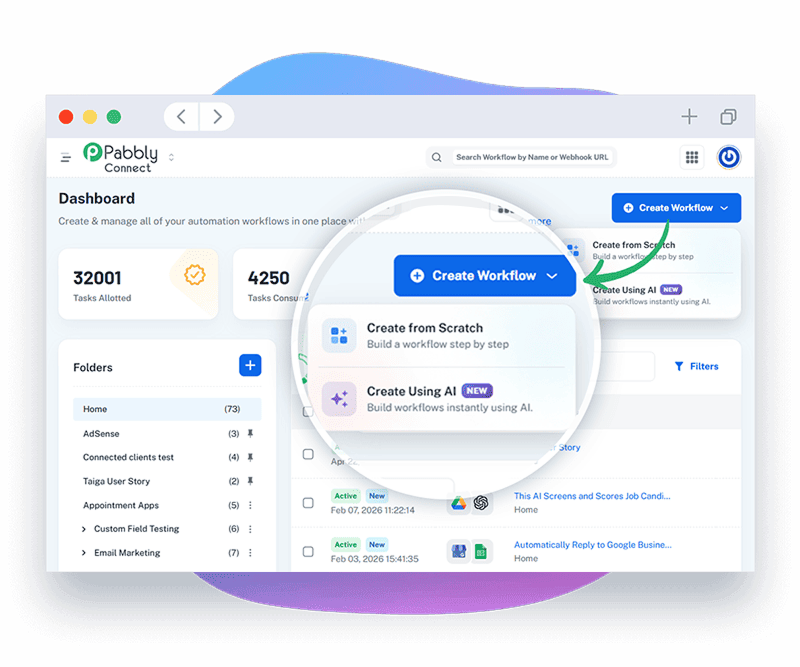
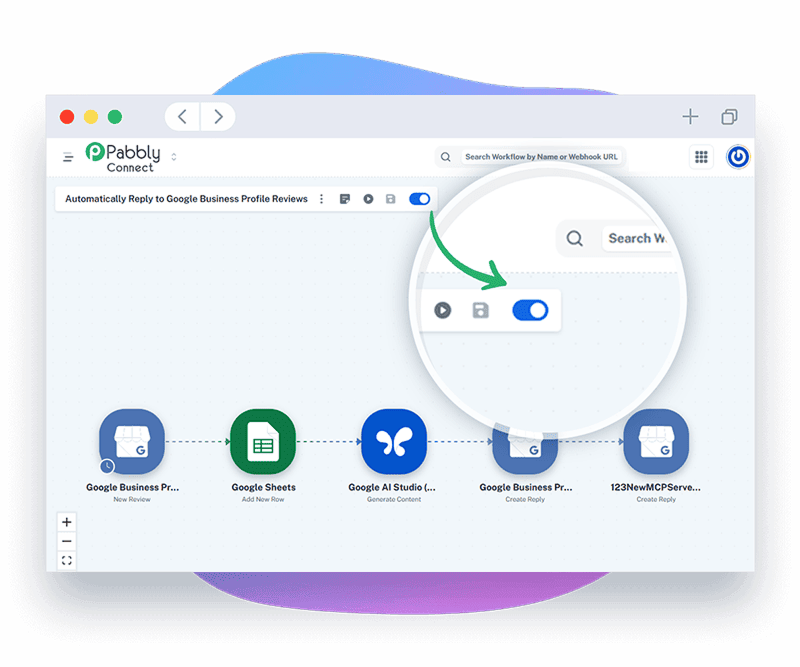
Log in to your Pabbly Connect dashboard and click Create Workflow. Give your workflow a clear name that describes its purpose, such as Lead Capture Automation or Shopify Order Processing.
Choose Your Trigger App
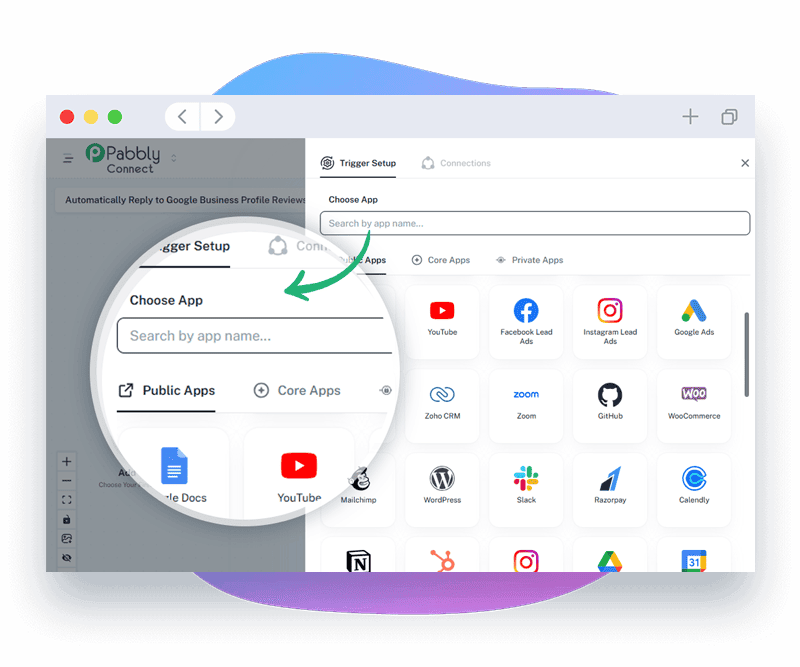
Select the application that will start your automation. This is known as the
Trigger. Examples include:
Select the application that will start your automation. This is known as the
Next, choose the application where you want the data to go. Popular actions include:
- Save time and keep projects organized
- Help teams work together easily
- Make website design simple
- Offer secure ways to manage data
- Useful for developers, marketers, and businesses
Next, choose the application where you want the data to go. Popular actions include:
Next, choose the application where you want the data to go. Popular actions include:
- Save time and keep projects organized
- Help teams work together easily
- Make website design simple
- Offer secure ways to manage data
- Useful for developers, marketers, and businesses
Next, choose the application where you want the data to go. Popular actions include:
Next, choose the application where you want the data to go. Popular actions include:
Next, choose the application where you want the data to go. Popular actions include:
Create a New Workflow
Log in to your Pabbly Connect dashboard and click Create Workflow. Give your workflow a clear name that describes its purpose, such as Lead Capture Automation or Shopify Order Processing.
Pro Tips to Get the Most Out of Pabbly Connect
These expert tips will help you build smarter, faster, and more reliable automations:
- Start with pre-built workflow templates to save setup time.
- Help teams work together easily
- Make website design simple
- Offer secure ways to manage data
- Useful for developers, marketers, and businesses
- Save time and keep projects organized
- Help teams work together easily
- Make website design simple
- Offer secure ways to manage data
- Useful for developers, marketers, and businesses
- Save time and keep projects organized
- Help teams work together easily
- Make website design simple
- Offer secure ways to manage data
- Useful for developers, marketers, and businesses
For faster setup, Agentic AI can generate complete workflows from a simple text prompt, making automation easy for beginners.
Common Pabbly Connect Mistakes to Avoid
Even though Pabbly Connect is beginner-friendly, small configuration mistakes can prevent your automations from working correctly. Avoid these common errors to build reliable workflows from the start.
Selecting an incorrect trigger (such as New Contact instead of New Order) can cause workflows to run at the wrong time or not run at all. Always verify the trigger before activating your automation.
Incorrect field mapping may send customer information to the wrong destination or leave important fields blank. Double-check your mapped fields during testing.
Many integrations require API access or authorization. If the necessary permissions aren’t granted, the workflow won’t be able to read or write data.
Packing too many actions into a single workflow makes it harder to manage and troubleshoot. Instead, create smaller workflows for different business processes.
Activating a workflow without testing can result in incorrect data transfers or failed automations. Always run a test before turning a workflow live.
When using Agentic AI, vague prompts often produce incomplete workflows. Be specific about the apps, triggers, actions, and expected outcome.
Troubleshooting Common Pabbly Connect Issues
If your automation isn’t working as expected, these quick fixes can help.
Check that:
- The workflow is switched ON.
- The correct trigger event is selected.
- Your connected app is properly authorized.
- A new trigger event has actually occurred.
Verify that:
- Required fields are correctly mapped.
- The destination app supports the selected action.
- API connections are still active.
- The data format matches the destination app's requirements.
Reconnect the affected application and confirm that your login credentials or API keys are still valid.
Review the Task History to identify failed steps, API errors, or permission issues. Correct the problem and run another test before reactivating the workflow.
Rewrite your prompt with more details.
“Send emails automatically.”
“When a new lead is added from Facebook Lead Ads, create a HubSpot contact, send a Gmail welcome email, and notify my sales team in Slack.”
Specific prompts produce much more accurate automations.
Best Practices for Building Reliable Automations
Once your workflows are running successfully, following these long-term practices will help keep your automations organized, scalable, and easy to maintain.
Organize workflows into folders based on departments or business functions.
Review automation history regularly to detect failed tasks.
Remove outdated or unused automations to keep your workspace organized.
Document complex workflows so your team can understand and manage them.
Regularly optimize workflows by removing unnecessary actions and improving efficiency.
Use clear workflow names so they are easy to identify later.
Update workflows whenever connected apps release major changes.
Keep API credentials secure and reconnect expired integrations promptly.
Review AI-generated workflows before publishing to ensure every step matches your business process.
Monitor workflow performance as your business grows and expand successful automations when needed.
FAQs About Remote Work Tools in the USA
01.What are remote work tools?
Remote work tools are online platforms that help people work, earn, or manage businesses from anywhere without needing a physical office.
02.Are remote work tools free to use?
Most platforms are free to join, but some may charge fees for premium features or take a commission on earnings.
03.Can I use multiple tools together?
Yes. Many remote workers use a mix of affiliate, e-commerce, and freelancing platforms to grow their income.
04.Which remote work tool is best for beginners?
Swagbucks and PrizeRebel are great starting points because they are easy to use and don’t need special skills.
05.Which tool is best for building an online business?
Shopify and Amazon are best for creating e-commerce stores, while ShareASale and Sovrn Commerce work well for affiliate marketing.
Conclusion
Pabbly Connect makes workflow automation simple by connecting your favorite applications and eliminating repetitive manual tasks. Whether you build workflows manually or use Agentic AI to generate automations from text prompts, the platform helps improve productivity, reduce human error, and streamline business operations. With support for 2,000+ app integrations, unlimited workflows, and powerful no-code automation features, it’s an excellent solution for businesses looking to save time and scale efficiently.